15
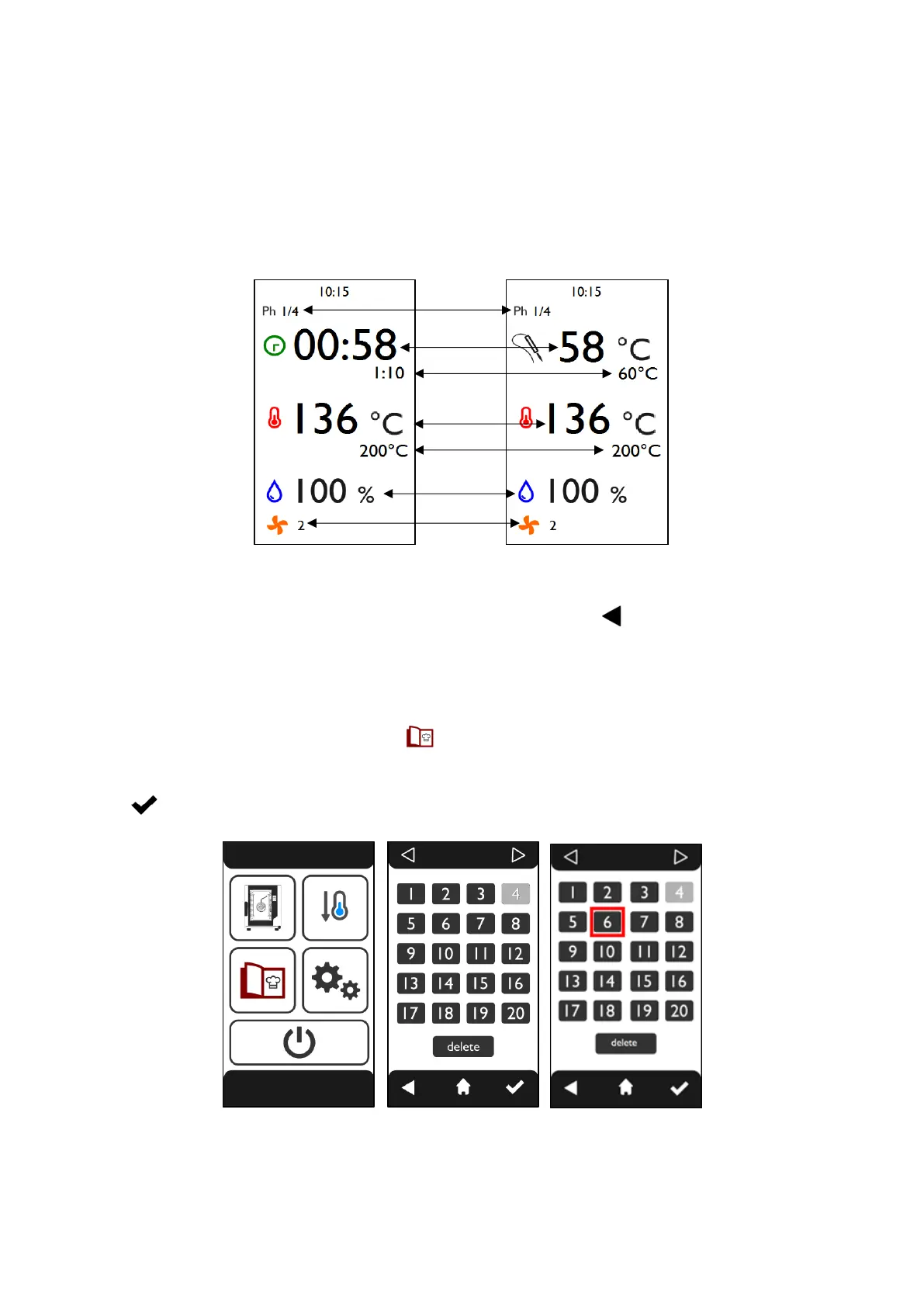
When cooking is active, the “COOKING” screen appears (Fig.20) or, if the core probe is present, the
“CORE PROBE COOKING” screen appears (Fig.21).
This screen displays:
1. Number of the phase in progress and number of total phases
2. remaining time of the current phase or actual core probe temperature
3. remaining cooking time or set core probe temperature
4. actual temperature in the cooking chamber
5. set temperature
6. set humidity percentage
7. selected fan speed
Fig.20 Fig.21
The parameter values can also be changed with the cooking cycle active. By touching any area of
the screen the parameter screen reappears; by touching the symbol the “COOKING”/“CORE
PROBE COOKING” screen reappears.
3.10 Recipe book
The oven has a recipe book in which up to 100 recipes can be stored (60 user and 40 Cloud). To
access the recipe book, touch the symbol on the “HOME” screen (Fig.22); the “RECIPE BOOK”
screen appears (Fig.23) which displays the empty recipes in light colour and the recipes in dark
colour. Selecting the recipe number, a red box appears (Fig.24). To start the cooking cycle touch the
symbol ..
Fig.22 Fig.23 Fig.24












 To Next Page