18
7 TESTING A SPECIMEN
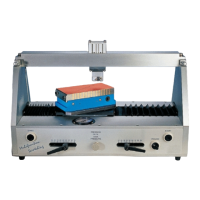
1. Push the sliding stopcock at the rear of the tester to its closed position.
2. Push the table to the left as far as it will go.
3. Push the sliding stopcock to its open position. See page 5.
4. Mount the specimen on the table.
Remember to remove the wrench after use.
5. Rotate the tool pressure adjustment control until the pressure shown on the
gauge at the front of the tester is a minimum of 0.2 bar.
Always start at low pressure and increase pressure gradually. If the
pressure is too high, the tool may dig into the specimen too much, resulting
in bad scratches and damage to the tool - see “Air pressure/force” on
page 20.
The pressure should be adjusted according to experience gained from
previous tests, the thickness and hardness of the coating, and the type of
scratching tool in use.
When the tester is used for the first time, or after a long period without use,
the tool holder cylinder can remain stuck in position at low working
pressure. Ensure the system is not pressurised , ie stopcock closed before
manually moving the cylinder. In this case, the cylinder can be released by
manually move the tool holder up and down a few times.
Op_1535_01 A5.fm Page 18 Wednesday, August 8, 2007 3:59 PM


 To Next Page