8
2 GETTING STARTED
Note: Before you use your gauge for the first time, remove the paper strip from the battery compartment.
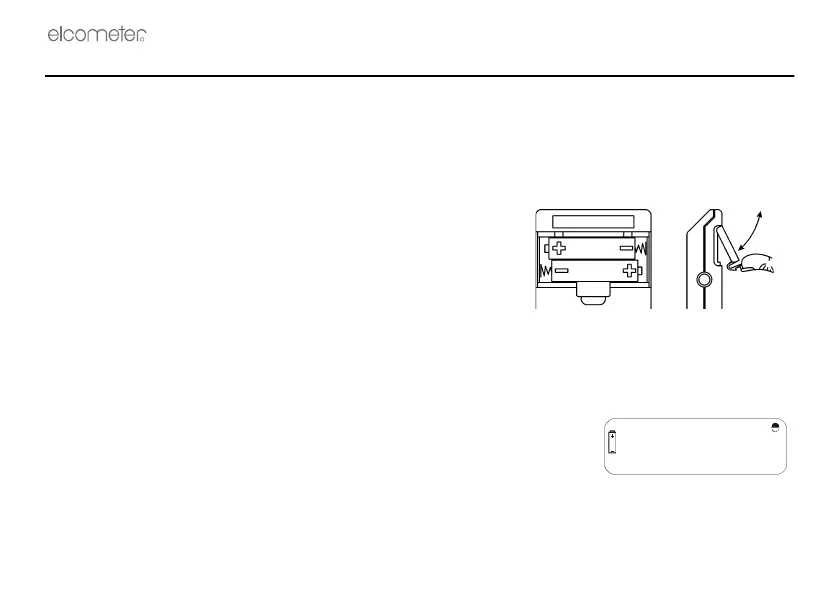
2.1 FITTING BATTERIES
The Elcometer 345 may be used with dry cell batteries or rechargeable batteries. 2 x LR03 (AAA) alkaline
batteries are supplied with the gauge. To fit or replace batteries:
1. Switch off the gauge.
2. Lift off battery compartment cover at rear of gauge.
3. Place batteries in the battery clips ensuring correct polarity.
4. Replace battery compartment cover.
Note: Remove the batteries from the gauge if it is to remain unused
for a long period of time. This will prevent damage to the gauge in
the event of malfunction of the batteries.
2.2 LOW BATTERY VOLTAGE
When the battery voltage is low the battery symbol illuminates on
the display. The gauge will still function but new batteries are
recommended.
When the battery symbol flashes and the gauge beeps every ten
seconds, the batteries must be replaced.
When the batteries are exhausted, the gauge will beep three times and then switch off.



 To Next Page