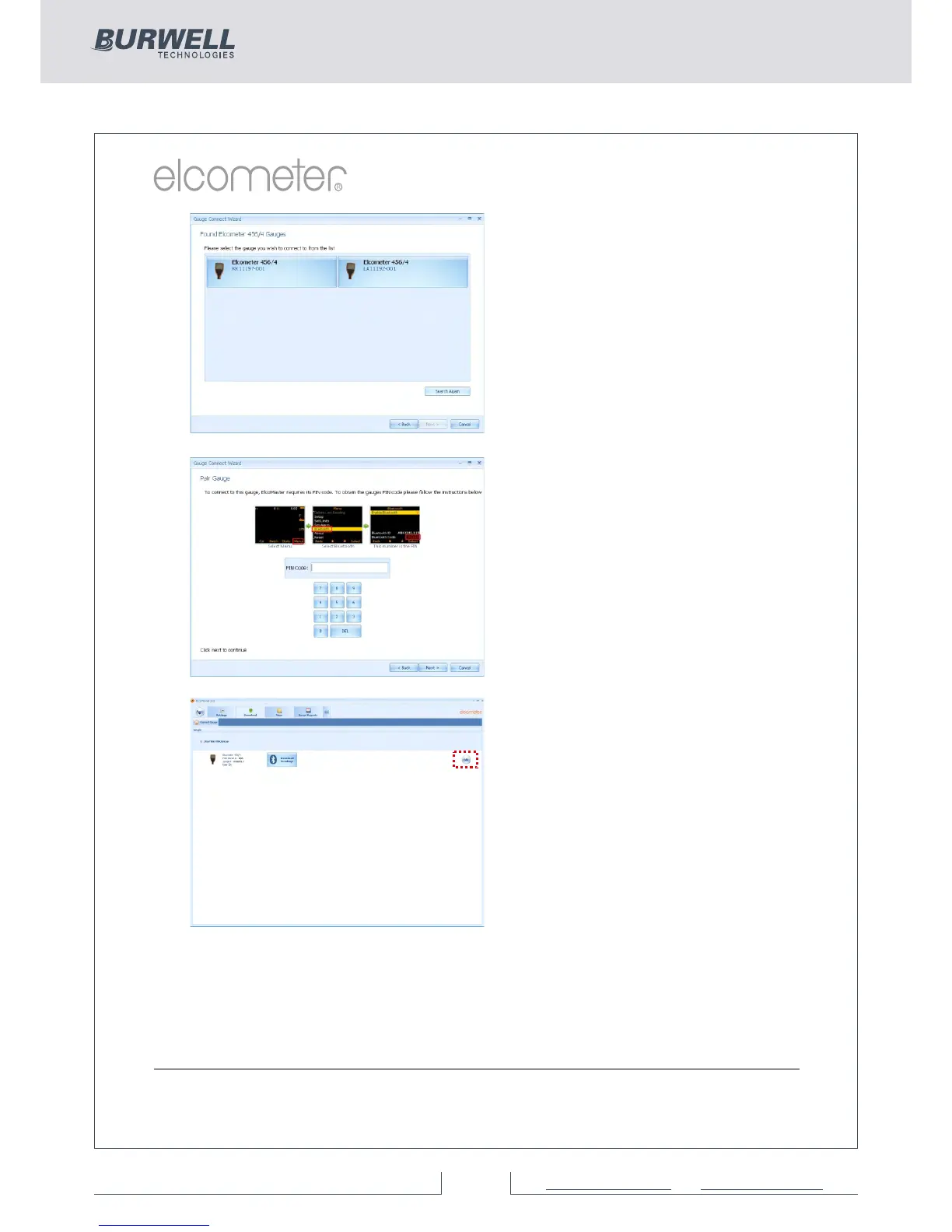
Each coating thickness gauge
connected is now listed.
Ÿ Select the appropriate gauge
and press ‘Next >’
If connecting via Bluetooth, the
gauges are identified using the
Bluetooth ID - which can be seen
o n t h e b o t t o m o f t h e
Menu/Bluetooth screen.
Connecting via Bluetooth now
requires the gauge to be ‘Paired’
by keying in the gauge’s unique
Bluetooth PIN Code. This code
can be found on the bottom of the
Menu/Bluetooth screen.
Ÿ Type in the Bluetooth PIN Code
and press ‘Next >’
(See Section 10 on page 56 for information on
connecting via Bluetooth to a mobile device
using ElcoMaster™ Mobile Apps.)
ElcoMaster™ will now validate the
connection, press Finish when
complete.
The gauge is now connected and
ElcoMaster™ will return the user
to the Download action tab, and
display the connected gauge.
The same gauge can be connected
by more than one method. Repeat
the ‘Connect Gauge’ and follow the
on screen prompts.
By clicking on the Edit button, users can Delete the gauge from
ElcoMaster™, name the gauge by a more familiar identification (Enter
a User ID) or set up the gauge power up display screen (Change the
Welcome screen). See Changing the Welcome Screen on page 64.



 To Next Page