LEDs
TX [Red] Turns on in transmit mode.
∆ F [Yellow] The Delta-F LED turns on if
transmit and receive frequencies or modes are
different due to the use of SPLIT, RIT, or XIT.
[Green] Eight LEDs show which functions are
in effect for the Multifunction Controls (pg. 14).
(-)
(+) RIT/XIT OFFSET If the
OFS control is centered, or you tap CLR , the green
LED turns on (offset = 0). Otherwise, the yellow
(-) or (+) LED will be on, indicating the direction of
the offset. See RIT , XIT , and CLR .
Front Panel Connectors
PHONES You can use either mono or stereo
headphones at either the front- or rear-panel
headphone jack. Also see AFX (pg. 37).
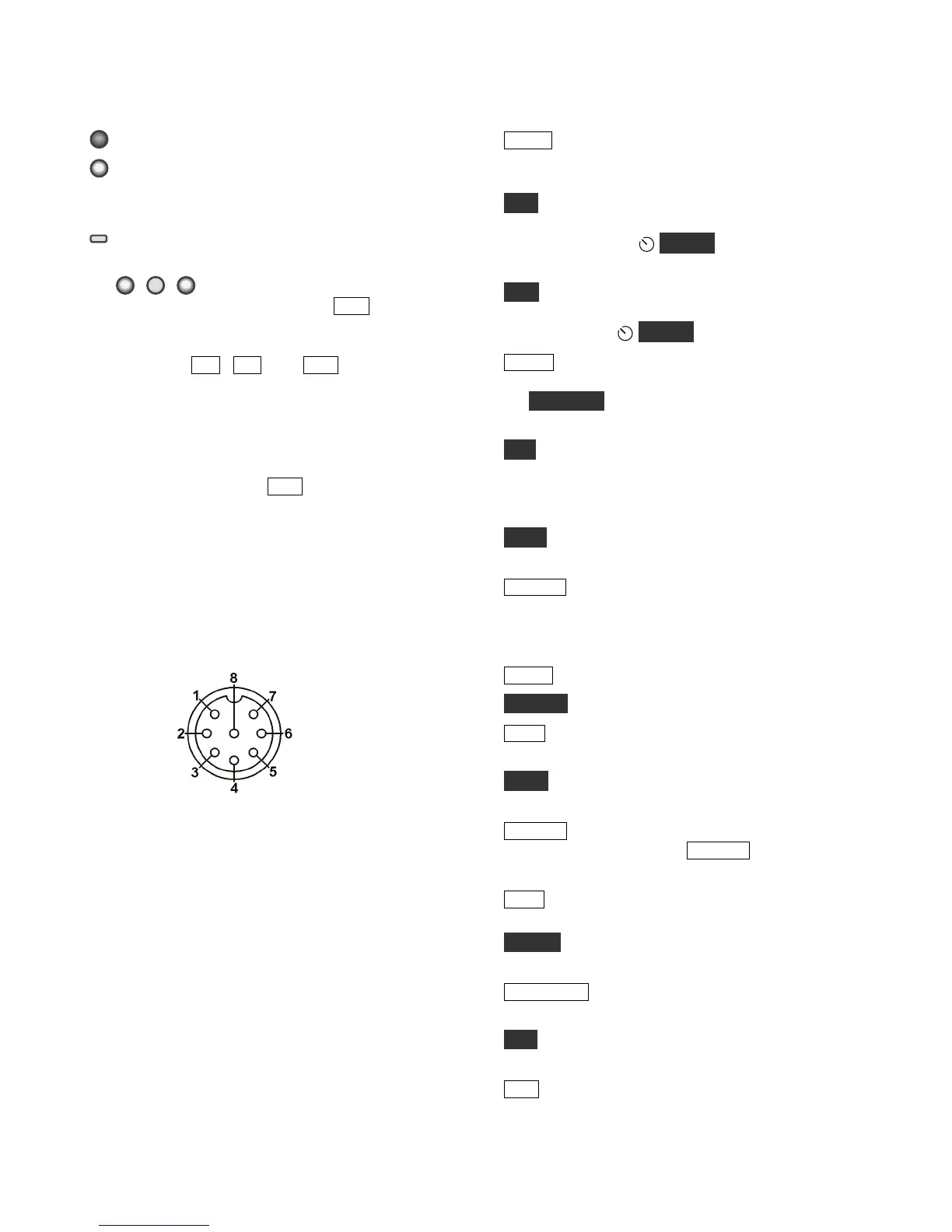
MIC An Elecraft MH2, MD2, Proset-K2, or other
compatible mic can be used (see pinout below). To
select the front- or rear-panel mic, and to turn bias
on/off, use the MAIN:MIC SEL menu entry.
Bias must be turned on for electret mics (e.g. MH2,
MD2, Proset). It must be off for dynamic mics (e.g.
Heil mics using HC4 or HC5 elements).
Mic jack, viewed from front of K3
1 Mic audio, low-Z (~600 ohms)
2 PTT
3 DOWN button *
4 UP button *
5 FUNCTION button *
6 8V (10 mA max)
7, 8 Ground
* See CONFIG:MIC BTN menu entry.
FP ACC This connector (RJ-45, 6 pins) is located
on the bottom of the transceiver, near the VFO B
knob. At present it is used only for factory test.
Primary Controls
BAND Tap left/right end to move among ham
bands. CONFIG:BND MAP disables bands. For
“quick” band switching, see CONFIG:MEM 0-9.
VOX Selects voice-operated or CW keying-
operated transmit (VOX icon on), or PTT (VOX
icon off). Also see
DELAY (pg. 32) and CW
VOX auto-off control (CONFIG:CW WGHT).
QSK Selects either full break-in (QSK icon on) or
semi break-in keying, if VOX is selected in CW
mode. Also see
DELAY (pg.32).
MODE Tap the left or right end of this switch to
select the operating mode. When DATA is selected,
the DATA MD switch is used to specify DATA-A,
AFSK A, FSK D, or PSK D (pg. 33).
ALT In LSB mode, switches to USB (and vice-
versa). Also selects alternate modes, including:
CW REV, DATA REV, and AM-S (pg. 31). In
FM mode, selects + /- or simplex (pg. 31).
TEST Selects TX TEST (TX LCD icon flashing);
allows key/mic test without actually transmitting.
POWER Turns the K3S on or off. Note: To
ensure correct save of operating parameters,
turn the K3S off before turning the power supply
off.
MENU Displays MAIN menu (pg. 23).
CONFIG Displays the CONFIG menu (pg. 23).
XMIT Manually-operated transmit. Places the K3S
into transmit mode (same as PTT, pg. 28).
TUNE Puts out a carrier at the present power level.
Also TUNE Power Level (pg. 29).
RX ANT Enables the receive antenna (pg. 24). If
the sub RX is on, holding RX ANT alternates
between the sub’s MAIN / AUX antennas (pg. 39).
DISP Shows an alternate display on VFO B, such
as time, date, voltage, etc. (pg. 38).
METER Selects voice transmit bar graph modes:
SWR and RF, or CMP and ALC (pg. 30).
ATU TUNE Matches the antenna (transmitting at
up to 10 W) using the KAT3A ATU (pg. 24).
ATU Puts the ATU into normal mode (ATU icon
on) or bypass mode (pg. 24).
ANT Selects ANT 1 or 2. In BSET mode with the
sub receiver on, selects MAIN or AUX antenna for
the sub receiver (pg. 39).





 To Next Page