6 Installation Manual
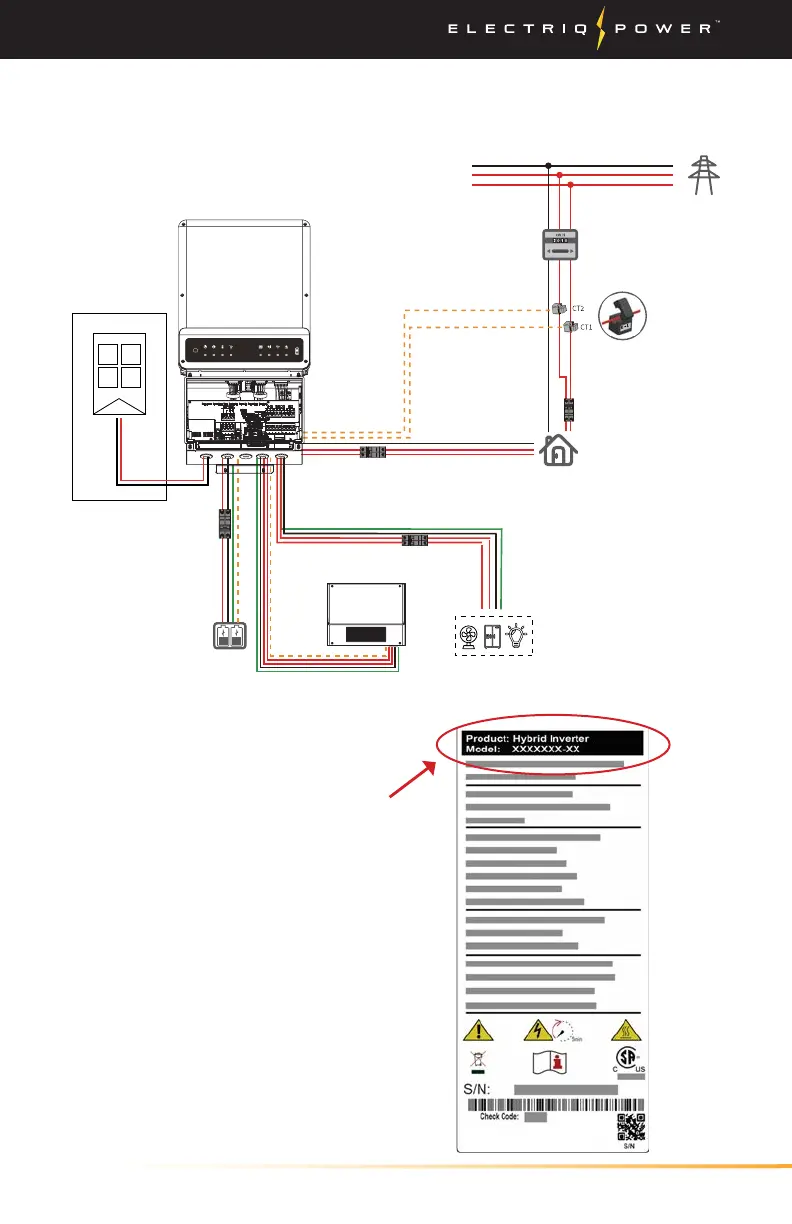
1.2. PARTIAL-HOME BACKUP CONFIGURATION
Intro / Partial-Home Backup Configuration
Inverter Nameplate
Check the inverter nameplate
located on the side of the inverter
labeled 'Model' to determine
which system you have.
DC-coupled is the A-ES inverter
and the AC-Coupled is the A-BP
inverter.
Option only available for DC-coupled systems (inverter model A-ES).
Back-up output breaker
Meter CT Communication
Grid
Power meter
Main Panel
and
Non-backed-up loads
Grid side
Battery
DC Breaker
NTC
BMS
On-grid output breaker
Main breaker
RESET
FAULTWi-FiCOMENERGYGRIDBATTERYBACK-UPSYSTEM
Solar array
DC-Coupled Only
Auto-transformer
+
-
A-ES


 To Next Page