61Installation Manual
Inverter / Whole Home
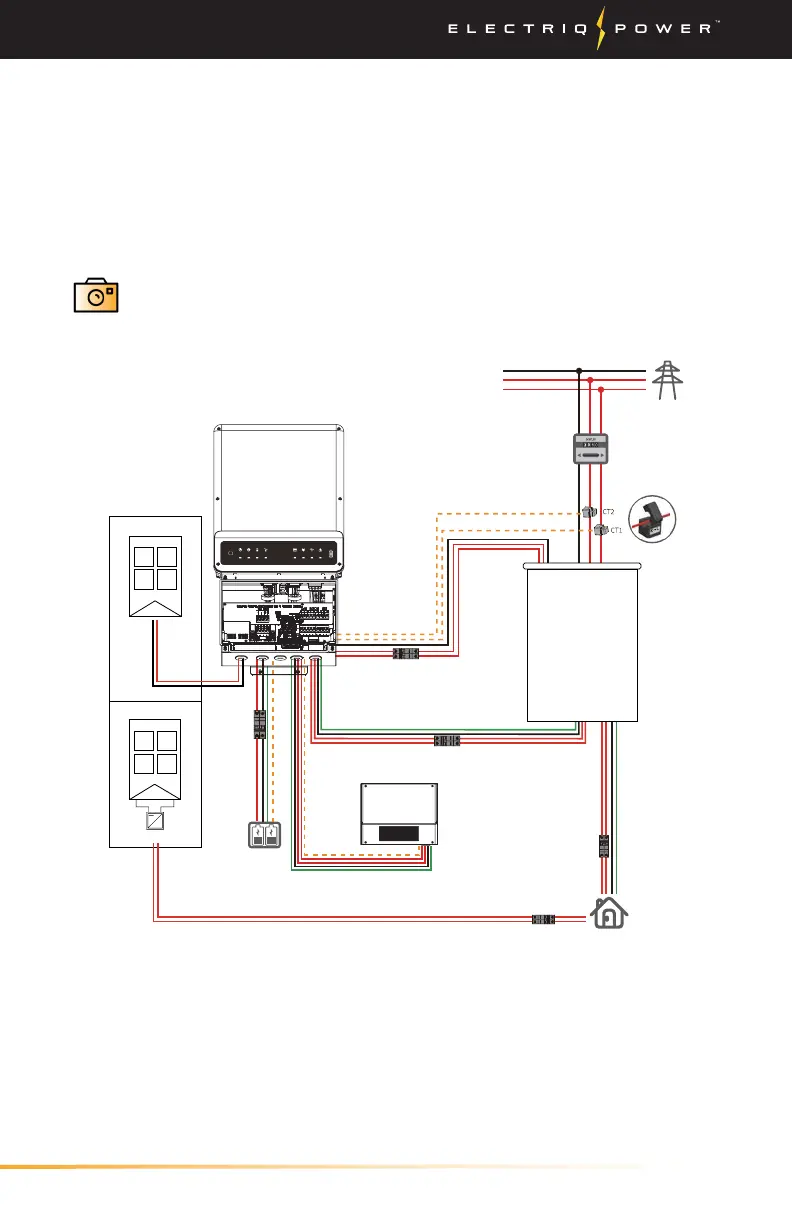
3.3.5.5. WHOLE HOME
3.3.5.5.1. AUTOMATIC TRANSFER SWITCH
For whole home configurations, make sure an automatic transfer
switch is installed. If o-grid, the maximum load must not exceed the
inverter rating otherwise the inverter will turn o and the loads will
not be backed up until load is reduced to max-rated output of inverter.
Once the Automatic Transfer Switch has been wired, take a
photo within the PowerTools app and press 'Next' to move on
to the next step.
+
-
~
Back-up output breaker
Meter CT Communication
Grid
Power meter
Main Panel
Grid side
Battery
DC Breaker
NTC
BMS
On-grid output breaker
Main breaker
RESET
FAULTWi-FiCOMENERGYGRIDBATTERYBACK-UPSYSTEM
Solar array
Solar array
DC-Coupled Option
or
AC-Coupled Option
DC-Coupled Option
AC-Coupled Option
Solar Inverter
Automatic transfer switch
Auto-transformer
+
-


 To Next Page