1.Model Printing
Slowly add the resin into the resin tank (the resin level is not less than 1/3 of the tank volume and does not
exceed the MAX line. The machine will perform a self-check before printing, and do not touch the machine
during the self-check). Cover the printer's anti-UV cover and then select the sliced test model for printing.
2.Model Processing
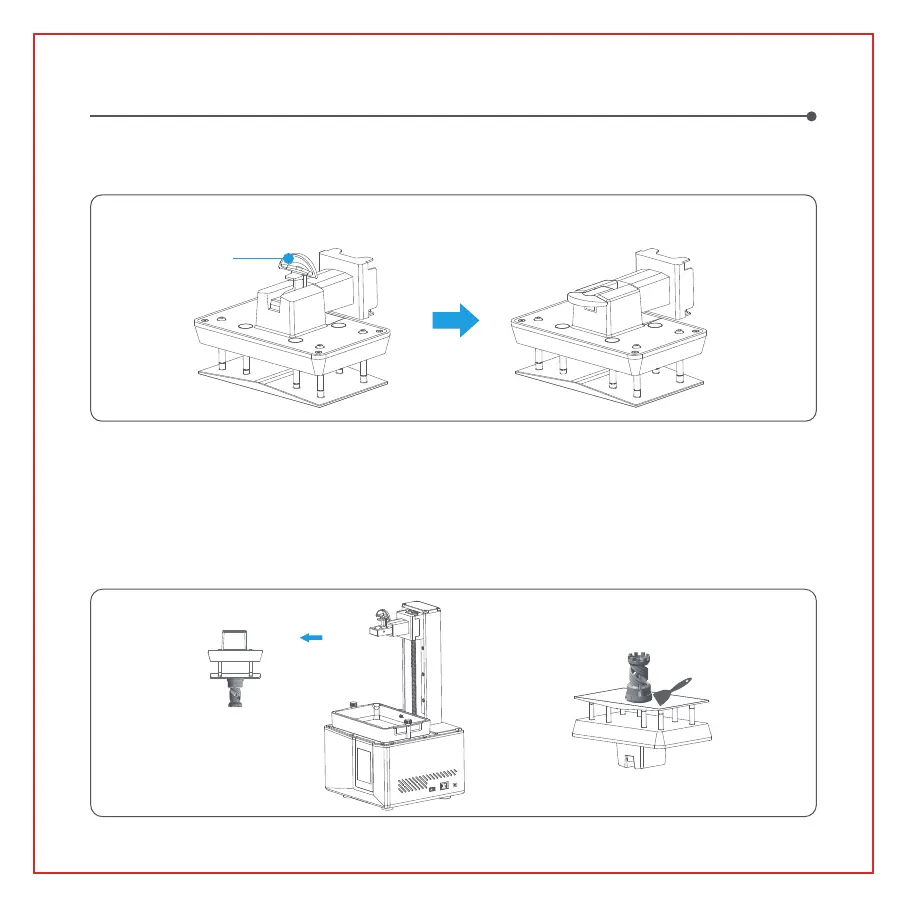
After printing is completed, wait until the resin on the build plate stops dripping, then lift the handle to take
out the build plate, and use a scraper to remove the model. You can use ELEGOO's cleaning and curing
machine to post-process the model.
Test Printing
After inserting the build plate into the connecting block, press down the handle to secure the build plate to the
connecting block (the build plate is capable of self-leveling and ready to use right out of the box).
Handle
10


 To Next Page