1. Install Voxeldance Tango
Select from the USB flash drive or go to Voxeldance's official website
(www.voxeldance.com/Tango) to download the right slicing software
version and install it on your computer.
2. How to use Voxeldance Tango
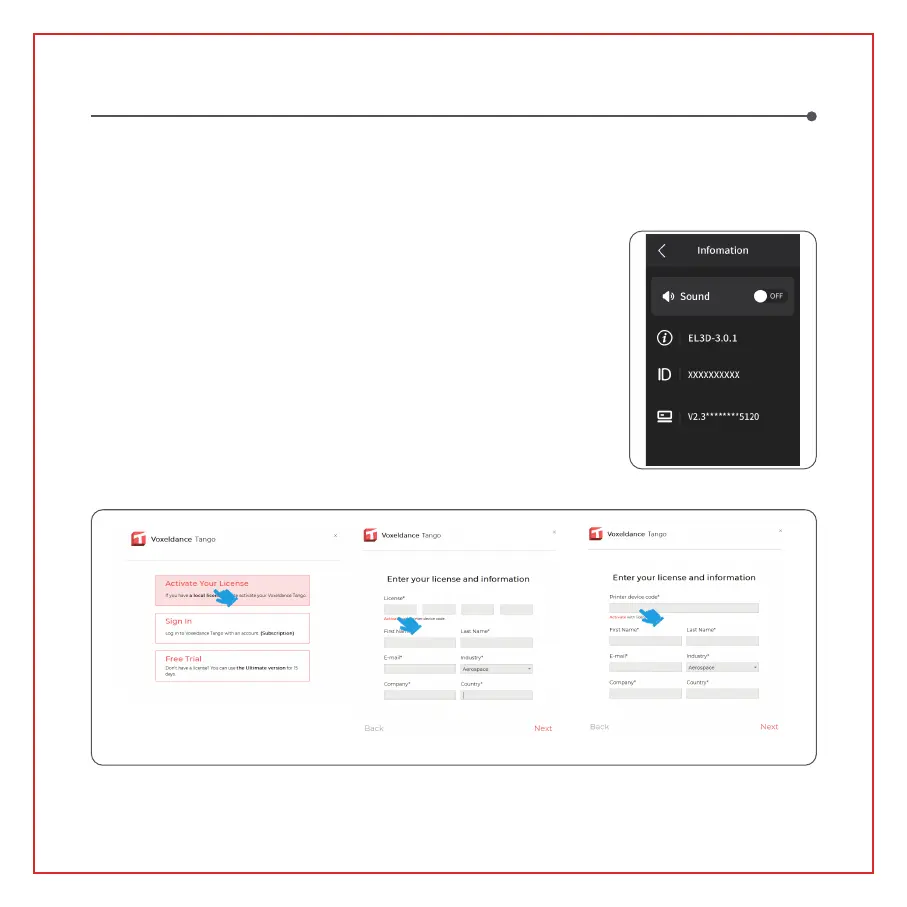
2.1 After the installation is completed, run the software and select
"Activate your license" - "Activate with printer hardware code" (See
Picture 4); Press "Settings" - "Information" on the screen to view the
machine "ID" (See Picture 3 ), and fill in the 10-digit "ID" into the
"Printer Hardware Code" column of the software, and fill in other
relevant information to complete the software activation.
The printer can install and use the Voxeldance Tango or CHITUBOX slicing software in the USB flash drive,
taking Voxeldance Tango as an example.
Software Installation and Setup
2.2 Click "File-Open File" and select your own 3D model file (.stl type). By left-clicking on the model and using
the options on the above menu, you can control and change the viewing angle, size, and position of the model.
(Picture3)
(Picture4)
11



 To Next Page