31Instructions for use
3.1.1 TX control panel
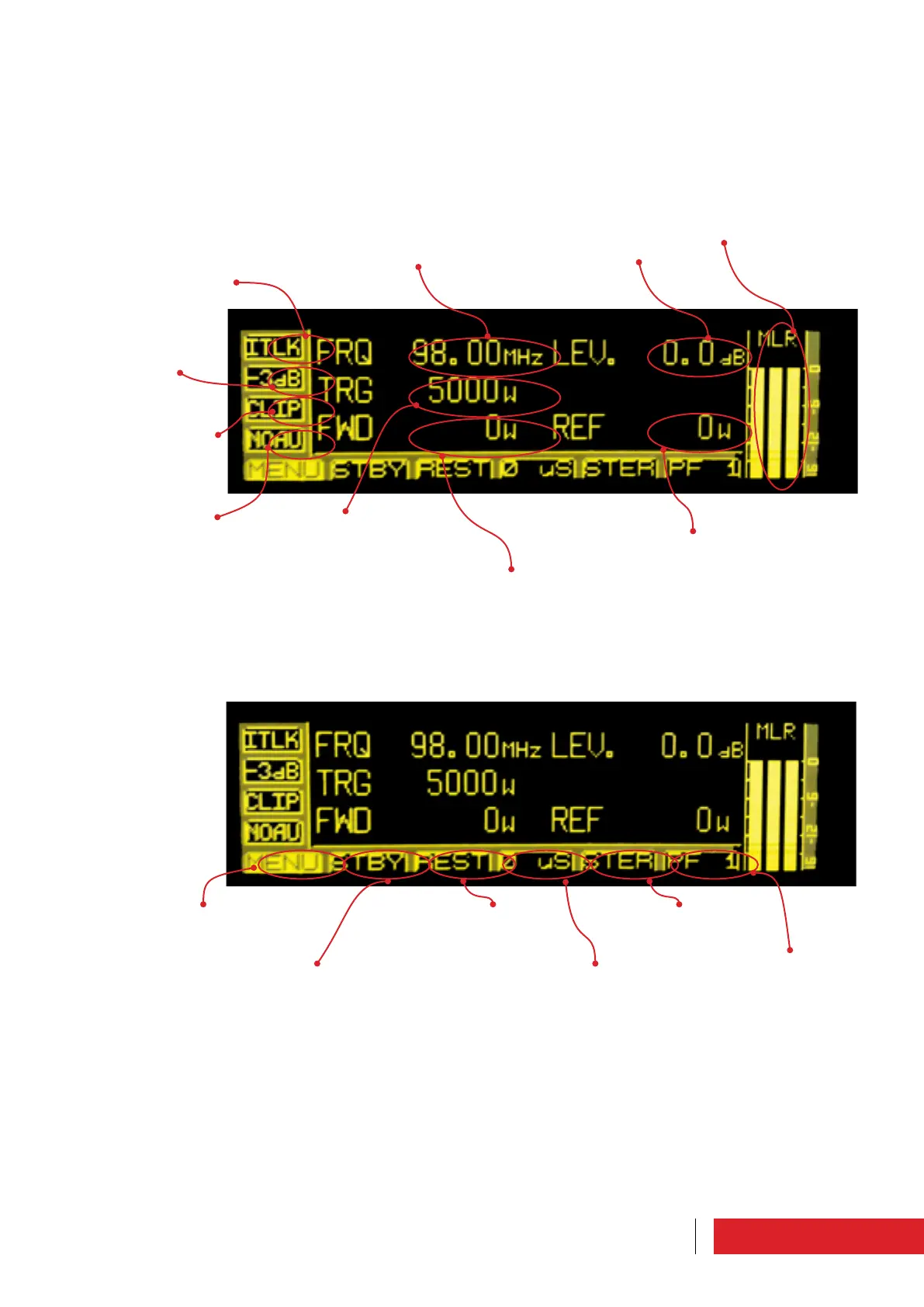
Main screen which appears automatically when turning on in LOCAL mode. It is used to
set and check the main operating parameters.
Warning light: when
it is on it indicates the
opening of the interlock
contacts.
Warning light: when it is
on it indicates a power
drop below 3dB (<50%
of target)
Warning light: when it is
on it indicates the clip-
per engagement caused
by overdrive
Warning light: when it is on
it indicates an absence of
signal beyond the limits set
Target frequency
Target power
Forward power effecti-
vely delivered
Target audio level
Reflected power: it must
be null or very low
Vu-meter: it must
indicate approx. 0dB
To access the list of
menus
To switch on /put the
system on stand-by
To reset the
alarms
To set the pre-emphasis
level
To set the audio
signal
To set the profile



 To Next Page