76
4.5 Operating faults (symptoms, causes and
remedies)
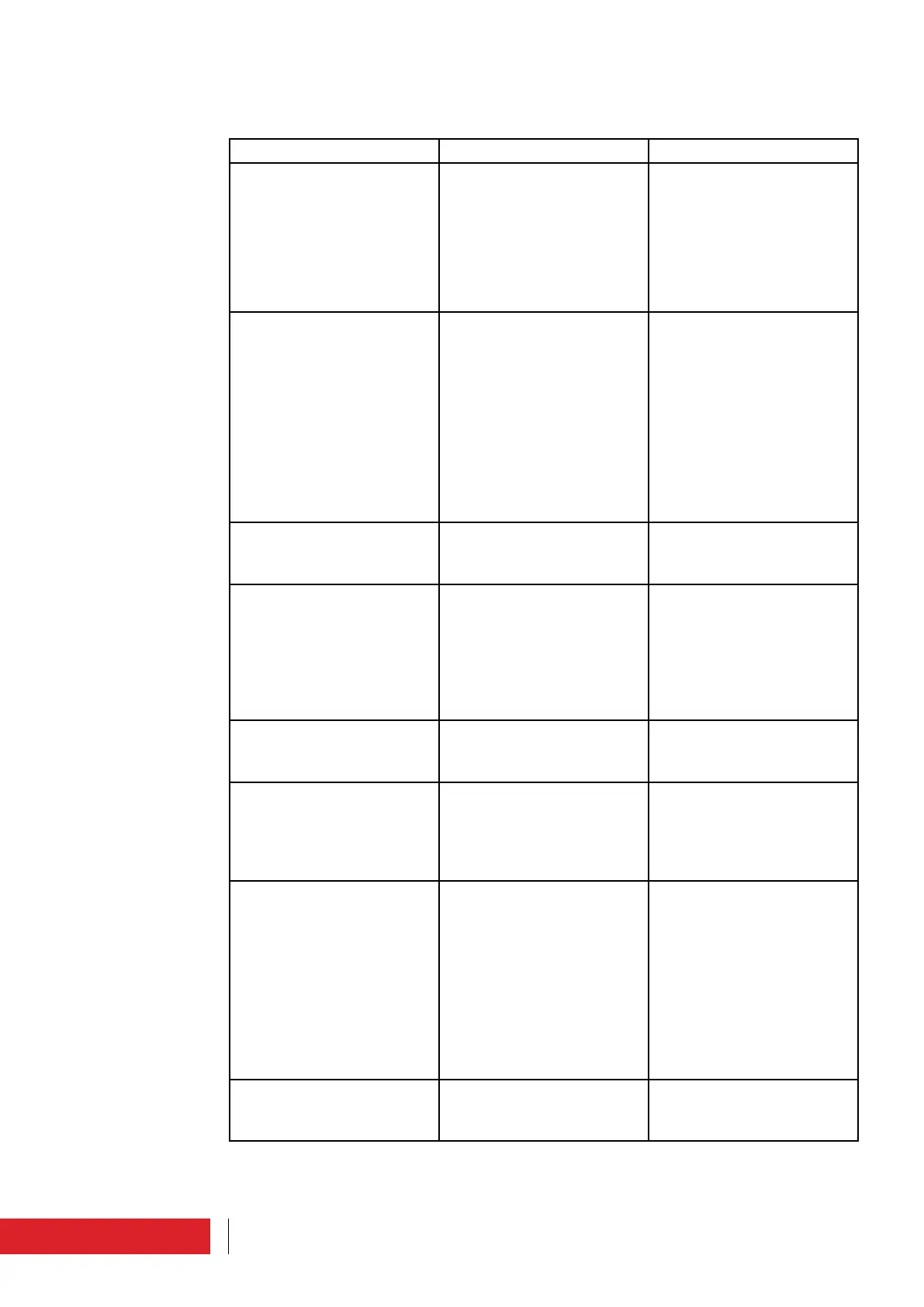
Fault Cause Remedy
The equipment does not start. • Faulty or missing power
supply cable
• Auxiliary power supply
incorrect (Led MAINS on
the front panel off)
• Fault on the power supply
stage
• Replace the power supply
cable and connect it to
the equipment
• Contact the manufacturer
• Contact the manufacturer
The equipment does not
reach the required power
• Equipment in Stand By
mode
• No jumper for interlock
• PLL not engaged (ON AIR
warning light on the front
panel off)
• Power supply fault
• RF module fault
• Fault on the power mea-
surement system
• Put the equipment in RF
ON
• Insert the jumper for the
interlock
• Contact the manufacturer
• Contact the manufacturer
• Contact the manufacturer
• Contact the manufacturer
The equipment transmits on a
different frequency from the
one set
• PLL board failure
• VCO board failure
• Contact the manufacturer
• Contact the manufacturer
Absence of modulation in
output and on display
• Audio cable interruption
or missing
• MPX board failure
• Stereo Coder board failure
• Modulation is off
• Audio cable connection or
replacement
• Contact the manufacturer
• Contact the manufacturer
• Reactivate modulation
using the relative menu
Output modulation absent,
but shown on the display
• MPX board failure
• Stereo Coder board failure
• Contact the manufacturer
• Contact the manufacturer
Output modulation does not
reach the desired value
• Input audio level low
• MPX board failure
• Increase the source audio
level
• Increase the sensitivity
of the ETG input and/or
contact the manufacturer
Stereophonic modulation
absence
• Stereophonic carrier off
• Audio cables interrupted
or missing
• Stereo Coder board failure
• Stereo Coder board mis-
sing
• Turn the stereophonic car-
rier on from the relative
menu
• Audio cable connection or
replacement
• Contact the manufacturer
• The equipment does
not feature the “Stereo
Coder” option, therefore
it cannot be used for ste-
reophonic transmission
One or more fans stopped • Fan failure
• Fan power supply failure
• Contact the manufacturer
• Contact the manufacturer
Maintenance



 To Next Page