46
SECTION 3: SWEAT INDUCTION AND COLLECTION
3.1 Preparing for Sweat Induction
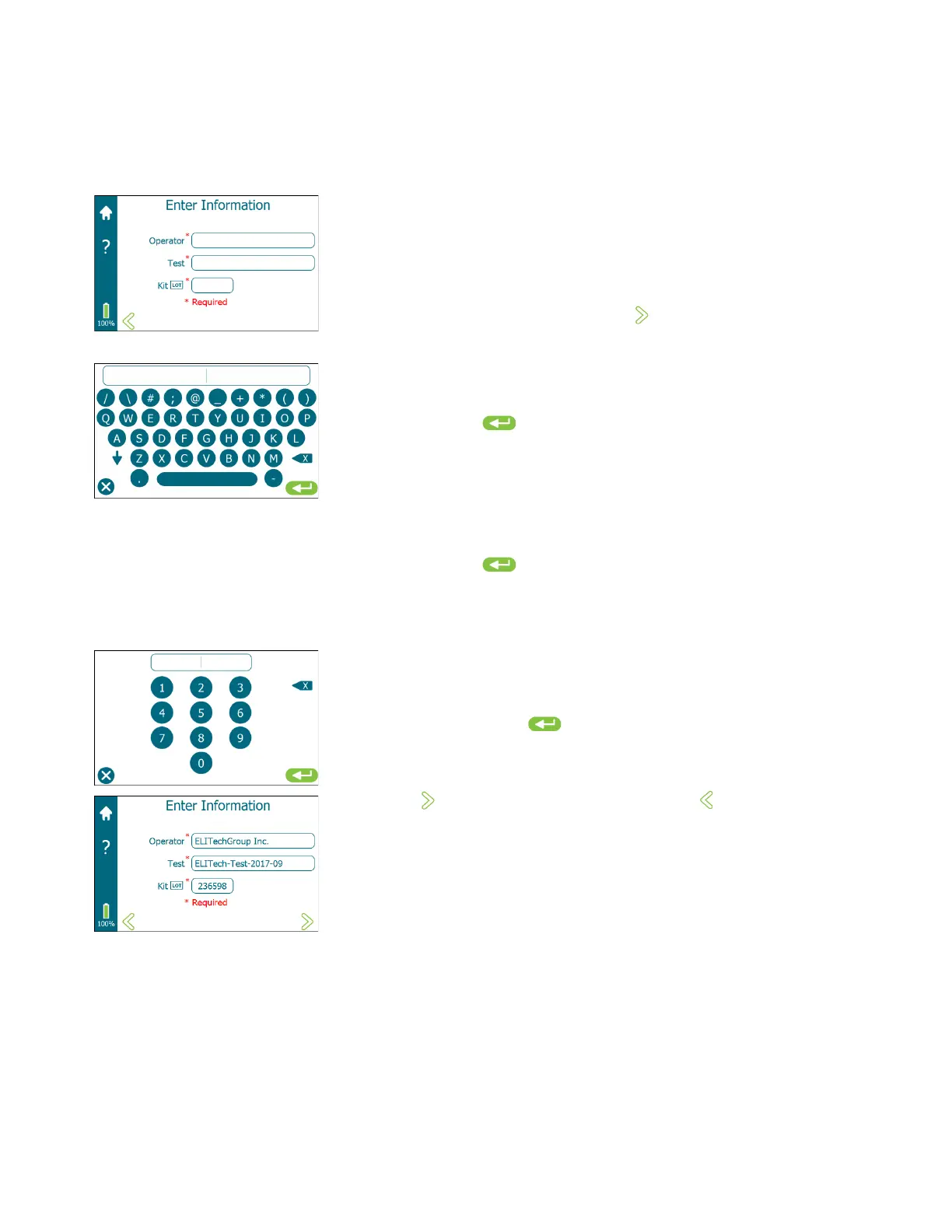
4. Enter Information (optional based upon system settings). See
information under Settings Screen in Section 2.5.
Enter Information allows the operator to input Operator, Test, and Kit
LOT numbers.
NOTE: Required fields (marked with an asterisk) must be entered before
advancing to the next screen is permitted ( is not displayed until
information in all required fields is entered).
a. Tap inside the Operator field to access the keyboard.
Using the keyboard, enter the Operator identification. When
finished, tap to save the entry and return to the Enter
Information screen. The maximum number of characters for the
Operator is 20.
b. Tap inside the Test field to access the keyboard.
Using the keyboard, enter the Test identification and when
finished, tap to save the entry and return to the Enter
Information screen. The maximum number of characters for the
Test identification is 20.
c. Tap inside the Kit LOT field to access the numeric keypad. Using
the keypad, enter the 6-digit Kit LOT number, which is located on
the Macroduct Advanced Supply Kit box label (SS-268).
When finished, tap to save the entry and return to the Enter
Information screen. Verify that the Kit LOT number is entered
correctly and that the supply kit is within the expiration date.
d. Tap to advance to the next screen, or tap to go back to the
previous screen.


 To Next Page