EasyManua.ls Logo

Elmo ST-600D - Record Control Functions

Elmo ST-600D
48 pages
Print Icon
To Next Page IconTo Next Page
To Previous Page IconTo Previous Page
Loading...
t)
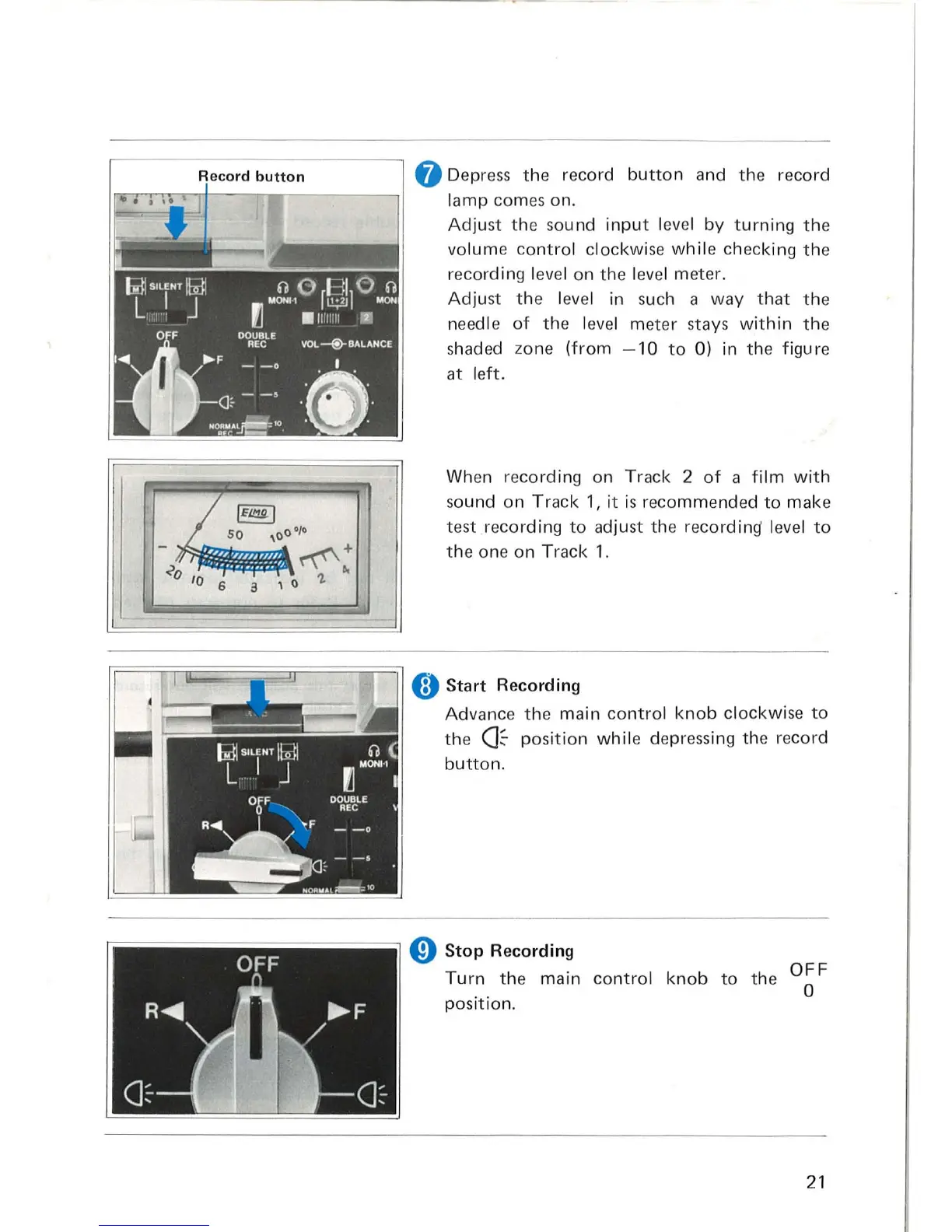
Depress
the
record
button
and the record
lamp comes on.
Adjust
the
sound
input
l
eve
l
by
turning
t he
volume
control
clockwise
while
checking
the
recording l
evel
on the level meter.
Adjust
the
l
eve
l in
suc
h a way
that
the
needle
of
the l
eve
l meter stays wi
th
in
the
shaded zone
(from
- 10
to
0) in the figu
re
at l
eft.
Wh
en
recording on Track 2
of
a
film
with
so
und on
Track
1,
it
is
recommended
to
make
test recording
to
adjust the recording' l
evel
to
the
one
on
Track 1.
8
Start
Recording
Advance
the
mai n
contro
l
knob
clockwise
to
the
Ck
position
while
depressing the record
button.
o
Stop
Recording
Turn
the main
control
knob
to
the
OFF
o
position
.
21

Related product manuals