EasyManua.ls Logo

Elmo ST-600D - Normal Recording

Elmo ST-600D
48 pages
Print Icon
To Next Page IconTo Next Page
To Previous Page IconTo Previous Page
Loading...
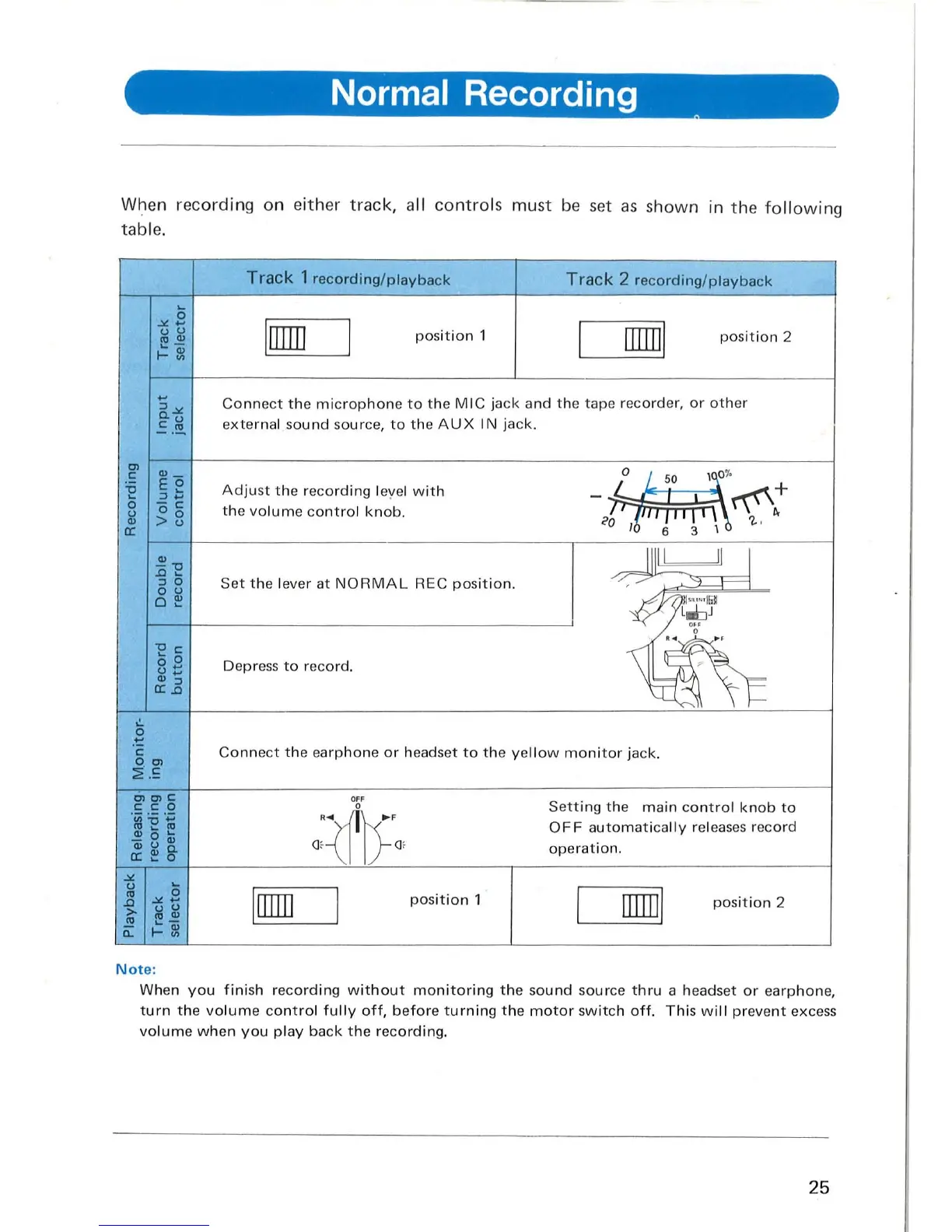
Normal Recording
When recordi
ng
on either
track,
all
controls
must
be
set
as
s
hown
in
th
e
fol
l
owing
table.
'"
c:
'0
5
u
'"
0:
:5
.'=
5
-" ...
u u
ev'"
,=~
...
"'-"
o.u
.=.~
"'-
EO
"'~
-
c:
00
>u
'"
-"0
.0
...
'"
0
o u
o~
"Oc:
... 0
0
...
u ...
'"
'"
0:.0
Track
1
recording/playback
Track
2
recording/playback
I
rnm
position
1
rnrn
l
position
2
Conn
ect
th
e
microphone
to
the
M IC j
ack
and
the
tape recorder, or
other
exte
rnal s
oun
d source,
to
the
AUX
IN jack .
Adjust
th
e reco
rding
l
eye
l w it h
th
e
vo
l
um
e
co
ntro
l
knob.
Set
the
lever
at
NORM
AL
REC
position.
Depr
ess
to
record.
III
I
L-J
I I
g '"
Co
nn
ec
t
the
ea
rphone
or
headset
to
t he yell
ow
monitor
jack.
:2".S
R~~
.
F
OC-\J
I;-
Of
Irnm
I
position
1
Note
:
Sett
ing the
main
co
ntro
l
knob
to
OFF
automatical
ly rel
eases
record
operat
ion.
rnm
l
position
2
When
you
f inish
recording
w i
thout
mon
i
toring
t he
sound
sour
ce
thru
a headset
or
ea
rphon
e,
turn
t he
vo
l
um
e
contro
l
fu
lly o
ff,
before
turn
ing
the
motor
sw
itc
h
off.
This
w
ill
prevent
excess
vo
l
ume
when
you
play
back
t he recording.
25

Related product manuals