EasyManua.ls Logo

Elmo ST-600D - Record Control; Fra M E Count er

Elmo ST-600D
48 pages
Print Icon
To Next Page IconTo Next Page
To Previous Page IconTo Previous Page
Loading...
Record Control
Frame Counter
~
- . .
~
0 0 0 0
Reset
button
24
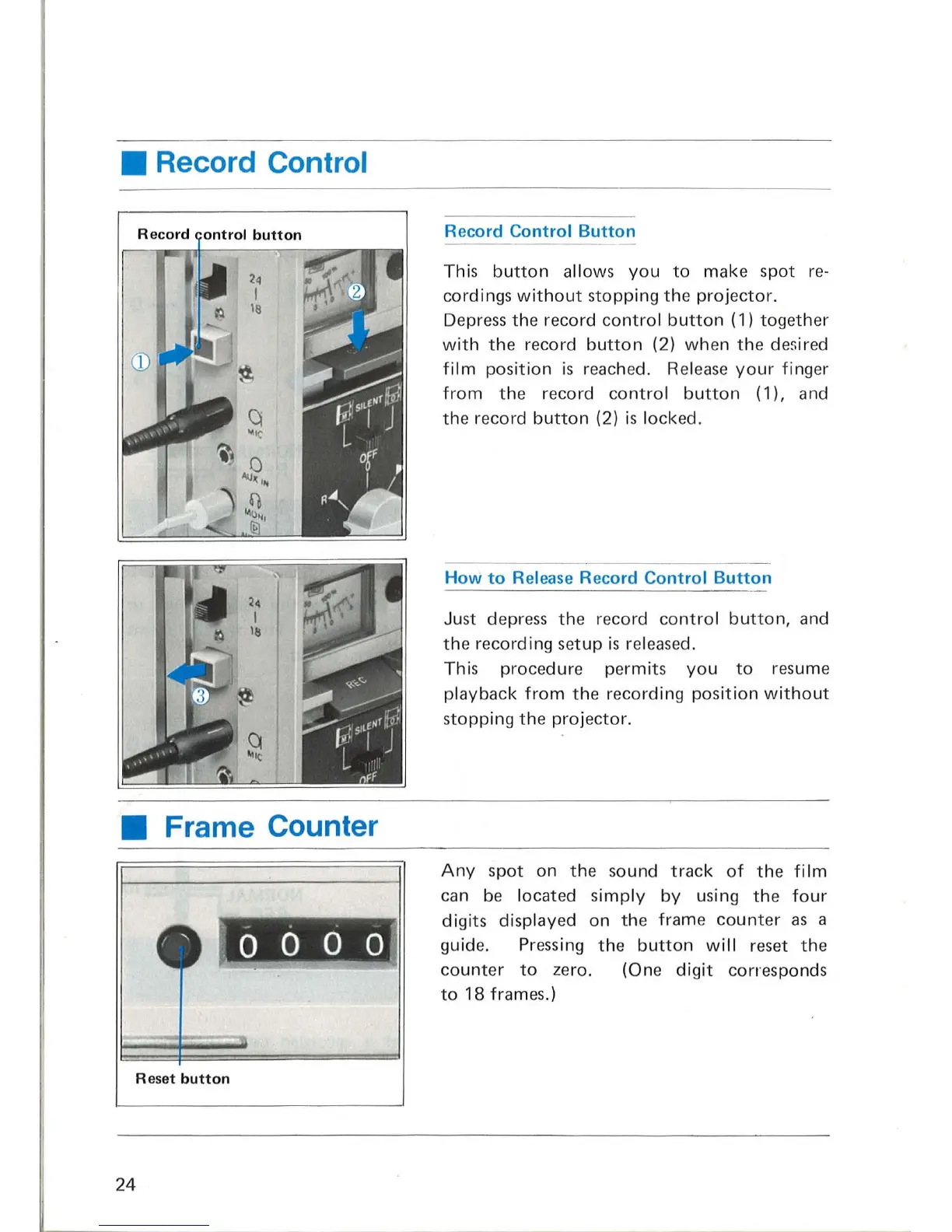
Record Control Button
This
button
allows
you
to
mak
e spot
re-
cordings
without
stopping
the
proj
ec
tor.
Depr
ess
th
e record
contro
l
button
(1)
togeth
er
with
the
record
button
(2)
when
the
d
es
ired
film
pos
ition
is r
eac
hed. Re
le
ase
your
finger
from
the
reco rd
contro
l
button
(1),
an
d
the
record
button
(2) is locked.
How
to Release Record Control Button
Just depress
the
record co
ntrol
button,
and
th
e recording setup is rel
eased.
Thi
s procedure p
er
mit
s
you
to
r
es
ume
playback
from
th
e recording
posit
ion
without
stopping
the
proj
ecto
r.
Any
spot on
the
so
und
track
of
the
film
can
be
locat
ed
s
imply
by
using
th
e
four
digits
displayed on the frame
counter
as
a
guid
e.
Pressing
the
button
will
reset
the
co
unter
to
zero.
to
18 frames.)
(One
digit
corresponds

Related product manuals