EasyManua.ls Logo

Elmo ST-600D - Page 29

Elmo ST-600D
48 pages
Print Icon
To Next Page IconTo Next Page
To Previous Page IconTo Previous Page
Loading...
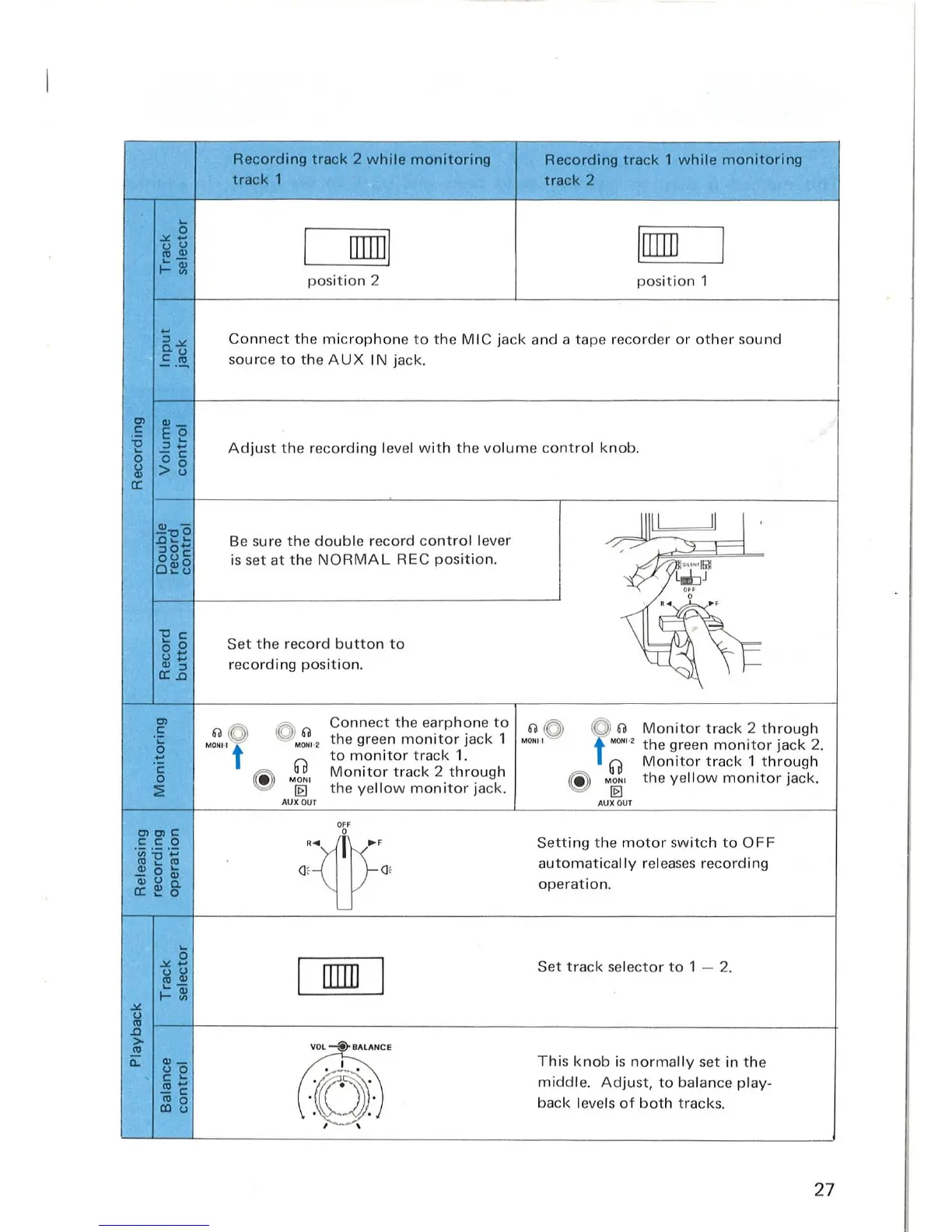
Recording
track
2
while
monitoring
Recording
track
1
while
monitoring
track
1
track
2
0
.>/.
...
I
rnml
I[]]]]
I
u u
'"
"'
....
-
1-5:
posit i
on
2
po
s
ition
1
...
Co
nn
ect
the
microphone
to
the M I C j
ack
a
nd
a
tape
recorder
or
ot
her sou nd
:::I.>/.
C.
U
.!:
.
~
source
to
the A UX
IN
jack.
CI>
"'-
c
Eo
~
:::I::
Ad
j
ust
the re
co
rd ing l
eve
l w i
th
the
vo
lum
e
cont
rol k
nob
.
-c
0
00
~
>u
a:
~"Co
Be
su
re
th
e
double
record
co
ntrol
lever
Illl
l
II
J
.c
........
/~7
:::10'"
~
ou
c
is set
at
t he
NORMAL
REC
position.
~
0",0
....
u
'
~~
"C
c
>
....
0
Set
the
r
ecord
b
utton
to
0 ...
u
...
r
eco
rding
position.
"'
:::I
a:.c
CI>
6O
~
~
60
Co
nn
ect
the
ea
rphon
e
to
M~"
~
f
M~"
Mo
nitor
t rack 2
through
.S
the gr
ee
n
monitor
jack 1
0
MONI·I t
MQHI
·2
t he green
monitor
jack
2.
...
0
to
monitor
tr
ac
k
1.
Mon
itor
tr
ack 1
through
'c
Mo
nitor
tr
ac
k 2
through
0
0
®
M ONI
®
MO"'
the ye
llo
w moni
to
r jack.
::i!
[0
the yel l
ow
monitor
jack.
[0
AUXOUT
AUX
O
UT
OFF
Cl>CI>C
0
C C 0
Ow'
Sett
ing
the
m
oto
r sw
it
ch to
OFF
'u;:.c
.~
"'
....
'"
Q, Q,
automatically
releases reco
rdin
g
"' 0
....
Q;uQ)
ope
r
at
ion.
a:~g.
0
.>/.
...
I
lIIIIJ
I
Set
track
se
l
ecto
r
to
1 - 2.
l;l
~
~~
.>/.
U
'"
.c
>
VO
L -®-
BA
LAN
CE
'"
c:::
"'-
~
Thi
s
knob
is
norm
a
lly
set in
th
e
u 0
C
....
middle.
Ad
ju
st,
to
balance play-
",
...
-c
'" 0
back
levels
of
both
tracks.
lIIu
, ,
27

Related product manuals