18
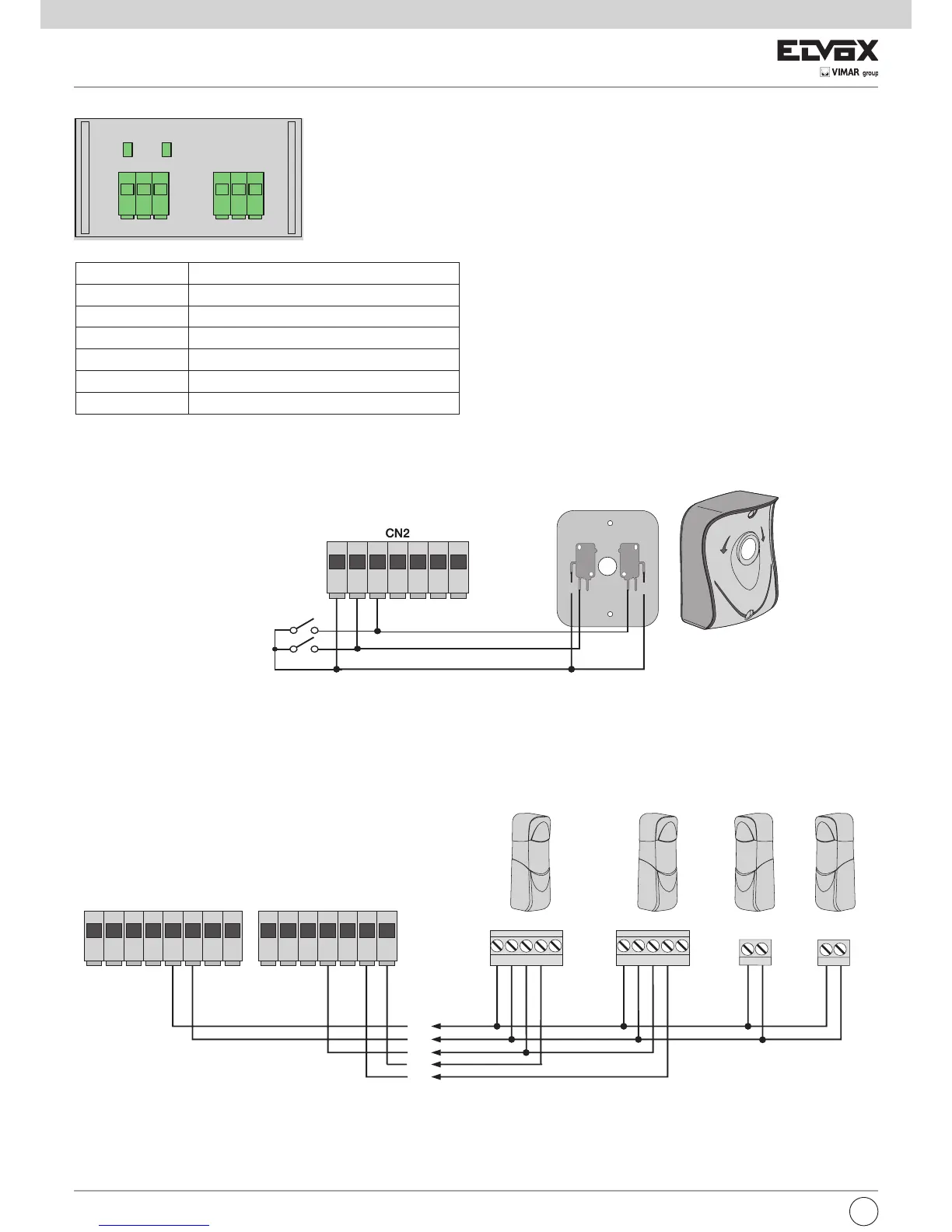
4.4- Connecting control buttons and key switch
Normally open contacts (the red AP/CH or APED LEDS light up when the selector or buttons connected in parallel are operated):
4.5- Connecting photocells
Normally closed contact (when the photocells are not engaged the FOTO LED and the STPA LED must be on), if not used then jumper between COM.
and FOTO and STPA, you must observe the polarity of the power supply for the photocells:
Fig. 6
Fig. 7
Encoder connection
Terminal number Description
22 Motor 1 encoder signal input
23 Motor 1 encoder supply negative
24 Motor 1 encoder supply positive
25 Motor 2 encoder signal input
26 Motor 2 encoder supply negative
27 Motor 2 encoder supply positive
Encoder interface card
pedestrian opening command
opening command
EN
COM COM
N.O. N.O.N.C. N.C.
13 14 15 16 17 18 19
RX1
+-CNCN



 To Next Page