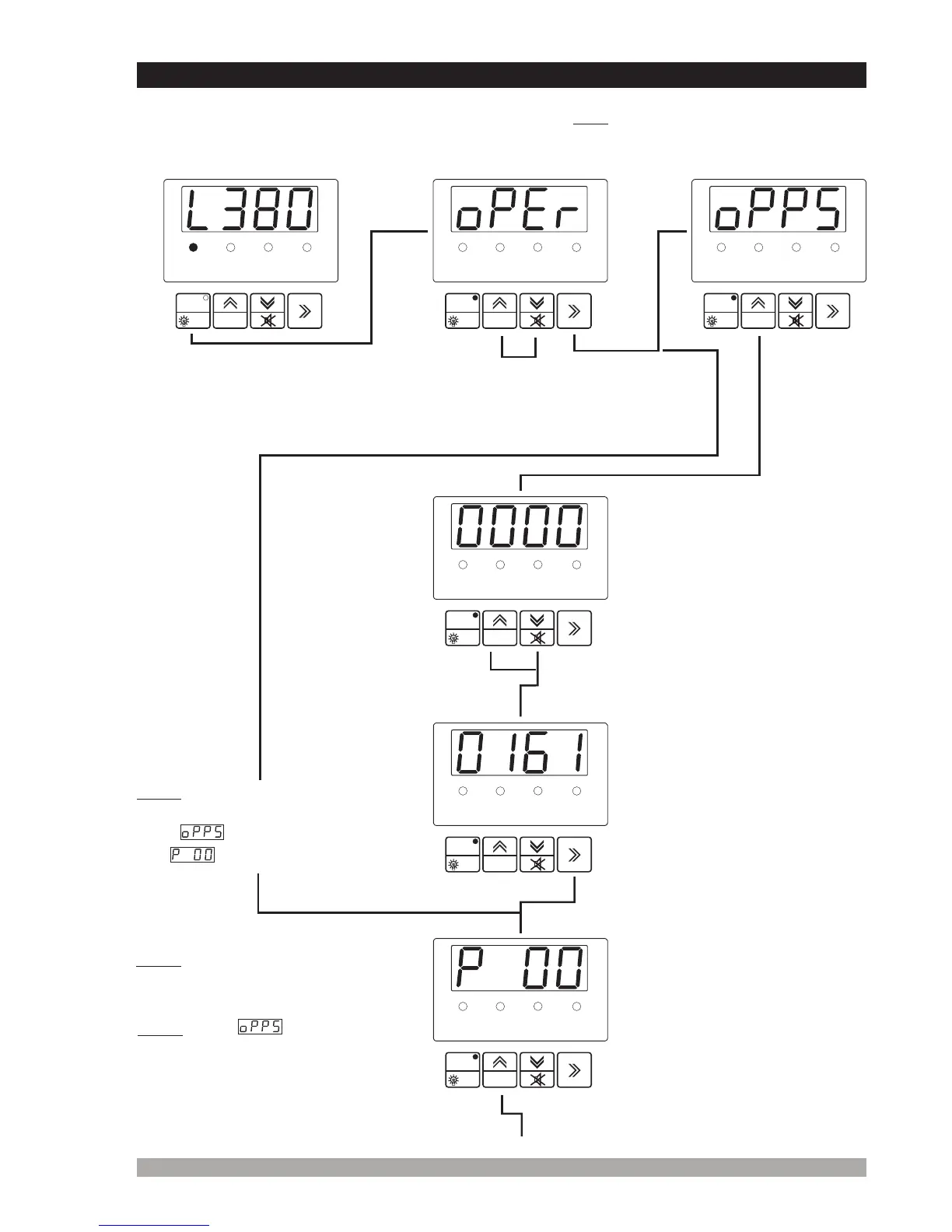
Presstheincrementbuttonto
accesstotheparametervalue.
P00:MainsVoltage
ConnectionLevel
4.2 AccessingToTheOperatorParameters
21
Pressthe
increment
button.
RESET
PROG
TEST
°F
VL12
GENV.
VL23
VL31
RESET
PROG
TEST
°F
VL12
GENV.
VL23
VL31
RESET
PROG
TEST
°F
VL12
GENV.
VL23
VL31
OperationScreen
Not1: IfEnterbuttonispressed
andtheoperatorpasswordis
zero, screenisignored
and isshown.screen
RESET
PROG
TEST
°F
VL12
GENV.
VL23
VL31
RESET
PROG
TEST
°F
VL12
GENV.
VL23
VL31
RESET
PROG
TEST
°F
VL12
GENV.
VL23
VL31
Programmingcanbecarriedoutonlywhiletheunitisin mode.PresstheOFF(17)
button.Iftheengineisrunning,itwillstopandtheLED(6)lightson. Thenproceedasfollows:
OFF
Not2: Usercanaccesstoparameters
to and only.P00 P09 P28
OPERATORPASSWORD
Whenthebuttonis
pressedfor seconds,
passwordisaskedfor
accessingtoparameters.
5
Usercanaccesstooperatorparameters
byenteringoperatorortechnician
password. Thisselectionisdonewith
incrementanddecrementbuttons.
Enterpassword
withincrementand
decrementbuttons.
PresstheEnterbuttonto
confirmpassword. Ifthe
passwordisincorrect,
theunitwilldropoutof
programmode.
Not3: When screenis
shown,parameterscanbe
seenbypressingEnterbutton
withoutenteringoperator
password.Butusercannot
changetheparameters.


 To Next Page