CG Drives & Automation 01-5958-01r0
7 Operation
Make sure the enclosed plastic (rubber) insert (if ordered, optional) covers the
monitor terminals before you start programming.
7.1 Overview
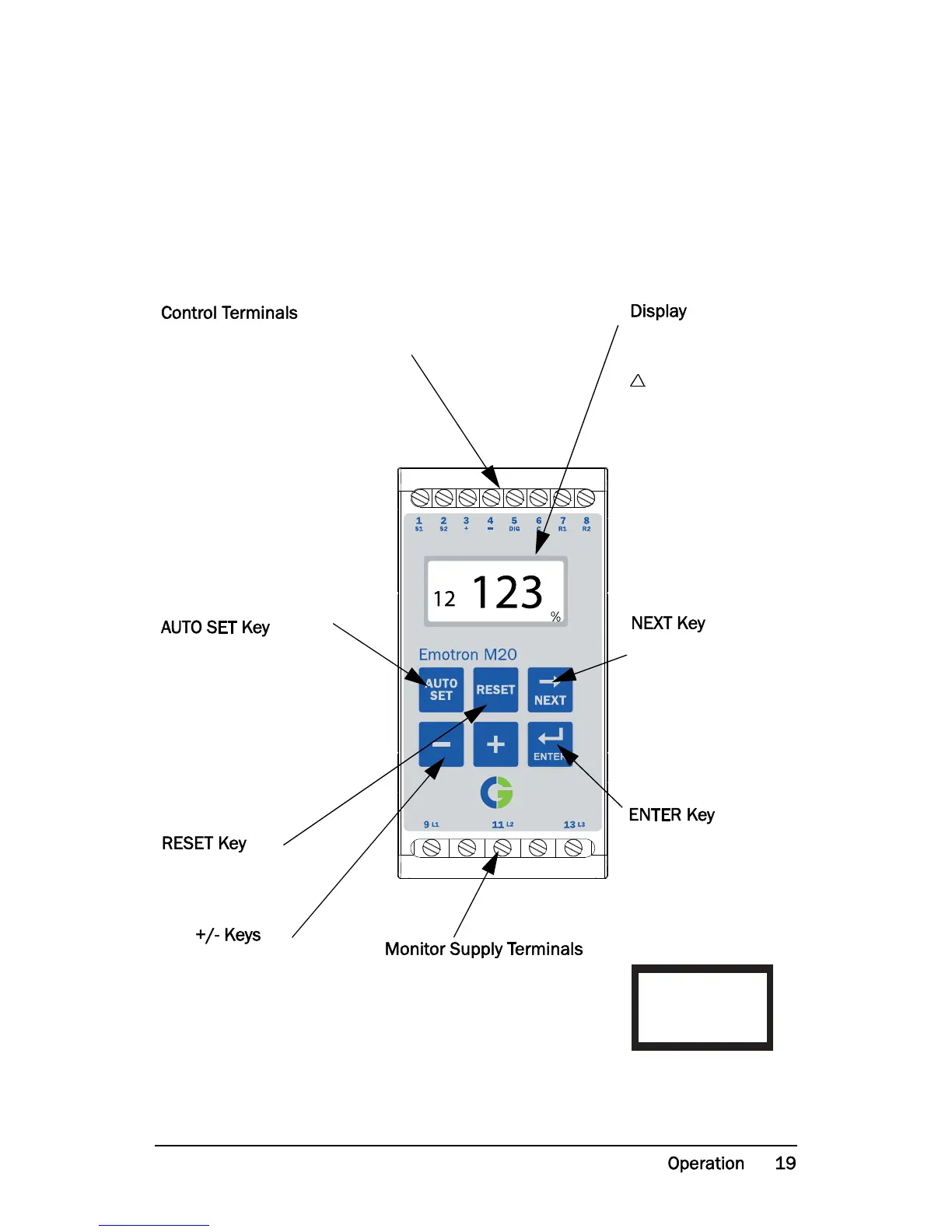
1 S1 Current transformer input
2 S2 Current transformer input
3 + Analogue output
4 - Analogue output
5 DIG External RESET or AUTO SET
or Block Pre-Alarm
6 C Common: RELAY, DIG
7 R1 Main Alarm Relay 1*
8 R2 Pre-Alarm Relay 2
Press for 3 seconds during
normal and stable load to
apply the automatic setting of
the alarm levels. Not avail-
able if Parameter Locked.
To reset ALARM
For increasing and
decreasing value
9 L1 Motor phase
11 L2 Motor phase
13 L3 Motor phase
After Power up window 01
appears, the actual load value
is shown.
Default view (example shows
54% load):
Use the NEXT key to scroll
through the function menu.
Proceeds to next window. If no
key is pressed for 1 minute the
display returns to window 01
automatically. Scroll back by
pressing and holding ENTER at
the same time as the NEXT key
is pressed.
Confirm (save) changes.
* For alternative relay function, see Special functions
in chapter 9.


 To Next Page