CG Drives & Automation 01-5958-01r0
8.2 Setting rated motor power and current
(window 41 and 42)
The rated motor power and the rated motor current must be set in windows 41
and 42.
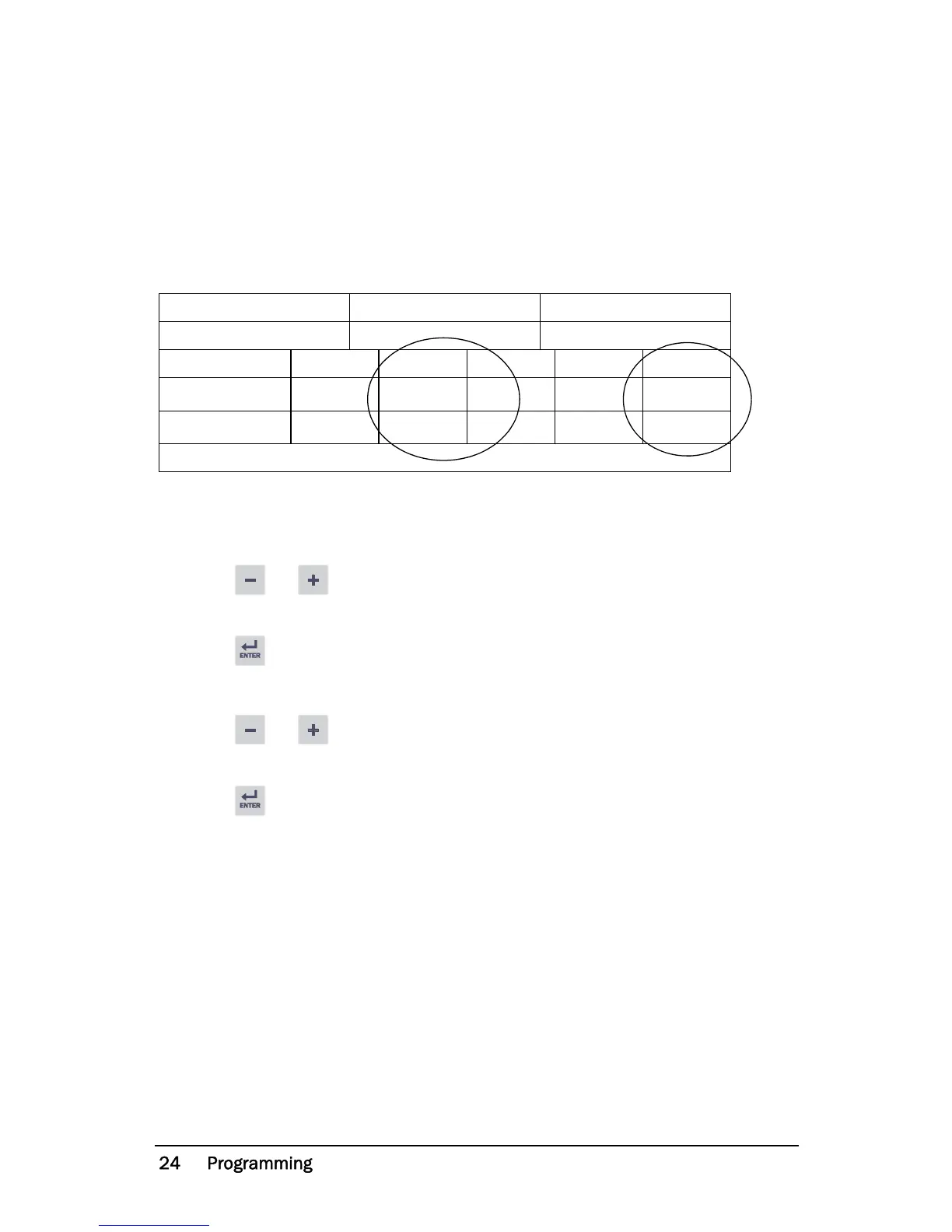
Example motor plate:
8.2.1 Programming
1. Go to window 41 (default = 2.2 kW).
2. Press or to set the rated motor power as indicated on the motor
plate (see example).
3. Press to confirm the change.
4. Go to window 42 (default = 5.6 A).
5. Press or to set the rated motor current as indicated on the motor
plate (see example).
6. Press to confirm the change.
TYPE: T56BN/4 NR: 948287 Prot. IP: 54
Serv: S1 Cos : 0.78 Is. Cl:F
V:Y/ Hz HP kW RPM A:Y/
240/415 50 3 2.2 1400 5.6/9.4
260/440 60 3 2.2 1680 5.8/9.1
ASYNCHRONOUS THREE-PHASE MOTORS


 To Next Page