Configure IP Address Manually:
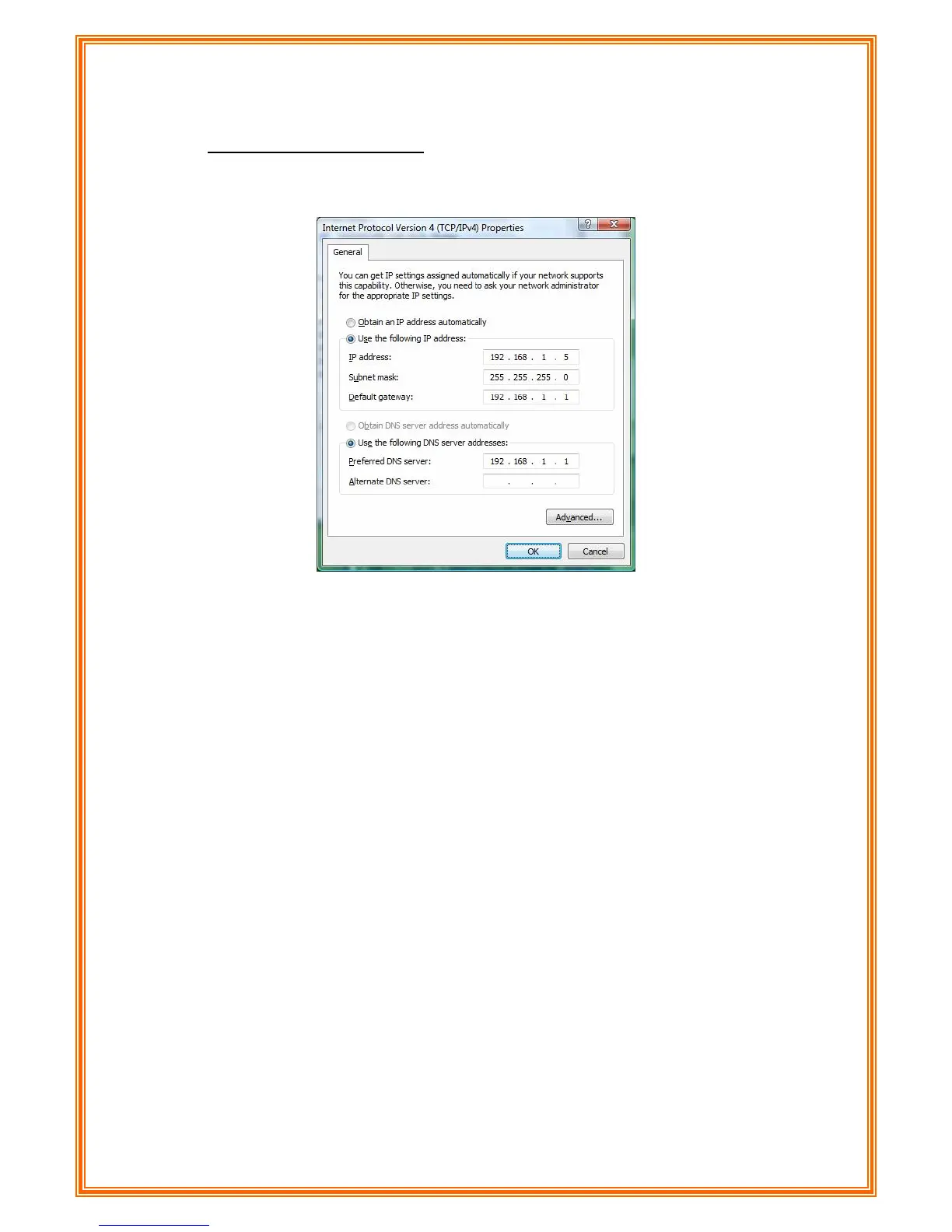
Step 7: Select Use the following IP address and Use the following DNS server
addresses.
IP address: Fill in IP address 192.168.1.x (x is a number between 2 to 254).
Subnet mask: Default value is 255.255.255.0.
Default gateway: Default value is 192.168.1.1.
Preferred DNS server: Fill in preferred DNS server IP address.
Alternate DNS server: Fill in alternate DNS server IP address.
You can use ping command under DOS prompt to check if you have setup TCP/IP
protocol correctly and if your computer has successfully connected to this router.
2) Type ping 192.168.1.1 under DOS prompt and the following messages will appear:
Pinging 192.168.1.1 with 32 bytes of data:
Reply from 192.168.1.1: bytes=32 times<2ms TTL=64
Reply from 192.168.1.1: bytes=32 times<1ms TTL=64
Reply from 192.168.1.1: bytes=32 times<10ms TTL=64
If the communication link between your computer and router is not setup correctly, after
you type ping 192.168.1.1 under DOS prompt following messages will appear:
Pinging 192.168.1.1 with 32 bytes of data:
Request timed out.
Request timed out.
Request timed out.
32
This failure might be caused by cable issue or something wrong in configuration procedure.



 To Next Page