15
LED WALL LIGHTS
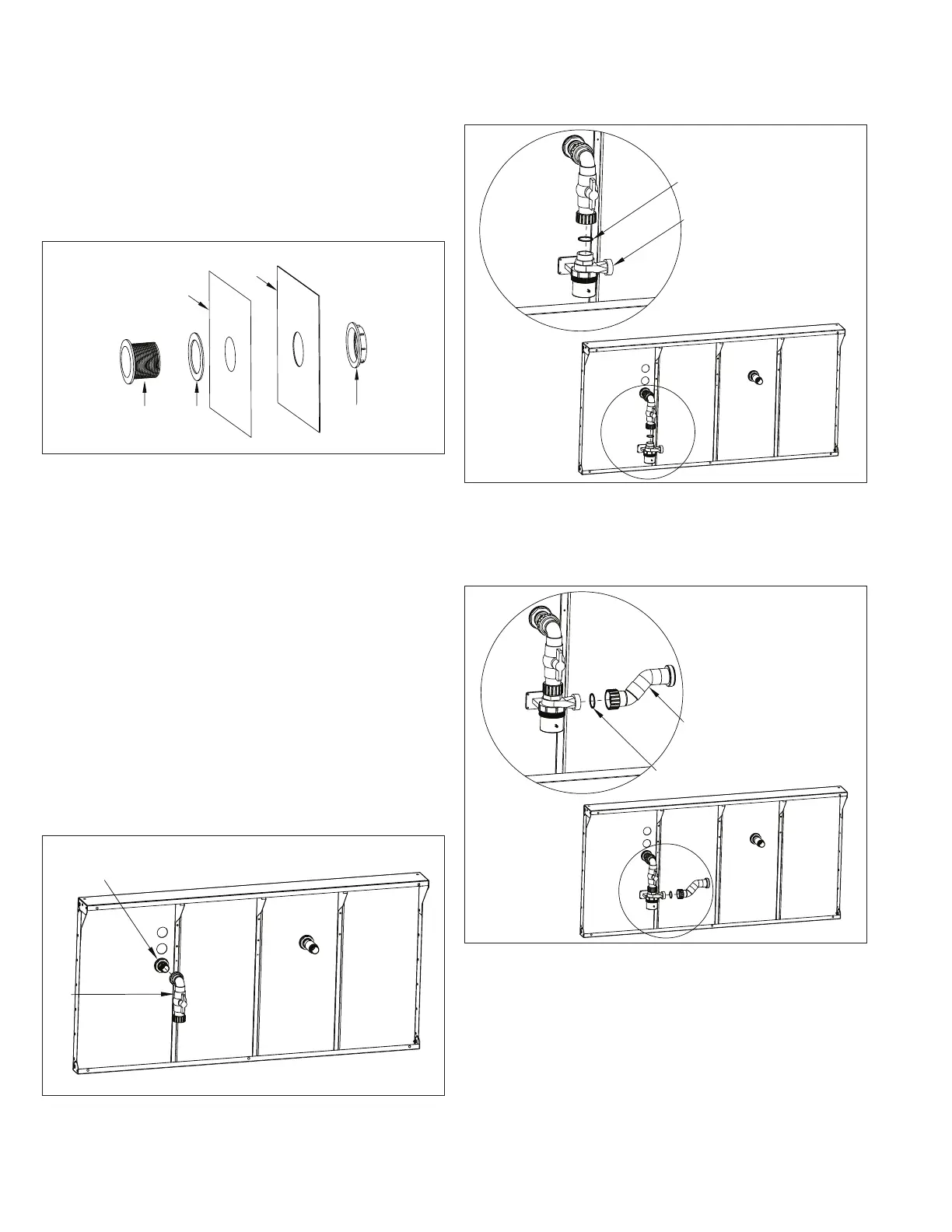
The Light Lens should be installed at this time.
Use a sharp utility knife to cut the round holes in the liner
(A), using the holes in the pool wall (B) as a template. Insert
the Light Lens (C) through the wall making sure the Clear
Gasket (D) is installed between the lens and the liner. The
single rib side of the gasket should be seated against the
flange of the lens. Secure the lens to the wall with the Lock
Nut (E) (Fig. 19).
C
D
E
A
B
Fig. 19
16. 16. Water Quality SystemWater Quality System
The following instructions apply for the standard Poolside
Water Quality System with no options ONLY.
If the optional UV Sanitizer, optional EZ50 Water Care
System, optional Gas Heater, or Remote Water Quality
System have been purchased, then refer to those
Supplemental Guides at this time to install the Water
Quality System.
The Water Quality System Thru-Wall Assemblies should be
installed by this point. Attach the Pre-Plumbed Thru-Wall
to Pump Inlet Assembly (A) to the Water Quality System
Suction Thru-Wall (B). Make sure to wrap Teflon tape
around the threads of the adapter that is glued into the
Thru-Wall. The union of the assembly can be taken apart to
make this step easier (Fig. 20).
A
B
Fig. 20
Attach the Circulation Pump (A) to the bottom of the
pre-plumbed assembly from the previous step. Make sure
that the Pump Union O-Ring (B) is seated properly prior to
installing the pump (Fig. 21).
Fig. 21
Attach the Pre-Plumbed Pump to Heater Assembly (A) to
the pump. Again, make sure that the Pump Union O-Ring (B)
is seated properly prior to installing the assembly (Fig. 22).
A
B
Fig. 22



 To Next Page