RMS 621
Endress+Hauser 3
6. Temperature inputs (temp. 1.1)
Signal type: Pt100
Sensor type: 3- or 4-wire
Select terminals E1-6 and connect Pt100 Æ
Z
Æ
Z
.
7. Application
Application 1: Steam heat
Steam type: super heated steam
Allocate flow 1, pressure 1 and temp. 1.1 to the steam measurement.
8. Display
Group 1
Display mask: 4 values
Value 1 (...4): flow 1, temp. 1.1, pressure 1 and density 1 Æ
Z
Group 2: select to above system e.g. mass flow 1, heat flow 1, mass sum 1.
9. Exit set-up
Exit set-up by operating ESC
Z
a number of times and acknowledging with
F
.
Display
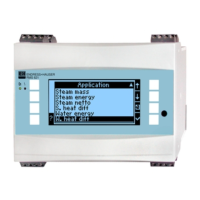
By operating any key you can enter the main menu and select the required group including all the
relative display values: Display -> Group -> Group 1. All can also be displayed in an automatic scroll
function: Setup -> Display -> Scrolled display (scroll using the arrow under group 6).
If a fault occurs the display automatically changes colour (blue/red). Detailed fault finding and
elimination can be found in the relative chapter of these operating instructions.
Example 2: Liquid heat difference
Sensors: 2 x TST90, Promag 50
1. Connect device to the power source (terminal L/L+, 220 V)
2. Press any key → Menu → Setup (all parameters)
3. Basic set-up
Date-time (set up date and time) Æ
Z
4. Flow input (flow 1)
Flow meter: Operating volume
Signal type: 4 to20 mA
Terminals: select A10 and connect the Prowirl to terminals: A10(+)/11(-) (active signal)
Set up start- and end-values
5. Temperature inputs (temp. 1.1 and temp. 1.2)
Signal type: Pt100
Sensor type: 3- or 4-wire
Terminals: select E1-6 and connect TST90 (temp. 1.1) Æ
Z
Terminals: selectE3-8 and connectTST90 (temp. 1.2)Æ
Z
Æ
Z
Fig. 1: Temperature sensor connection, e.g. to input 1 (Slot E I)
Pos. 1: 4-wire input
Pos. 2: 3-wire input
Pos. 3: 3-wire input e.g. optional
temp. expansion card (Slot B I)




 To Next Page