RMS 621
4 Endress+Hauser
6. Applications
Application 1: Water heat differential
Operating mode: Heating
Select "Flow 1"
Installation point: Cold (means return)
Allocate temperature sensors 1.1 and 1.2 to heat and cooling section.
7. Display
Group 1
Display mask: 4 values
Value 1 (...4): Flow 1, temp. 1.1, temp. 1.2 and density Æ
Z
Group 2: select to above system e.g. mass flow 1, heat flow 1, mass sum 1 etc.
8. Exit set-up
Exit set-up by operating ESC
Z
a number of times and acknowledging with
F
.
Display
By operating any key you can enter the main menu and select the required group including all the
relative display values: Display -> Group -> Group 1. All can also be displayed in an automatic scroll
function: Setup -> Display -> Scrolled display (scroll using the arrow under group 6).
If a fault occurs the display automatically changes colour (blue/red). Detailed fault finding and
elimination can be found in the relative chapter of these operating instructions.
An example of steam mass measurement using a Prowirl 77 can be found in the appendix of this
operating manual.
Application basic set-up
The values shown are only an indication in order to simplify the commissioning of the device, this
means that only the most necessary settings are shown. Special functions (e.g. tables, corrections,
etc.) are not shown.
Water applications
Input values: Flow, temperature 1, (temperature 2)
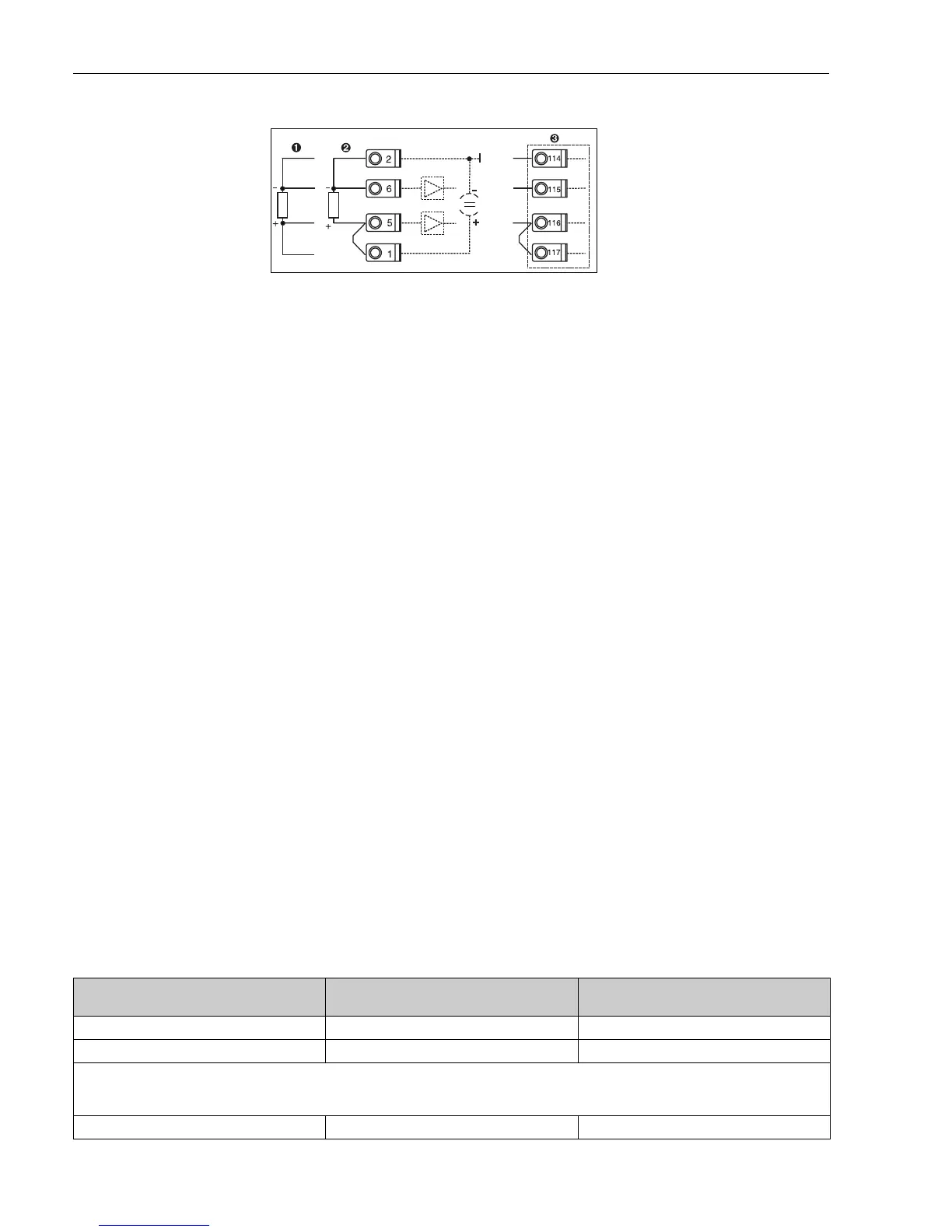
Fig. 2: Temperature sensor connection, e.g. to input 1 (Slot E I)
Pos. 1: 4-wire input
Pos. 2: 3-wire input
Pos. 3: 3-wire input e.g. optional
temp. expansion card (Slot B I)
Flow
Pulse/PFM (e.g. ProWirl)
Analogue (e.g. Promag) Differential pressure (e.g. Orifice)
Flow input Flow input Flow input
Flow meter: Operating volume Flow meter: Operating volume Differential pressure/Orifice/water
Terminals:
– Flow meter with active signal connect to e.g. terminals A10(+)/11(-).
– Flow meter with passive signal select e.g. terminals A10 and connect to terminals A10(-)/82(+).
k factor Start/end value (m
3
/h) Start/end value (mbar)




 To Next Page