RMS 621 6 Commissioning
Endress+Hauser 31
6.4.2 Main menu - Quick Setup
Using the Quick Setup menu there is an easy and fast way to work through the application to be
run. Here the user is led through the set-up step by step using only the operating addresses relevant
to the application. More in depth unit set-up can be done in the unit basic set-up (see Chap. 6.4).
This is specially valid for the display set-up, as this is automatically generated when using the Quick
Setup. The most important process values for each application are displayed in two groups (Water
heat quantity application in one group only). The display can be matched or changed in Main menu
- Setup - Display set-up.
!
Note!
Flow measurement operating on differential pressure cannot be set up using the Quick Setup. Please
configure the differential pressure unit using the standard Setup. (→ Chap. 6.4.3).
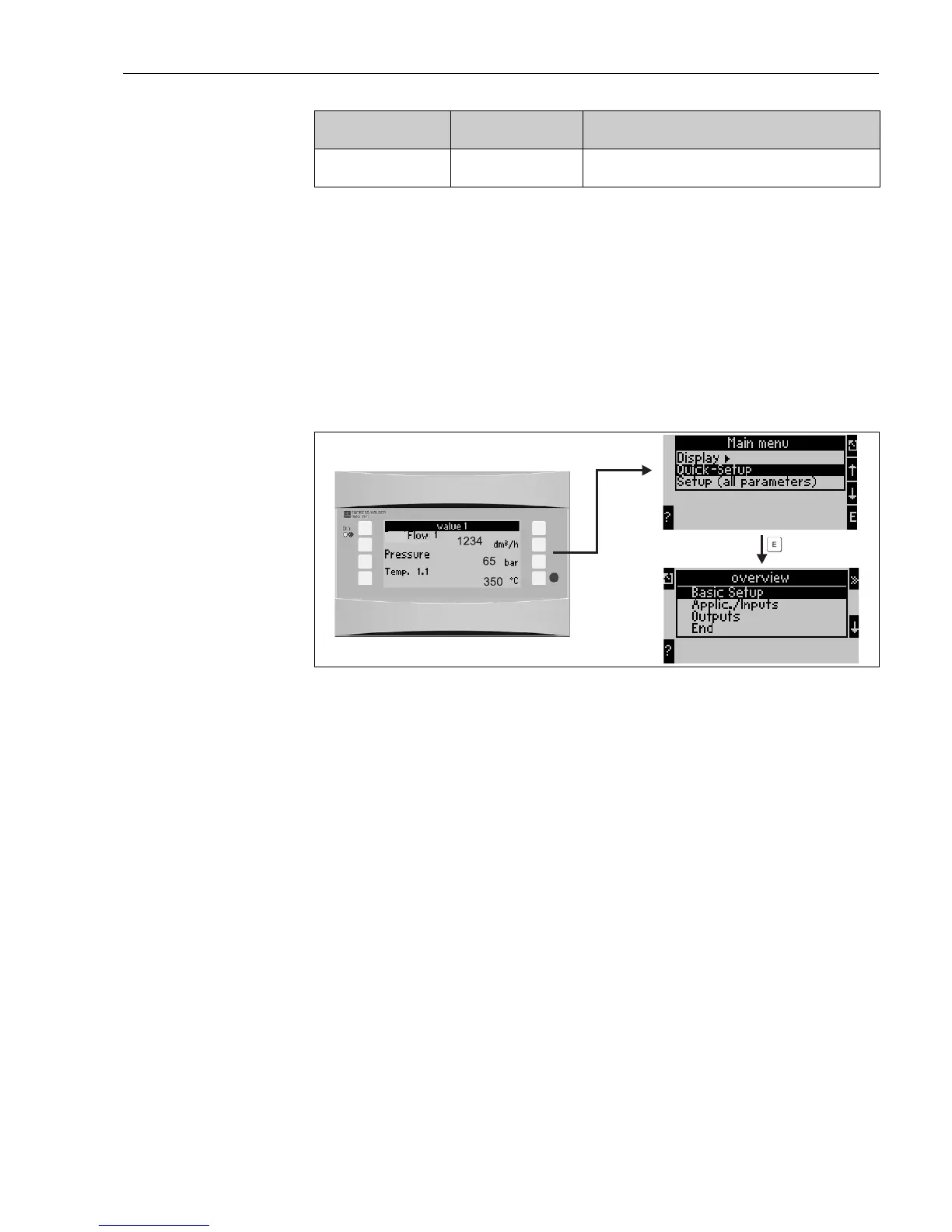
Fig. 23: Main and sub menu in Quick set-up
• Unit set-up
This sub menu contains unit data such as unit identifier, date and time.
• Application/inputs
All important parameters for the application to be calculated are to be found in this sub menu.
• Outputs
Active and passive analogue and pulse outputs as well as relays are set up in this sub menu.
• End
Exit Quick Setup
Quick Set-up - Set-up in individual steps
1. First check the unit set-up and select an application (Menu: Applications/Inputs).
2. The following operating addresses are predefined dependent on the application selected.
Check the default values in each window and change these if required by the application (’E’
key), before moving to the next address (’>>’ key).
3. The application configuration is completed once all relevant addresses have been selected.
Now the unit asks "Set up further applications?".
4. Once all required applications have been set up, access to the output menu is
possible. Here the units asks if the outputs are to be set up. Acknowledge the request with OK.
Now the outputs can be set up as described in points 1 to 3.
Info Display of unit data such as programme, name,
version, software generation time and date (for service use).
Function (Menu
address)
Parameter set-up Description




 To Next Page