11g Wireless Client Bridge/AP Version 1.36
46
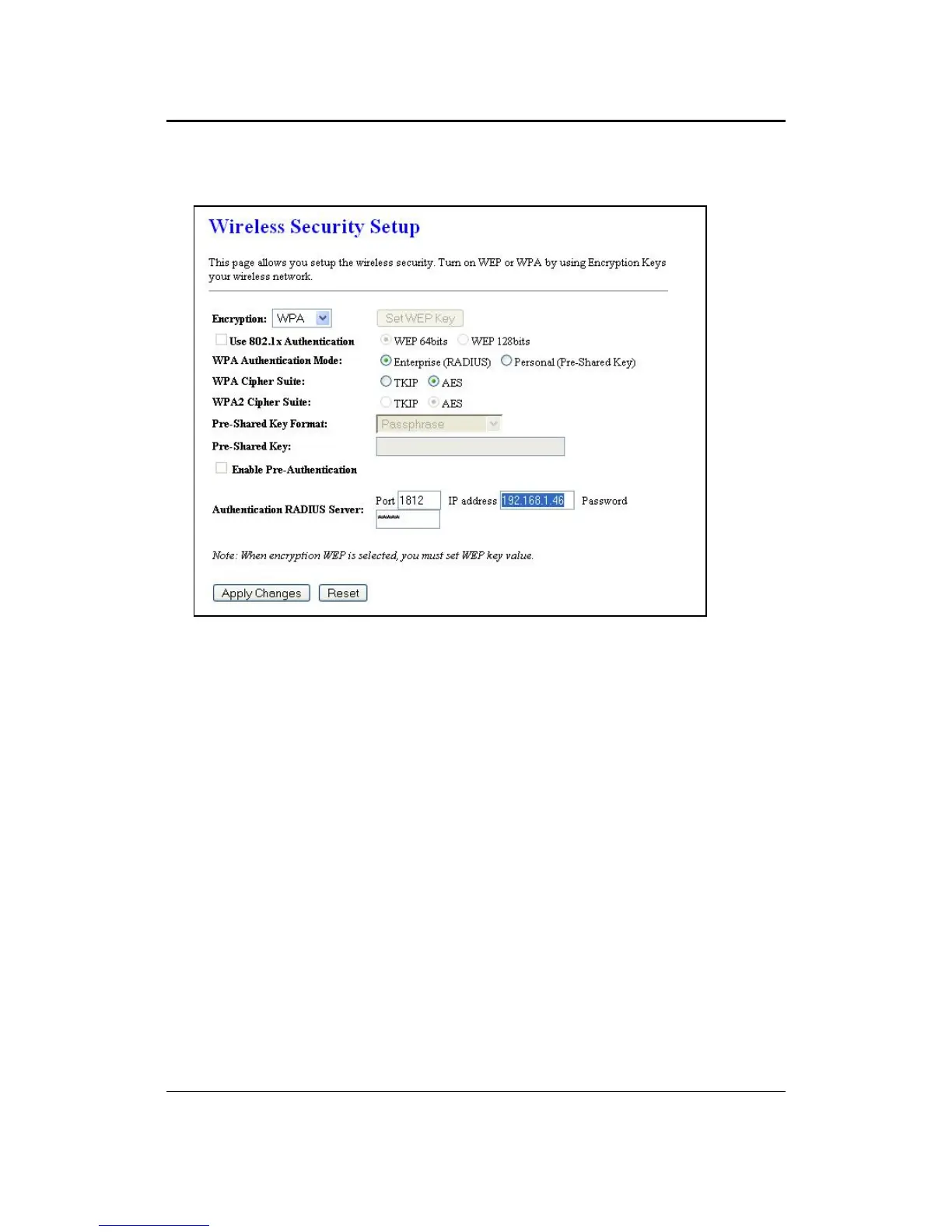
5.4.3.4 WPA / WPA2 / WPA2 Mixed RADIUS Authentication
Encryption: Select WPA, WPA2 or WPA2_Mixed from the drop-down list if your
wireless network uses this encryption. WPA (Wi-Fi Protected Access) was designed
to improve upon the security features of WEP (Wired Equivalent Privacy). The
technology is designed to work with existing Wi-Fi products that have been enabled
with WEP. WPA provides improved data encryption through the Temporal Integrity
Protocol (TKIP), which scrambles the keys using a hashing algorithm and by adding
an integrity checking feature which makes sure that keys haven’t been tampered with.
WPA Authentication Mode: Select the Enterprise (RADIUS) radio button.
WPA/WPA2: Select TKIP, AES or both as the cipher suite.
RADIUS Port: Enter the port number of the RADIUS server. The default is usually
1812.
RADIUS IP Address: Enter the IP address of the RADIUS server.
RADIUS Password: Enter the shared password of the RADIUS server.
Click on the Apply Changes button to confirm the changes. This device will
automatically restart once these changes have been applied.



 To Next Page