51
IP1967EN - 2016-08-01
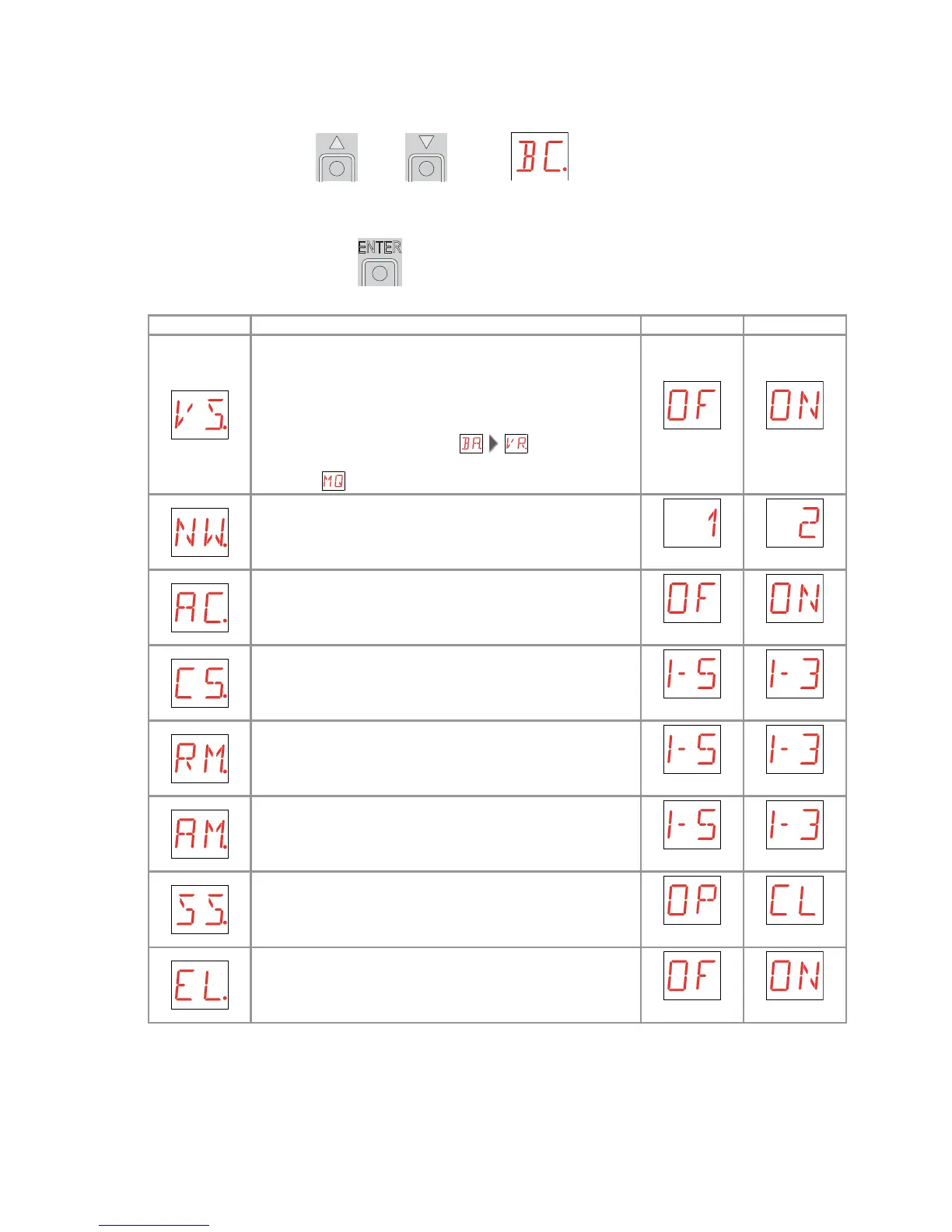
- use the keys S and T to select the required function
- press the ENTER key to confirm
Display Description
VS - Selecting mechanical stops verification.
When enabled (ON), with every power supply connection
the automation automatically checks the mechanical
opening and closing end stops and/or the stop limit
switches during opening and closing operation at the
speed set with the adjustment .
During the learning operation, the display visualizes the
message .
OFF ON
NW - Selecting number of door wings.
1 2
AC - Enabling of automatic closing.
OFF ON
C5 - Step-by-step/opening command operation.
STEP-BY-STEP OPENING
RM - Radio receiver functionality.
STEP-BY-STEP OPENING
AM - AUX coupling board operation.
STEP-BY-STEP OPENING
SS - Selection of automation status at activation.
Indicates how the control panel considers the automation
at the time of switch-on, or after a POWER RESET com-
mand.
OPEN CLOSED
EL - Enablement of electric lock release stroke.
When an electric lock is present, the enablement of the
release stroke is recommended.
OFF ON
9.5 Second level menu - BC (Basic Configurations)


 To Next Page