58
IP1967EN - 2016-08-01
Display Description
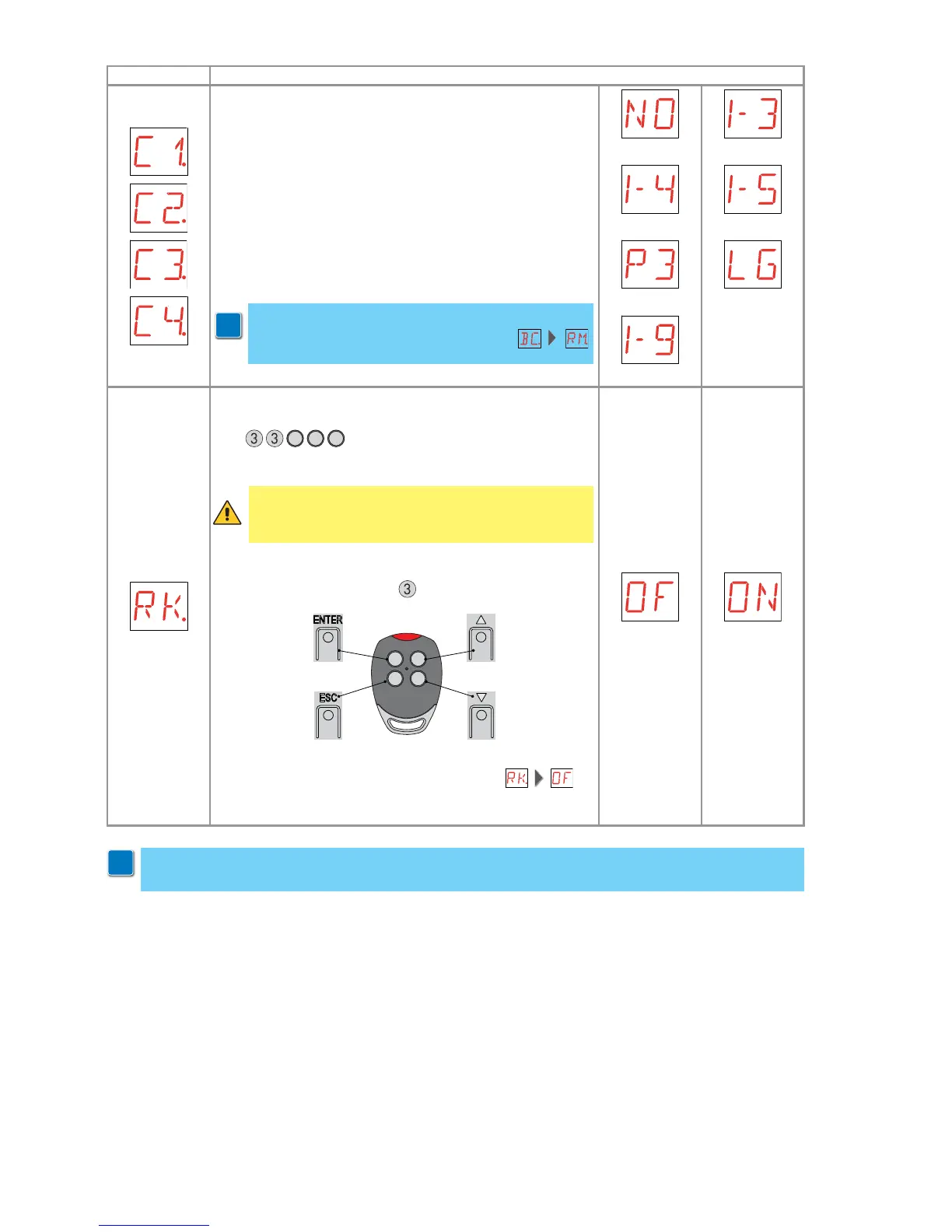
C1 - Setting key 1 function of memorized transmitter.
C2 - Setting key 2 function of memorized transmitter.
C3 - Setting key 3 function of memorized transmitter.
C4 - Setting key 4 function of memorized transmitter.
NO - None
1-3 - Opening command
1-4 - Closing command
1-5 - Step-by-step command
P3 - Partial opening command
LG - Courtesy light status change command
1-9 - STOP command
i
WARNING: 1-3 (opening) and 1-5 (step-by-step) are
binary options and are dependent by the
selection.
NONE
CLOSING
PARTIAL
STOP
OPENING
STEP-BY-STEP
COURTESY
LIGHT
RK - Navigation via transmitter keyboard.
With the display switched off, quickly type the sequence of
keys
3
3
2
4
1
using the desired memorized transmit-
ter.
Note: it is recommended to use a dedicated transmitter.
To test the new configuration, switch off the display and give
an open command using key
3
.
12
34
Navigation via transmitter keyboard is automatically disa-
bled after 4 minutes of inactivity or by setting .
OFF ON
WARNING: during navigation via transmitter keybo-
ard, NONE of the memorized transmitters are active.
i
Warning: it is possible that, owing to the type of automation and control panel, certain menus
are not available.


 To Next Page