59
IP1967EN - 2016-08-01
Display Description
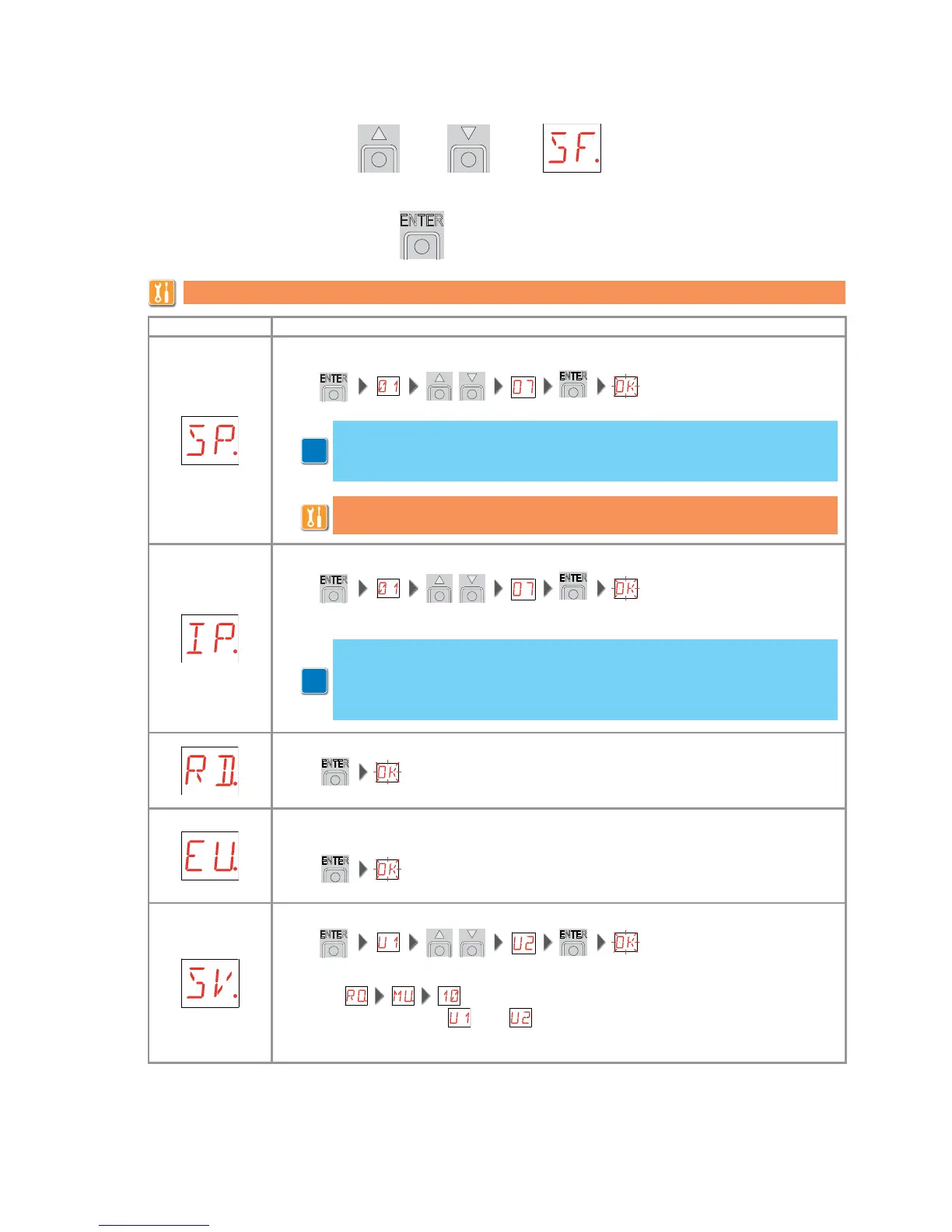
SP - Setting the password
IP - Inserting the password.
RD - Resetting the basic settings (SETTINGS RESET).
EU - Deleting of the user configurations and the last configuration set present in the
memory module.
SV - Saving user configuration.
Selecting it is possible to save up to 2 personalised configurations
in the memory positions and only with the storage module present on the
control panel.
9.8 Second level menu - SF (Special Functions)
- use the keys S and T to select the required function
- press the ENTER key to confirm
The procedures to activate the functions are described in the table.
It is possible to annul the set password by selecting the sequence JR1=ON,
JR1=OFF, JR1=ON.
i
i
Note: this is only possible when the password is not set.
The setting of the password prevents unauthorised personnel from accessing
selections and adjustments.
Note: this is only possible when the password is set.
When the password is not inserted, it is possible to access the visualisation
mode regardless of the selection made with JR1.
When the password is inserted, it is possible to access the maintenance mode.


 To Next Page