61
IP1967EN - 2016-08-01
Display Description
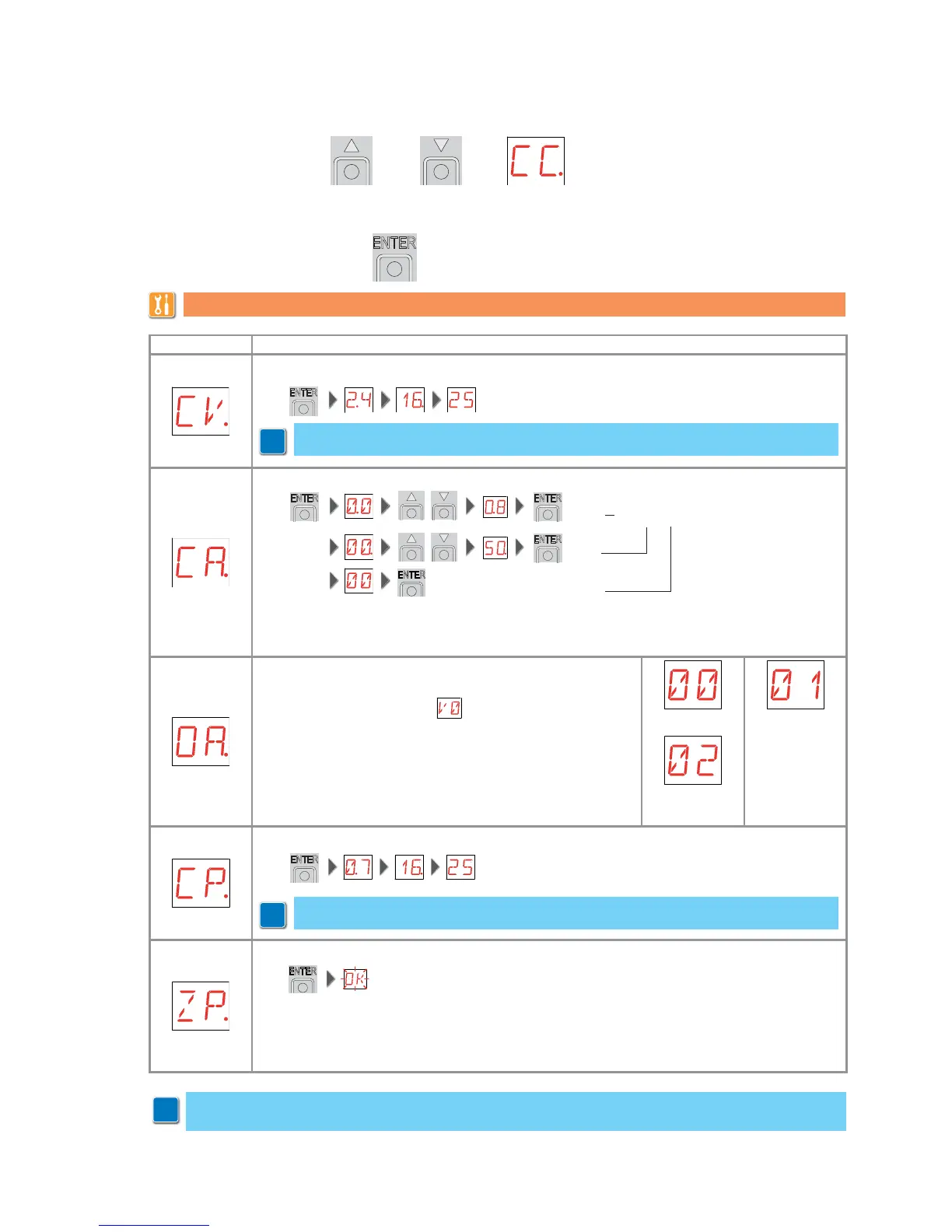
CV - View total manoeuvres counter.
= 241.625 manoeuvres (example)
CA - Setting the maintenance alarm interval. (max 500.000 partial manoeuvres)
= 08 08 50 00 = 85.000 manoeuvres (ex)
= 50
= 00
It is possible to set the required number of operations for the signalling of the mainte-
nance alarm.
OA - Selecting maintenance alarm viewing mode.
00 - Display
(display alarm message )
01 - Flashing light
(when automation is closed it flashes 4 times every 60
minutes)
02 - Open gate indicator light
(when automation is closed it flashes 4 times every 60
minutes)
DISPLAY
INDICATOR
FLASHING
CP - View partial manoeuvres counter.
= 71.625manoeuvres (example)
ZP - Resetting partial manoeuvres counter.
To ensure correct operation, it is recommended to reset the partial manoeuvres counter:
- after each maintenance intervention,
- after each setting of the maintenance alarm interval.
2 s
2 s
9.9 Second level menu - CC (Cycles Counter)
- use the keys S and T to select the required function
- press the ENTER key to confirm
The procedures to activate the functions are described in the table.
i
Note: view only.
i
i
Note: view only.
Warning: it is possible that, owing to the type of automation and control panel, certain
menus are not available.


 To Next Page