62
IP1967EN - 2016-08-01
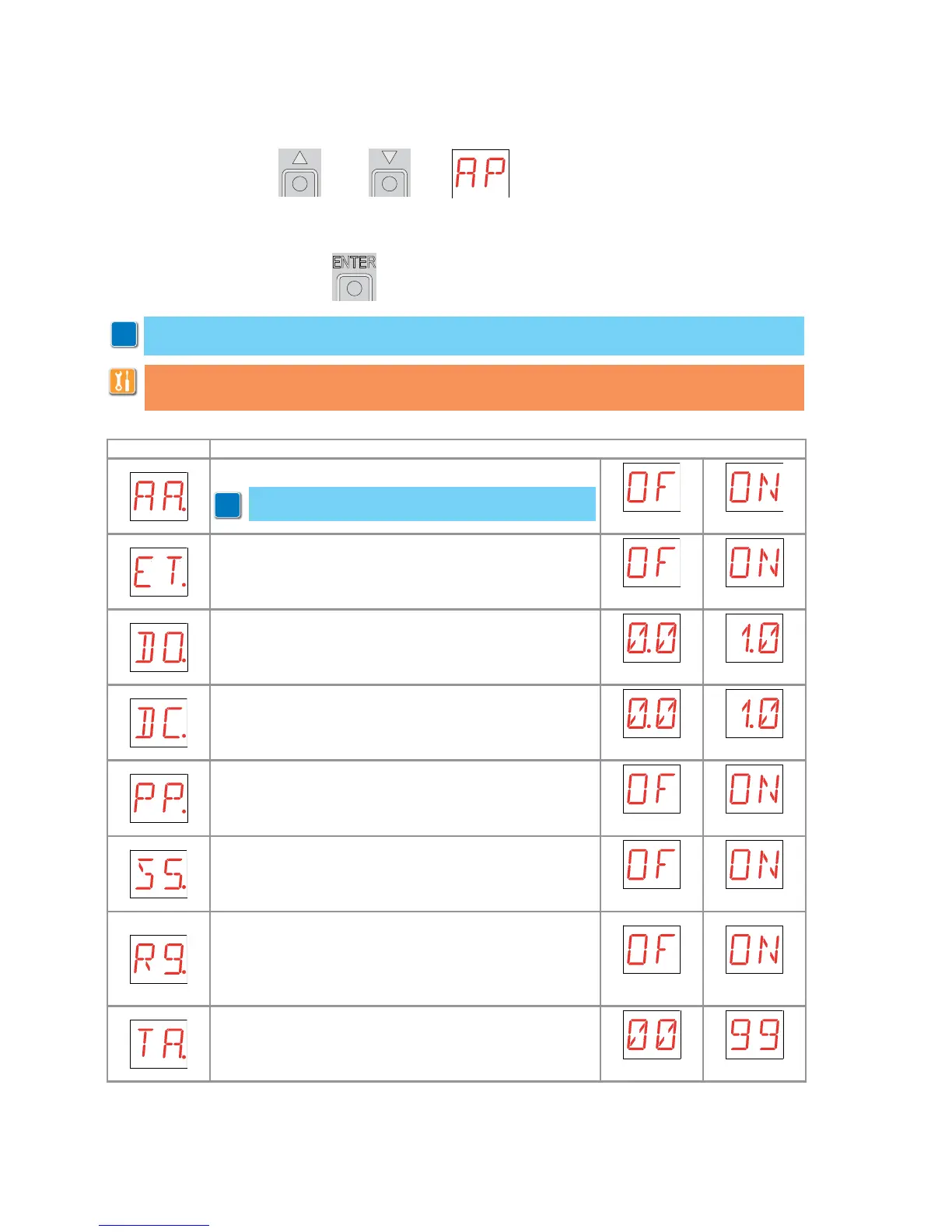
- use the keys S and T to select the required function
- press the ENTER key to confirm
Display Description
AA - Activating advanced parameters menu.
OFF ON
ET - Enabling of safety test (SOFA1-A2 card).
OFF ON
DO - Setting of disengagement on obstacle during ope-
ning. [s]
MIN MAX
DC - Setting of disengagement on obstacle during clo-
sing. [s]
MIN MAX
PP - Step-by-step sequence with commands 1-5.
OFF - Opening-Stop-Closing-Opening
ON - Opening-Stop-Closing-Stop-Opening
OFF ON
S5 - Duration of STOP in step-by-step sequence with com-
mands 1-5.
TEMPORARY PERMANENT
R9 - Enablement of automatic closing after command 1-9
(STOP).
When enabled (ON), after a command 1-9 the automation
carries out the automatic closing (if enabled), after the set
time.
OFF ON
TA - Adjustment acceleration phase. [%]
FAST SLOW
9.10 Second level menu - AP (Advanced Parameters)
i
WARNING: the gap between the adjustment values of the parameters may vary according
to the type of automation.
Given the complexity of the parameters, use of the Advanced Parameters menu is recom-
mended only for qualified technical personnel.
i
NOTE: activation necessary before being able to scroll
through the AP menu.


 To Next Page