Turn off the Appliance
Press the ON/OFF Key on the Transmitter. The Transmitter LCD display
will only show the room temperature and Icon (see Figure 8). A single
“beep” from the IFC conrms reception of the command and both the
pilot light (if the unit is not set to continuous pilot) and main burner will
turn off.
Room Thermostat (Transmitter Operation)
The Remote Control can operate as a room thermostat. The thermostat
can be set to a desired temperature to control the comfort level in a
room. To activate this function, press the Thermostat Key (see Figure
5). The LCD display on the Transmitter will change to show that the
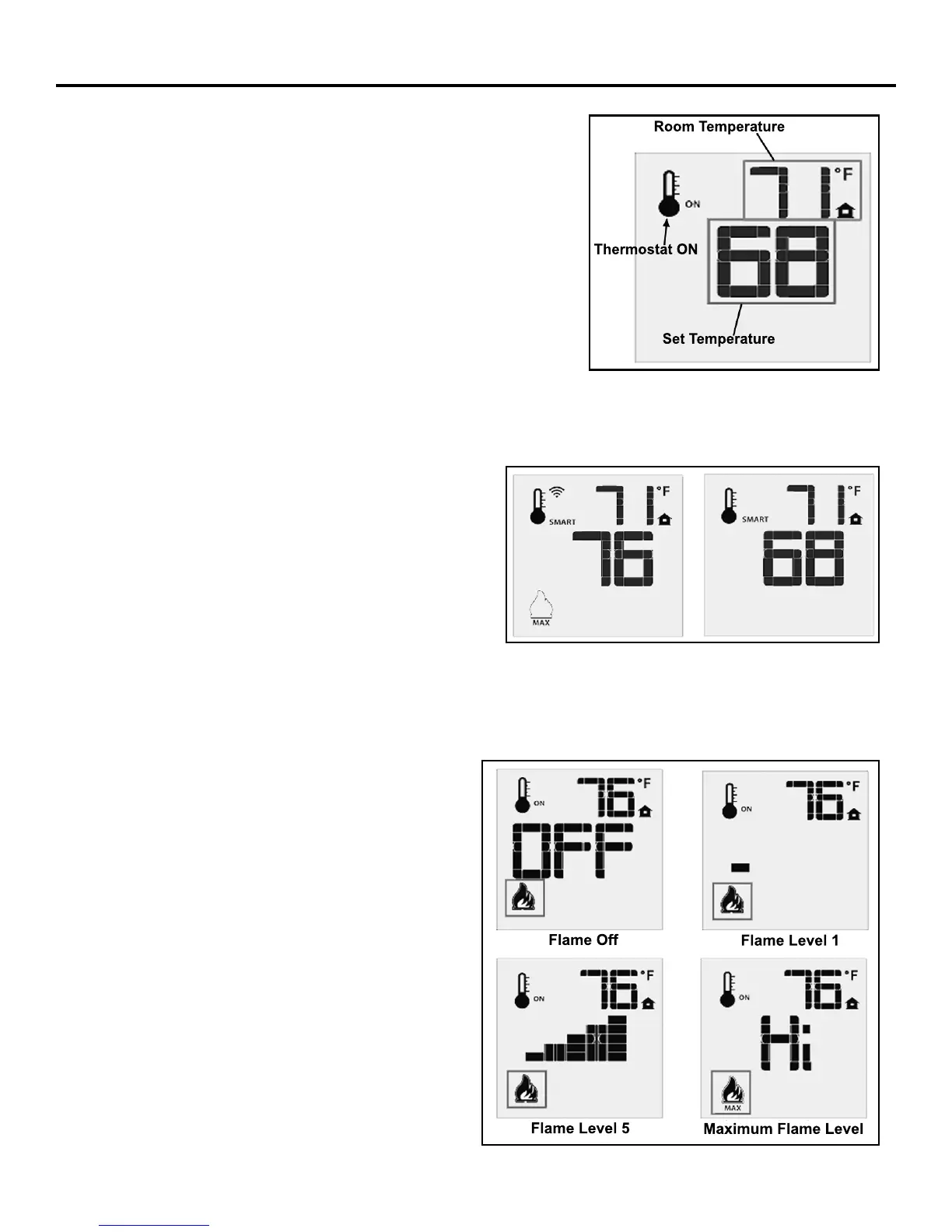
room thermostat is “ON” and the set temperature is now displayed (see
Figure 10). To adjust the set temperature, press the Up or Down Arrow
Keys until the desired set temperature is displayed on the LCD screen
of the Transmitter.
Smart Thermostat (Transmitter Operation)
The Smart Thermostat function adjusts the ame height
in accordance to the difference between the set point
temperature and the actual room temperatures. As the room
temperature gets closer to the set point the Smart Function
will modulate the ame down. To activate this function,
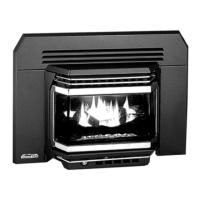
press the Thermostat Key (Figure 5) until the word “SMART”
appears to the right of the temperature bulb graphic (Figure
11). To adjust the set temperature, press the Up or Down
Arrow Keys until the desired set temperature is displayed on
the LCD screen of the Transmitter.
Room Temperature
Set Temperature
Thermostat ON
Figure 10: Remote Control Displays
Set Temperature.
Remote Flame Control
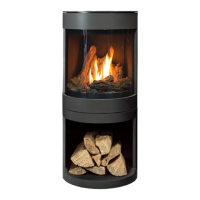
The Proame 2 remote control system has six (6) ame
levels. With the system on, and the ame level at the
maximum in the appliance, pressing the Down Arrow
Key once will reduce the ame height by one step until
the ame is turned off. The Up Arrow Key will increase
the ame height each time it is pressed. If the Up Arrow
Key is pressed while the system is on but the ame is
off, the ame will come on in the high position (refer to
Figure 12). A single “beep” will conrm reception of the
command.
Figure 11: Remote Control’s Smart Flame Function.
Figure 12: Remote Control’s Flame Levels.
Flame Off
Flame Level 1
Flame Level 5
Maximum Flame Level
Operating Instructions
12


 To Next Page