Auxiliary Control
This function is not used on the Berkeley and can be
disregarded.
Operating Instructions
Fan Control
The Berkeley comes with a convection fan that can
be controlled with the Transmitter. The fan speed can
be adjusted thorugh six (6) speeds. To control the
fan press the Mode key (Figure 5) to index to the fan
control icon (Figure 14). Use the UP/DOWN arrow keys
to turn on, off, or adjust the fan speed (Figure 14). A
single beep from the IFC will conrm the command
has been received
Figure 14: Fan Control
13
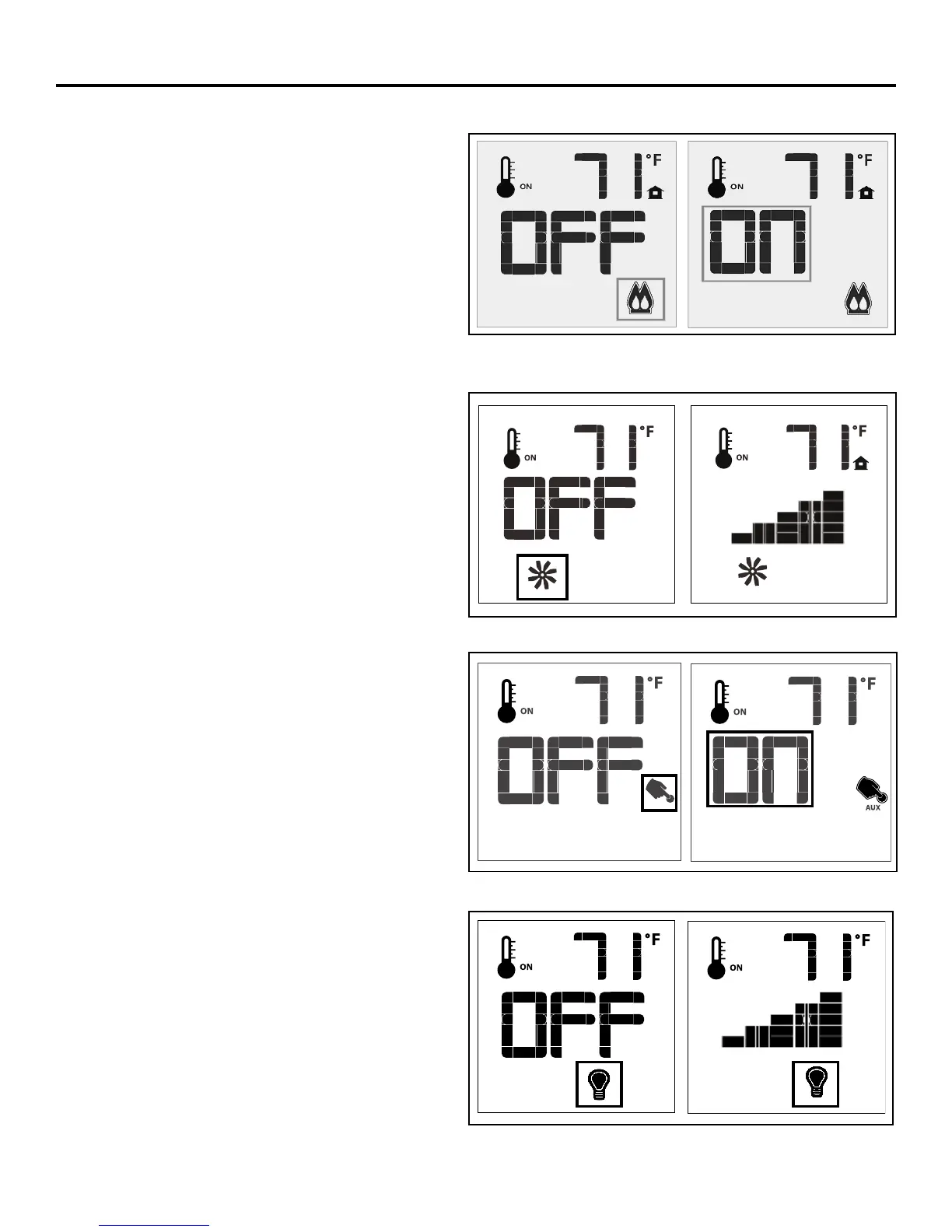
Split Flow Operation
The split ow operation on the Berkeley turns off the
front section of the burner, greatly reducing the heat
output of the unit. If you’d like to have the replace on
but would not like to have as much heat in the room,
you can turn off this function. Press the Mode key of
your remote repeatedly until the double ame icon is
lit up (refer to Figure 13). By pressing the up or down
key, turn the rear split valve to “on” or “off”. The front
ame on the burner will turn on and off. This does
not affect the ame setting of the remaining ame.
Turning off the front section of this burner may result
in an extinguishing “pop”, particularly if your replace
is operating on propane gas, this is normal.
Figure 13: Split Flow Control
Figure 15: Auxiliary Control (not used)
Figure 16: Dimmer Control (not used)
Dimmer Control
This function is not used on the Berkeley and can be
disregarded.


 To Next Page