6. IMPORTANT NOTICE OF CANopen
- The default bitrate is 125 kbps.
- In order to enable the EPC DC/DC Converter, CANopen device must be in operational
state and object 0x6200:02 must be switched ON (value 0xFD).
- Current values are shown in mA, voltage values in mV, time values in ms and power
values in W.
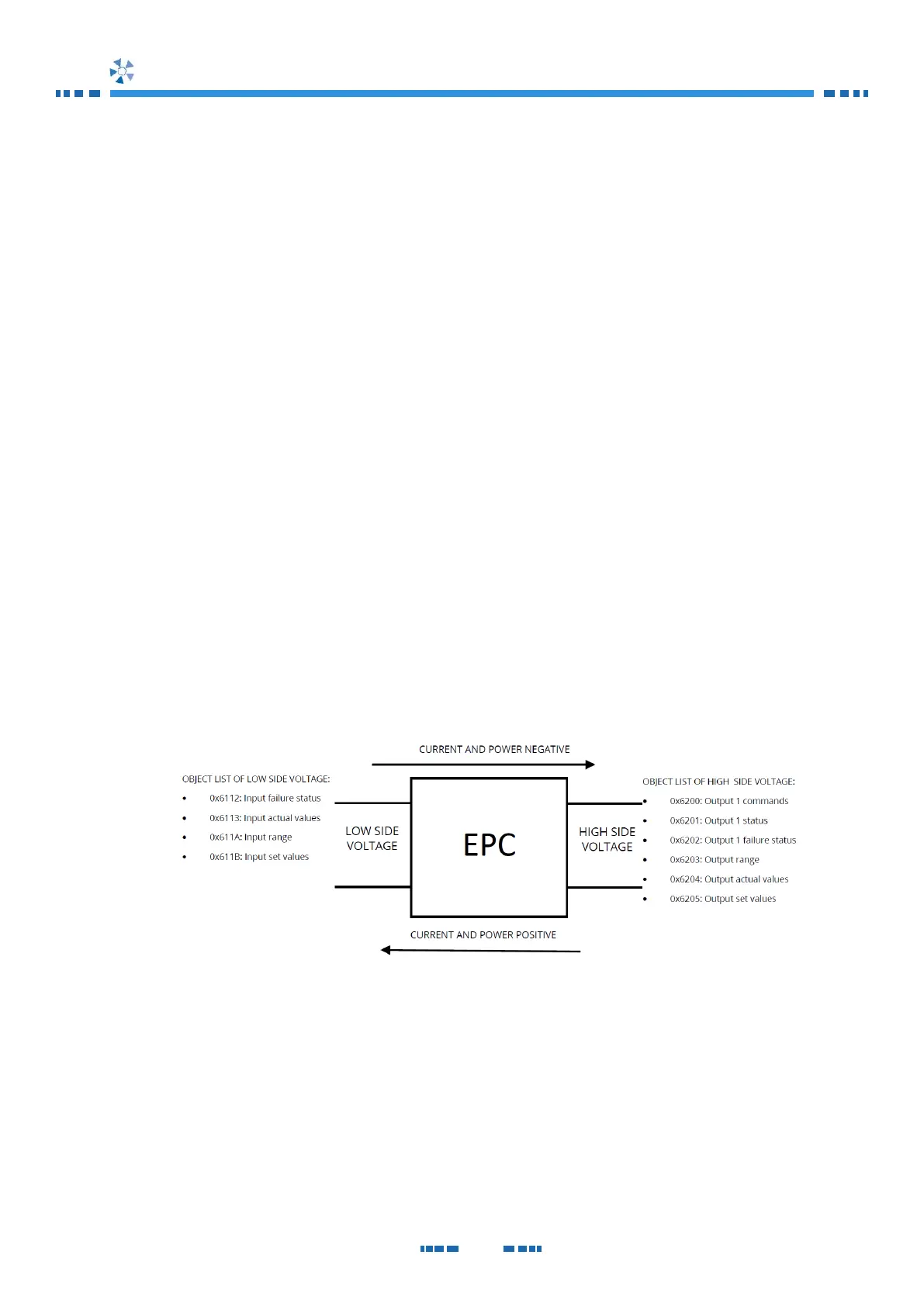
- Input objects show information of low side voltage connector.
- Output objects show information of high side voltage connector.
- In control mode, just one target value can be nonzero (i.e., if high side current is
desired to be controlled, low side current and high side power must be zero
commanded).
- Positive current is defined as charging current (energy goes from HVDC to LVDC
side). Negative current is defined as discharging current (energy goes from LVDC to
HVDC side).
- In case of an EPC error, the CAN - CANopen interface will send an error message to
the CANopen bus and change to pre-operational state. It is mandatory reset the
error before enabling the EPC again.
- TPDO is transmitted if one of the mapped objects changes its value.
Fig. 10 Struct of CANopen index
7. IMPORTANT OBJECTS OF CANopen
EDS file of this product is defined according to CiA 453. For more information, please
check EDS file of CAN - CANopen interface and CiA 453 specifications.
The most important objects of the EDS file are explained in this document.


 To Next Page