ESC/VP21 Commands
You can monitor and control the projector from a computer via USB.
Connect the device and the projector with a USB cable, and then enter the
communication commands (ESC/VP21 commands).
Before starting
To control and monitor the projector using ESC/VP21 commands, the
following preparations must be carried out.
a
Install the USB communication driver (EPSON USB-COM Driver) to
your computer. For information about the EPSON USB-COM Driver,
contact your local dealer or the nearest address provided in the
Epson Projector Contact List.
s Epson Projector Contact List
b
Set USB Type B to Link 21L from the projector's Configuration
menu.
s Extended - USB Type B p.74
c
Set Link 21L to On.
s
Extended - Link 21L p.74
d
Connect the computer's USB port to the projector's USB (Type B)
port with a USB cable.
Start from step 2 from the second time.
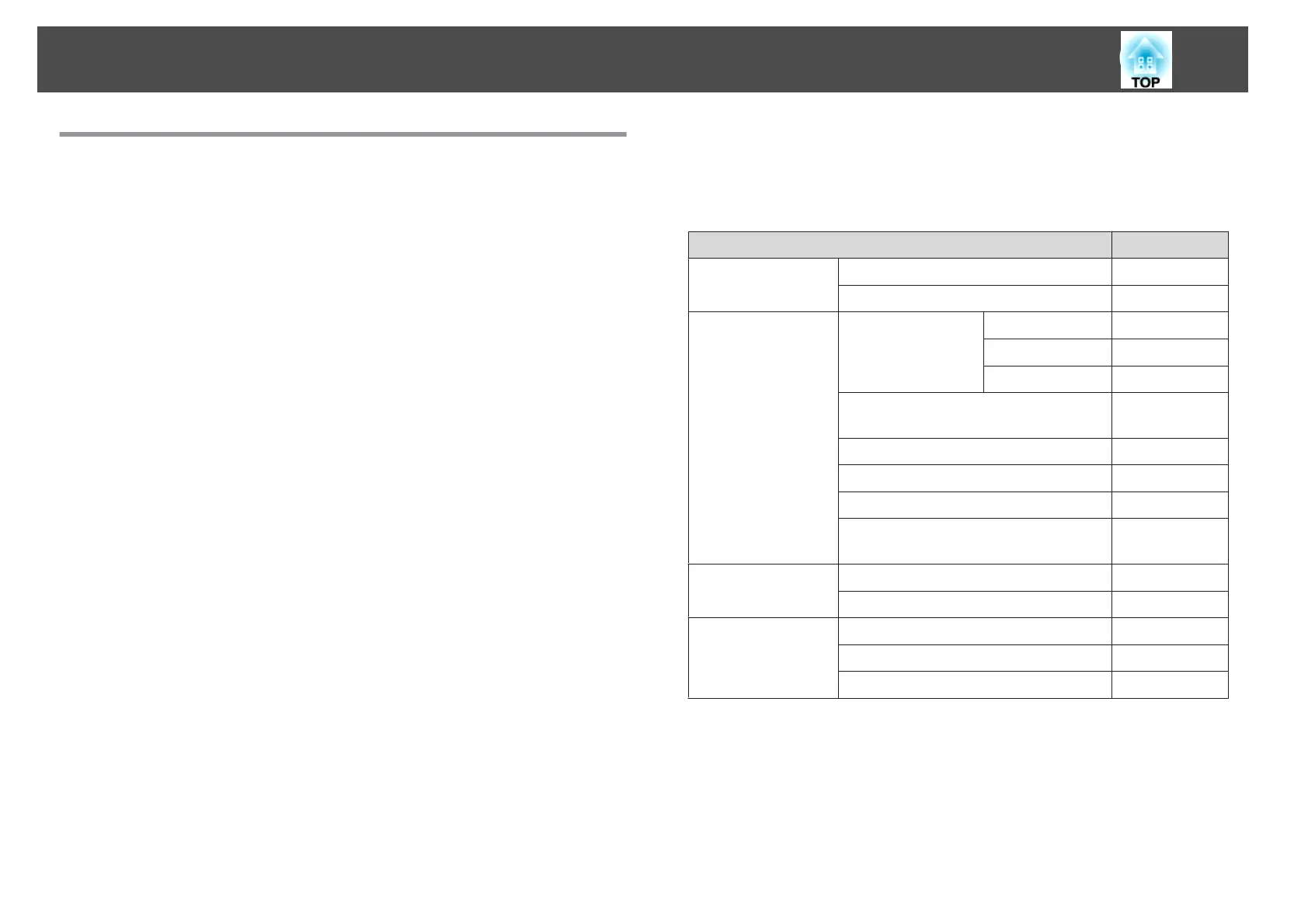
Command list
When the power ON command is transmitted to the projector, the power
turns on and it enters warm-up mode. When the projector's power has
turned on, a colon ":" (3Ah) is returned.
When a command is input, the projector executes the command and
returns a ":", and then accepts the next command.
If the command being processed terminates abnormally, an error message is
output and a ":" is returned.
Item Command
Power ON/OFF On PWR ON
Off PWR OFF
Signal selection Computer Auto SOURCE 1F
RGB SOURCE 11
Component SOURCE 14
HDMI (EB-1775W/EB-1770W/
EB-1760W only)
SOURCE 30
Video SOURCE 41
USB Display SOURCE 51
USB SOURCE 52
LAN (EB-1775W/EB-1770W/EB-1760W
only)
SOURCE 53
A/V Mute On/Off On MUTE ON
Off MUTE OFF
A/V Mute selection Black MSEL 00
Blue MSEL 01
Logo MSEL 02
Add a Carriage Return (CR) code (0Dh) to the end of each command and
transmit.
Communications protocol
• Default baud rate setting: 9600 bps
• Data length: 8 bit
• Parity: None
Monitoring and Controlling (EB-1775W/EB-1770W/EB-1760W Only)
114


 To Next Page