SpiroSphere
®
ECG Instructions for Use
Page 16/136
Version 02.02 • 04AUG2022
Prior to the rst use, a system setup needs to be performed.
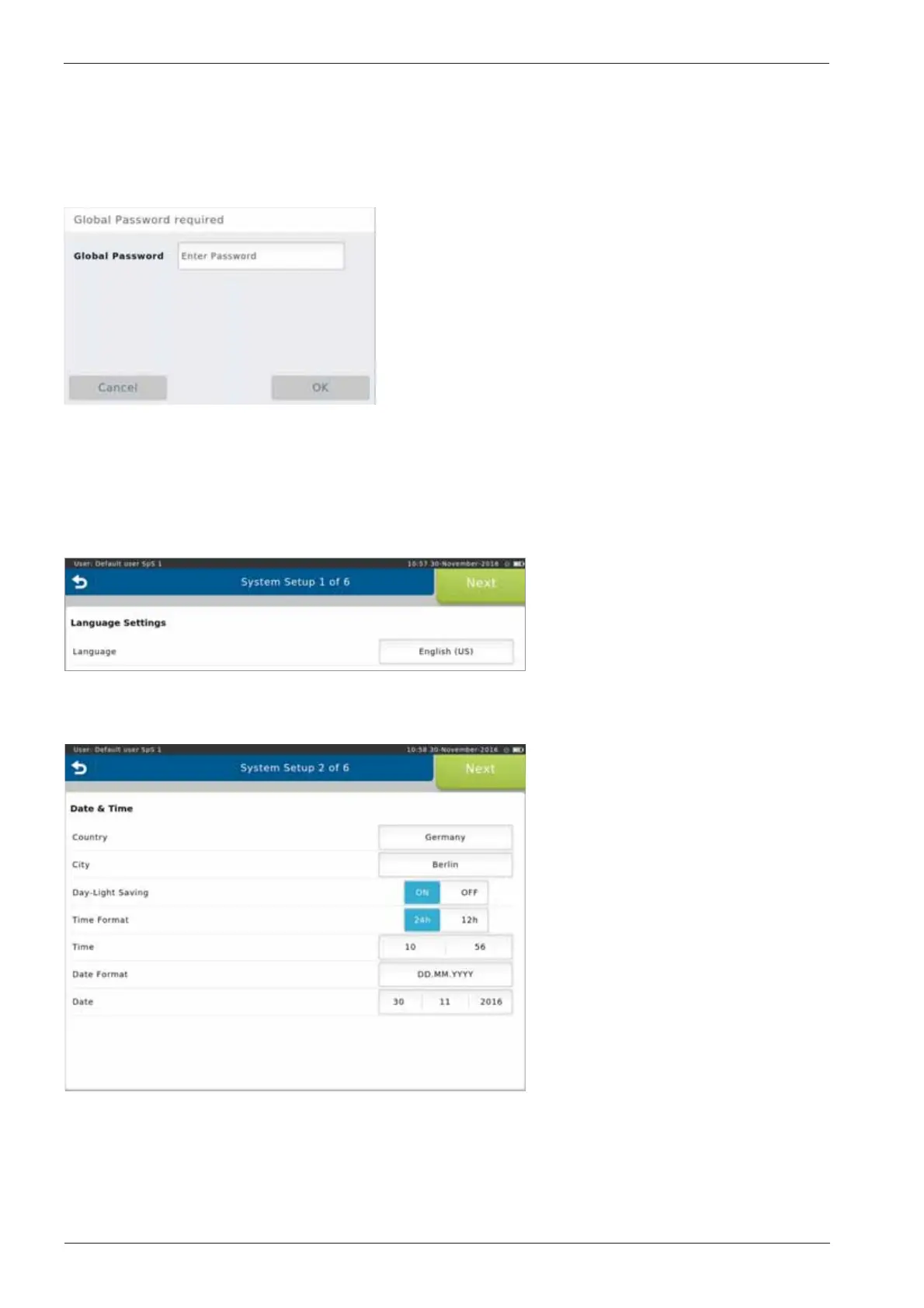
After switching on the SpiroSphere for the rst time, following screen appears:
Enter the Global Password and
press <OK>. (The preset global
password is "691982".)
The System Setup wizard starts automatically.
1. Language Settings
Select the appropriate language
and conrm with <Next>.
(Refer to chapter "Settings &
Tools >Regional")
2. Date & Time Settings
Select the appropriate settings
and conrm with <Next>.
(Refer to chapter "Settings &
Tools >Timezone Date & Time")
Follow the system setup steps (step 1 - 6) and enter or select the appropriate settings. Tap on
<Next> to conrm the respective settings and to continue with the next step.
Setup


 To Next Page