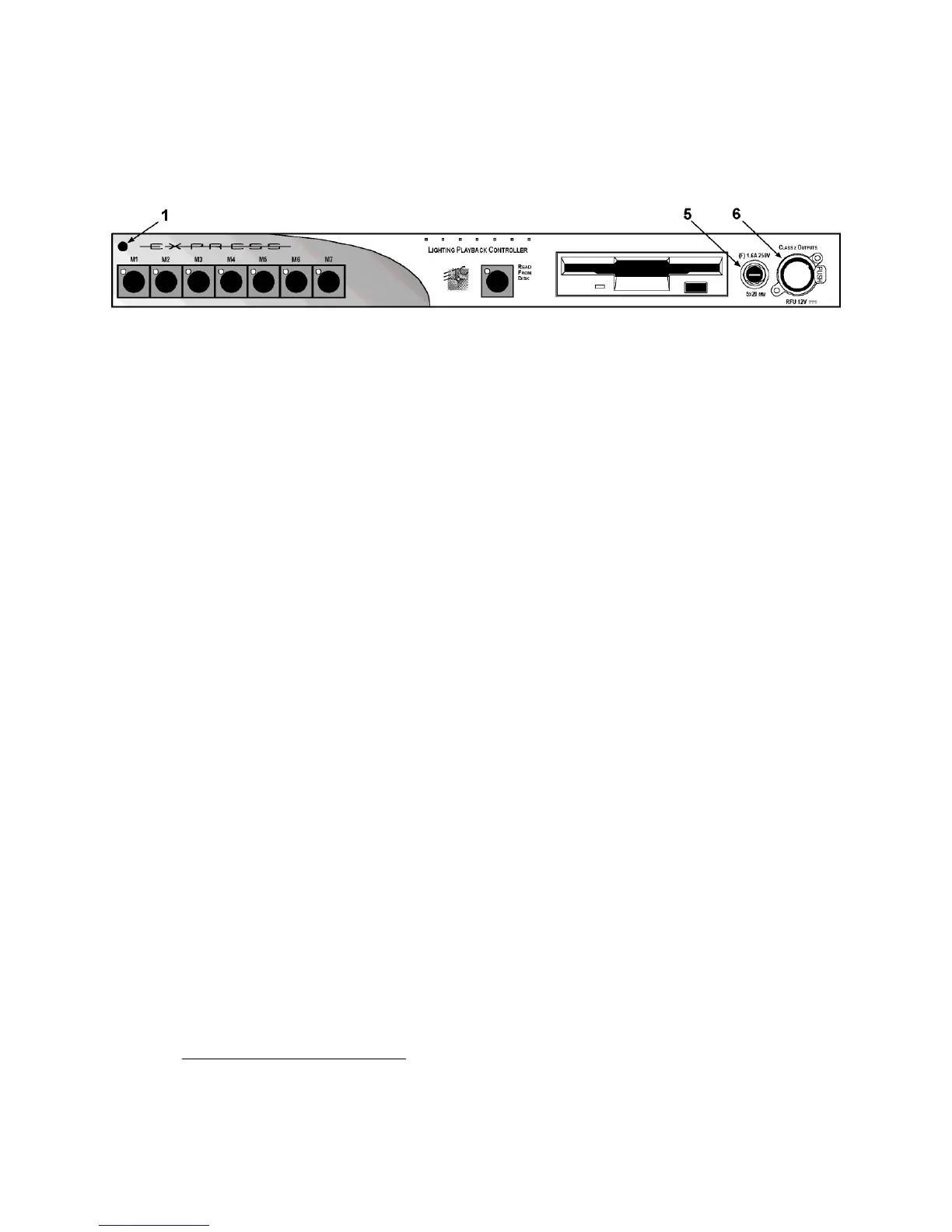
6 Front panel
Front panel
The LPC’s front panel is shown in the illustration below. The numbers are
keyed to the explanations of features below.
Features
The features of the LPC front panel are, from left to right:
1. The power-on indicator glows when the LPC is powered on.
2. Seven macro control buttons. Use these to control the LPC and the
show.
3. Read From Disk button. Use this to read the show into the LPC.
4. Disk drive.
5. The fuse holder protects the LPC from an excessive power drain by
the RFU, if attached.
6. RFU connector.
Producing shows for the Express LPC
Shows that run in the Express LPC may be produced in a couple of ways.
One way is to develop the show in an ETC console that runs the same
version of software as the LPC, such as an Express, Expression or Insight
console. If the show is created in a console that has features not available
in the LPC, such as a higher channel or dimmer count, the LPC responds
only within the limits of its capabilities and ignores everything else.
Another way to create a show for an Express LPC with ETC’s console
emulator, Expression Off-Line, which runs on a pc-type computer. With
Expression Off-Line you can produce a complete show that is tailored
exactly for your particular LPC model.
2
2.
See Expression Off-Line, page 13, for information about using Off-Line to create
or edit LPC showfiles.













 To Next Page