Express LPC QuickGuide, v.3.1 5
Cabling
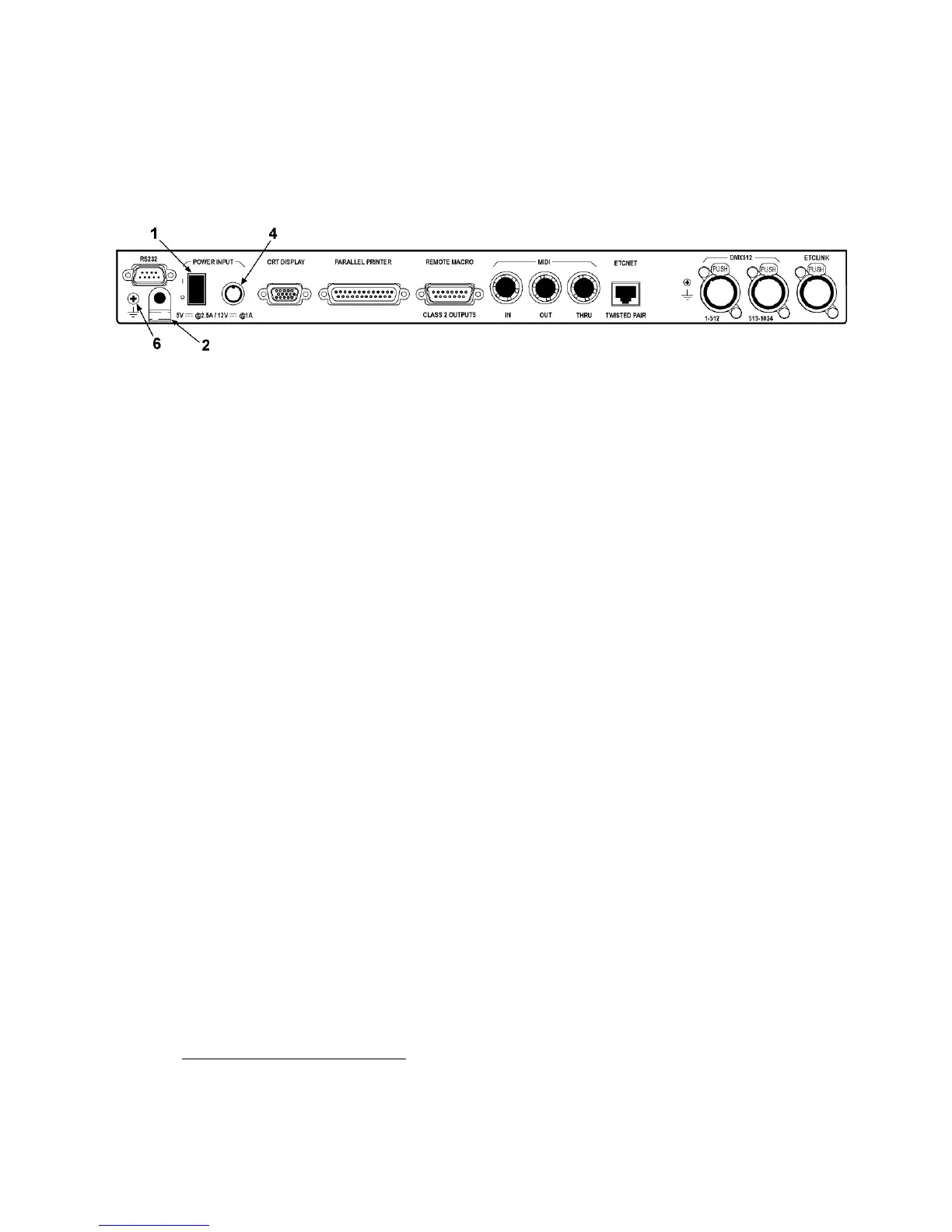
All connections to the LPC, except for the optional RFU, are made to the
LPC’s rear panel. The numbers in the figure refer to items under Power
Supply, below.
Power supply
1. Push the LPC’s power switch to the off position (“O” symbol).
2. Remove the thumb screw to free the cable clamp from the rear panel.
3. The power supply has a cable attached to it. Clip the cable clamp over
the cable near the 8-pin male connector.
4. Plug the connector into the LPC rear panel receptacle.
5. Adjust the cable clamp so that you can re-attach it to the LPC.
6. Plug one end of the furnished power cord into the power supply and
the other end into a grounded power outlet.
1
Dimmers
Connect the dimmers as explained in the installation sections of your
Express User Manual (Appendix A).
Accessories
If you are using a monitor, a Remote Focus Unit, a printer, ETCNet, MIDI
or remote macros with your LPC, or if your show performs remote
triggering, connect and install as explained in the installation sections of
your Express User Manual (Appendix A).
1.
The chassis may also be grounded, if needed, by placing a ground wire under this
Phillips-head screw.













 To Next Page