APOLLO user manual
Issue G
78
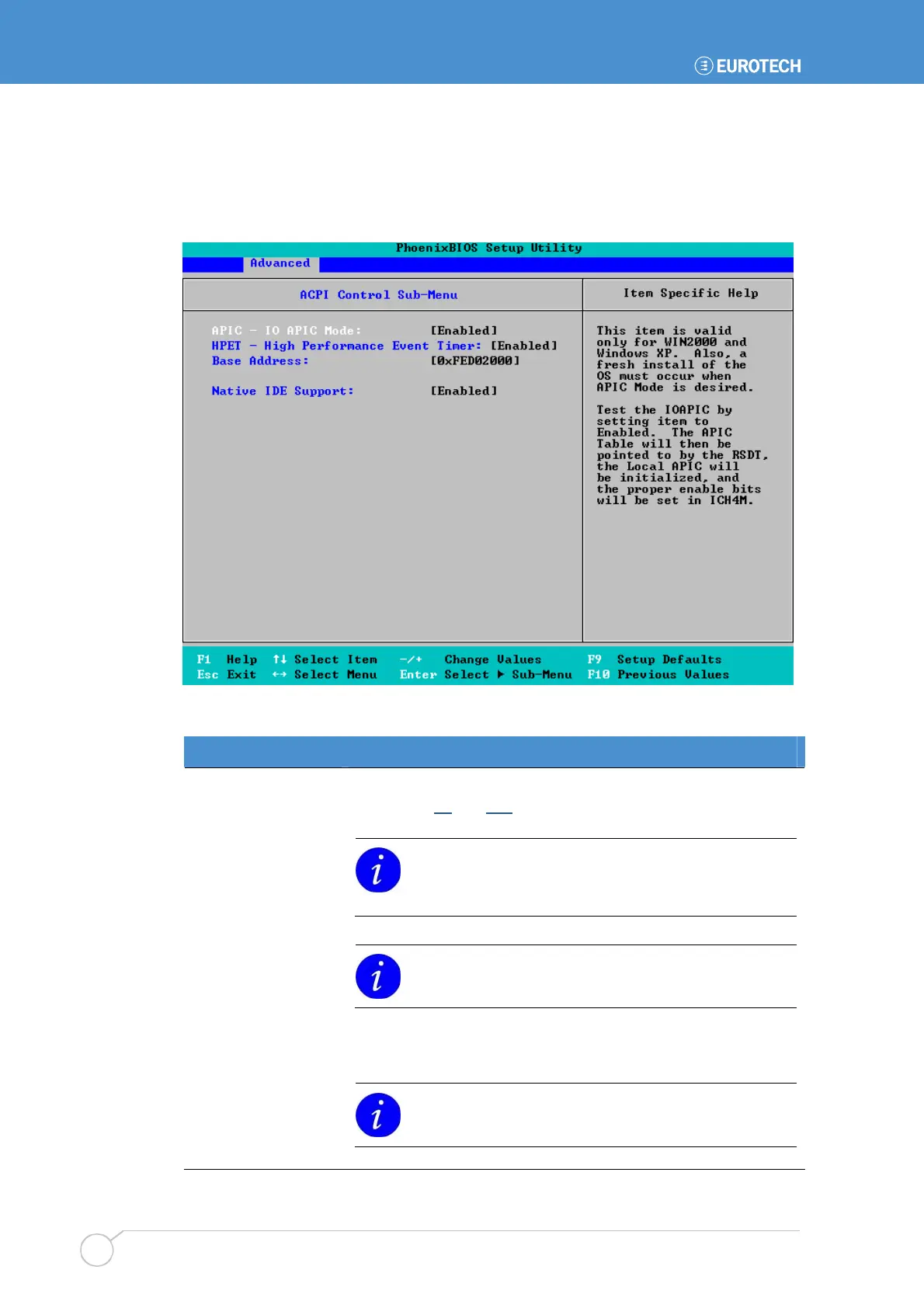
ACPI control settings
You can control ACPI (Advanced Configuration and Power Interface) settings. To do this,
highlight ACPI Control Sub-Menu in the Advanced menu and press Enter. The following
screen is displayed:
The details you are prompted to specify are explained in the following table:
Field Explanation
APIC - IO APIC Mode
Choose Enabled to set the APIC interrupt mode.
See pages 98
and 125 for further information about the APIC
Advanced Interrupt Controller.
This is only valid in Windows XP and Windows 2000.
You must re-install the operating system if you want to
change to APIC mode.
HPET - High
Performance Event
Timer
Choose Enabled to test the High Performance Event Timer (HPET).
This is only valid in Windows XP.
Base Address
Specify the base address for the HPET.
Native IDE Support
Select Enabled if you want to include Native IDE support for
Windows XP. If you do this, the NATA package is created.
This setting has no effect in Win98, WinME or
Win2000.



 To Next Page