38
39
2
4 53
876
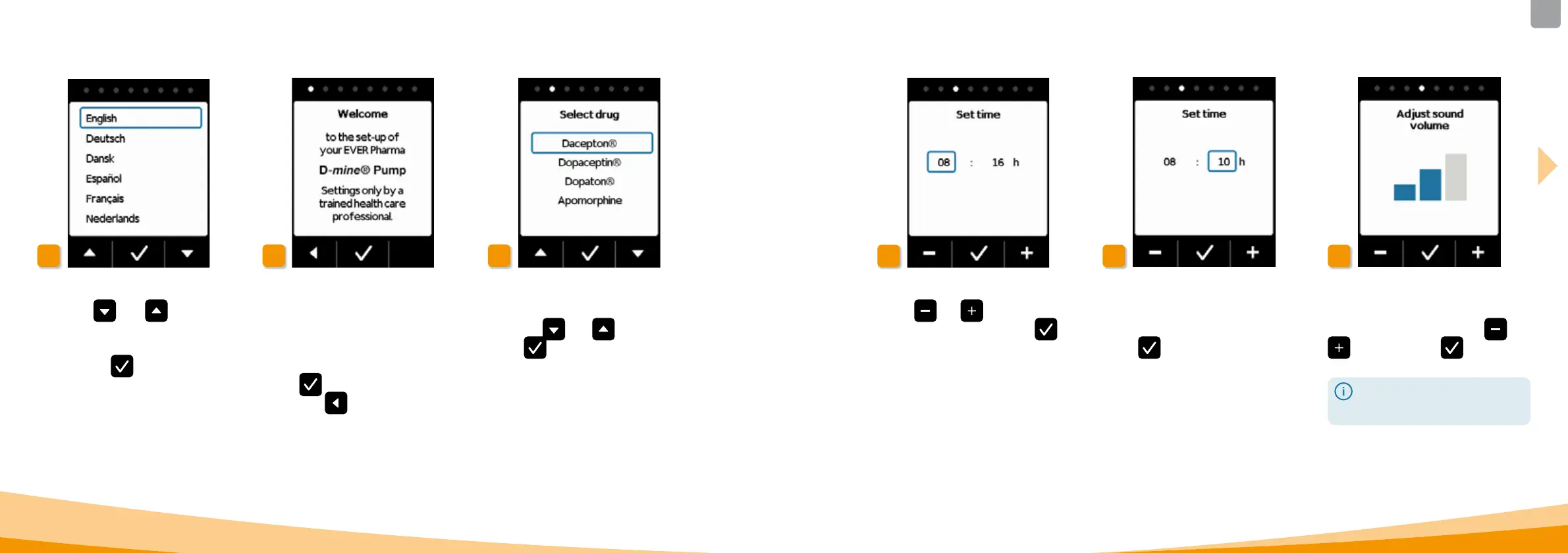
Setting the drug
Select the name of the drug
using the
and buttons, then
press
.
The selected name is
always displayed on the main screen.
Setting the hour
Press
or until the current
hour is displayed, then press
.
Setting the minutes
Repeat the process above until the
current minutes are displayed.
Press
when the minute value is
correct.
Adjust sound volume
You can set the desired sound volume
of the audible alerts with the
and
buttons. Press to save the
setting.
This setting only aects audible
alerts. This does not change the
alarms.
Setting the language
Press the
and buttons until
the desired language has a blue frame
around it.
Then press
. All texts on the
screen of the pump are now displayed
in the selected language.
Start the settings process
The pump guides you through the
settings step by step. You can follow
the progress by observing the points
displayed in the navigation field.
Press
to navigate to the next
step. Press
to return to language
selection.



 To Next Page