46
47
3
1 2 3
4
5
6
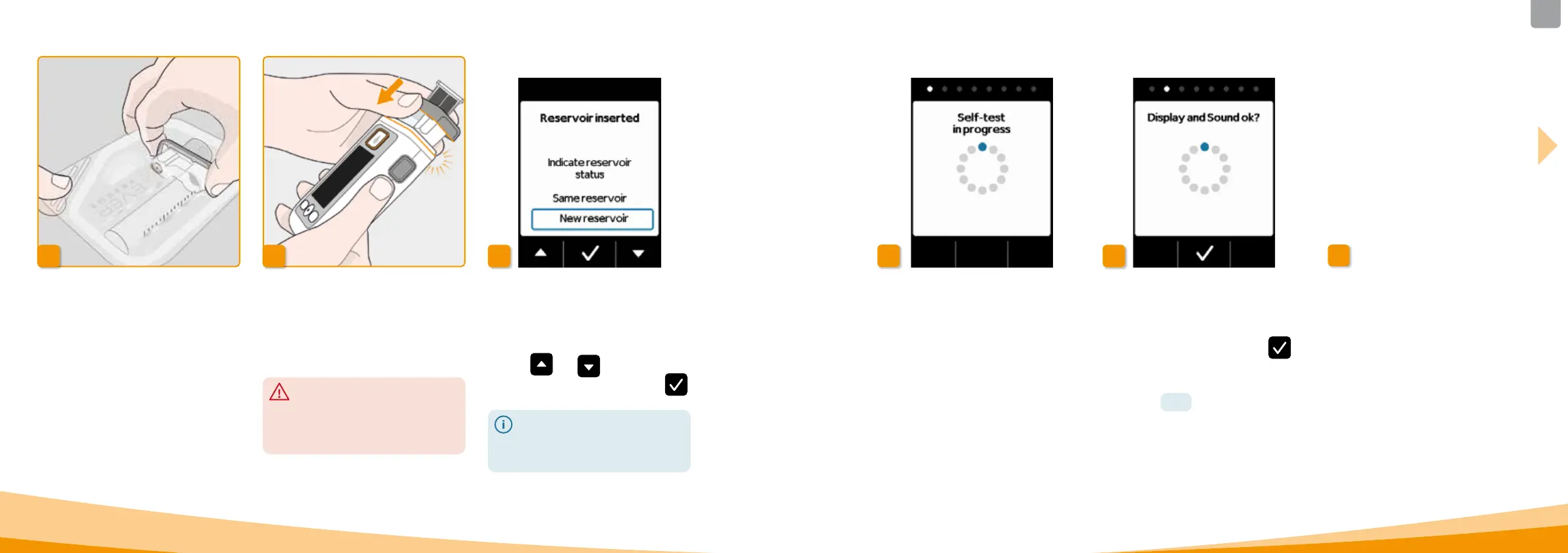
Attach the reservoir to the pump
Insert the reservoir into the opening
on the pump as shown. The reservoir
will snap into place with an audible
click.
Do not touch the interior of
the adapter when inserting the
reservoir.
Risk of injury and risk of loss of
sterility.
Preparing a new reservoir
Wash your hands thoroughly
before working with sterile parts.
Check to ensure that the packaging is
not damaged and that the date on the
package has not expired.
Remove the reservoir from the sterile
packaging.
Selecting the reservoir
The pump detects that a reservoir has
been inserted, but not whether the
reservoir is empty.
Use the
and buttons to select
"New reservoir" and confirm with
.
Selecting "Same reservoir" will
return you to the main menu.
"Same reservoir" is not displayed
when the reservoir is first inserted.
Confirming the self‑test
The self‑test is complete. Did you hear
the two acoustic signals? If so, confirm
the completion of the test with
.
If you did not hear any acoustic signals
or only one acoustic signal,
then proceed
to Section
7.6 "Troubleshooting".
Prepare vial
Take a new drug vial. Check to ensure
that the vial contains your prescribed
medication and that the date on the
vial has not expired.
Self‑test of the pump
The pump performs a self‑test. Here,
the electronic system on the device is
checked to ensure that it is functioning
properly. This includes the acoustic
signals. Therefore, pay attention
d
uring the test to determine whe
ther
you can hear two short acoustic
signals.



 To Next Page