37
Component Identification and Explanation
Weld Cycle and Graph Line Details
The pictures used in this manual are for illustrative purposes only and may
not represent every single combination or possibility of adjustment that
exists. They are designed to establish basic principles of operation and
setup for the user to follow. Any values portrayed in the artwork are not to
be considered recommended settings or even default settings of the unit.
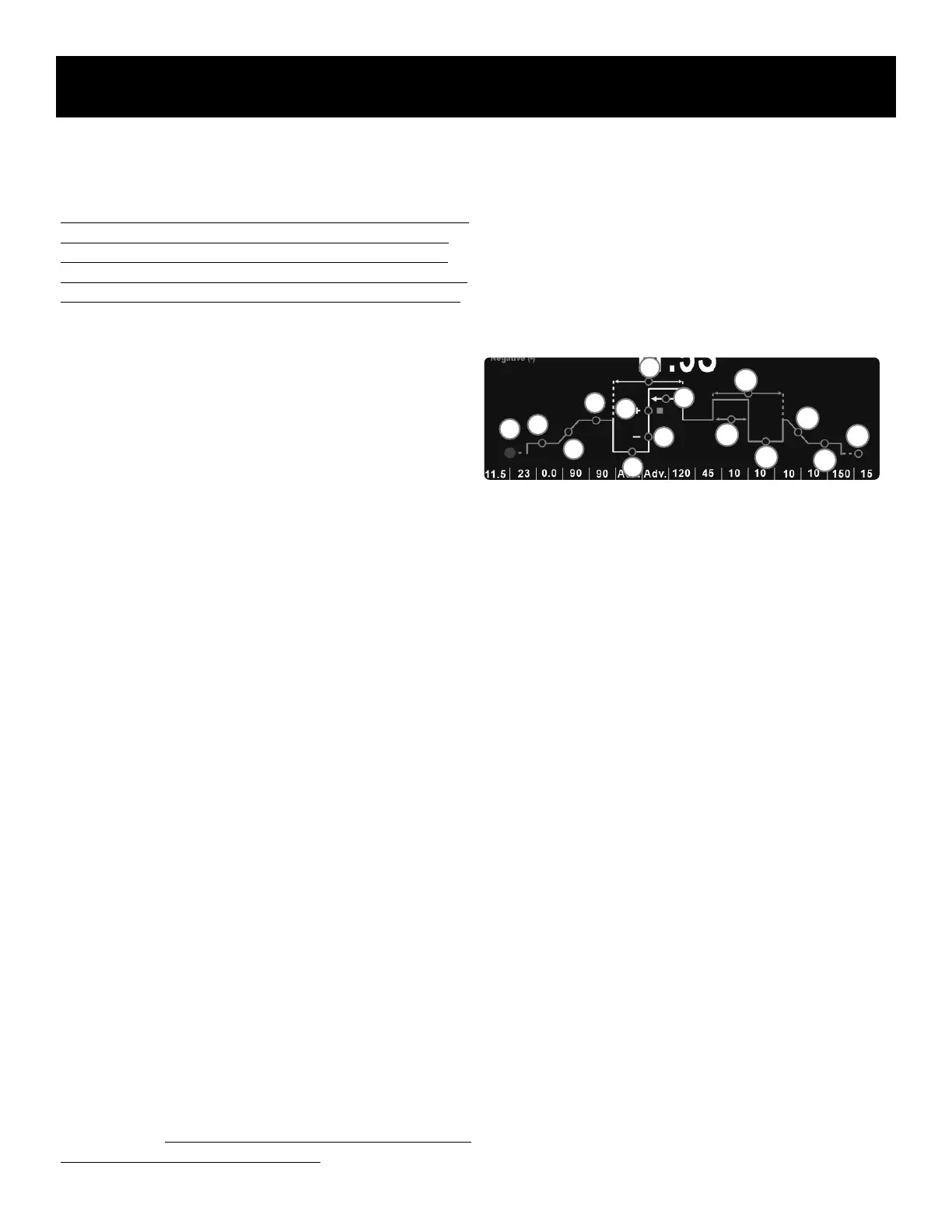
UNDERSTANDING THE GRAPH LINE OF THE TIG WELD CYCLE.
The graphed line of the Weld Cycle on the screen is designed to give the
user a simplied visual representation of the weld cycle from the beginning
of gas pre-flow phase, through to the welding phase on through to the
end arc termination and post flow phases. It’s designed to aid the user in
understanding each weld function and the impact it has on the weld cycle.
To help delineate certain additional parameters, the graph line is color
coded. Common parameters found in all modes trace the green portion of
the graph line. All AC welding parameters are highlighted in the yellow
portion of the graph line. Pulse parameters are highlighted in the blue
portion of the graph line. When not used, both AC and Pulse parameters
are eliminated from the graph line, leaving only the pure DC graph line.
Each adjustable parameter is represented by an open circle somewhere
along the graph line. The exact location of the circle on the graph line
represents its place and role in the weld cycle. However, some parameters
such as the Independent AC half-wave form control, have an indirect role
on the weld cycle. These are placed on the graph in a location that most is
most closely associated with the role of the parameter. When the selector
knob is turned, the circle representing the corresponding Parameter Line
parameter will turn red. When a parameter is selected for adjustment, by
pushing the adjustment knob, the red circle will enlarge to conrm selec-
tion.
When different functions are selected or turned on, the graph will expand
and contract, based on what functions and parameter settings are selected.
In some cases when a function is selected, such as “Live Lift” or the status
of a function is changed, the circle on the graph line parameter represent-
ing a major parameter of the graph line will not disappear, but correspond-
ing parameter selection on the parameter line will be grayed-out and disa-
bled for adjustment. This simply means that the parameters is either preset
by the machine, or the nature of the function selected makes the adjust-
ment of specic parameter unnecessary or moot. A clear example of this
would be if the pedal mode is selected using the “Remote” function. The
functions of “Up-Slope Timer” and “Down-Slope Timer” are still valid as-
pects of the weld cycle, but instead of being set and controlled automati-
cally on the screen of the welder, the operator is control of it manually
through the up and down operation of the pedal.
When selecting the Standard or AC Advanced Pulse function for use, a
new blue graph line will be inserted into the Weld Cycle Graph Line to
represent the added parameters that are needed to be able to adjust the to
pulse parameters. It should be noted that AC and DC Pulse portions of the
graph line are slightly different from each other.
AC TIG Graph Line:
The graph line of the AC TIG weld cycle in this example is shown in the
most expanded form with all features displayed except Spot Timer. (The
Spot Timer Weld Graph Line changes the graph line drastically. The Spot
weld graph line is covered separately.) The actual graph line will change
depending upon what functions and settings are selected. However, the
operation and order of the basic weld cycle remains unchanged.
See the AC TIG graph line information and notations below:
(In logical weld cycle order, from left to right priority, then up and down.)
1. Pre-Flow Timer. Value is in Seconds.
2. Start Amps. Value is in Amps.
3. Up-Slope Timer. Value is in Seconds.
4. Welding Amps/ Electrode Positive. This is the home location the
welder defaults after 5 seconds of inactivity or while welding, unless
“Independent Amplitude” is selected. When “Independent Amplitude”
is selected and turned on, this becomes the Electrode Positive (EP+ )
percentage setting and the home location defaults to Electrode Nega-
tive (EN-) setting. This parameter location also serves as the high
Amperage portion (also known as the Peak Amperage) of the Pulse
cycle when the “Pulse” Function is turned “On.”
5. Electrode Negative. This parameter only appears when “Independent
Amplitude” is selected and turned on, this becomes the Electrode
Negative location. Once “Independent Amplitude” is selected, this
becomes the home location of the welder settings since it allows
direct adjustment of Amps. When Independent Amplitude is deselect-
ed, this circle disappears.
6. Electrode Negative Wave Form. This has no value assigned to it, only
shapes representing Adv. Square (square), Soft Square (rounded
square), Sine (rounded, upside down U), Trapezoid (blunt triangle)
and Trianglar (Triangle).
7. Electrode Positive Wave Form. This has no value assigned to it, only
shapes representing Adv. Square (square), Soft Square (rounded
square), Sine (rounded, upside down U), Trapezoid (blunt triangle)
and Triangular (Triangle).
8. AC Frequency. Value is in Hertz (Hz).
9. AC Balance. Value is in Percent of Electrode Positive (% of EP+).
10. Pulse Time On. This appears only when Pulse is selected. Value is in
percent of Welding Amps (or EN-) versus Pulse Amps.
1
2
3
4
5
6
7
8
10
9
11
12
13
14
15


 To Next Page