47
The Stick welding mode uses a different layout of the menu screen, with
different functions and parameters than TIG. The most notable difference
between AC and DC Stick welding is the polarity recommendation. AC,
because of the way it references electrode positive when adjusting the AC
balance, will require the Electrode Hodler to be located in the negative
terminal for the settings to be correct.
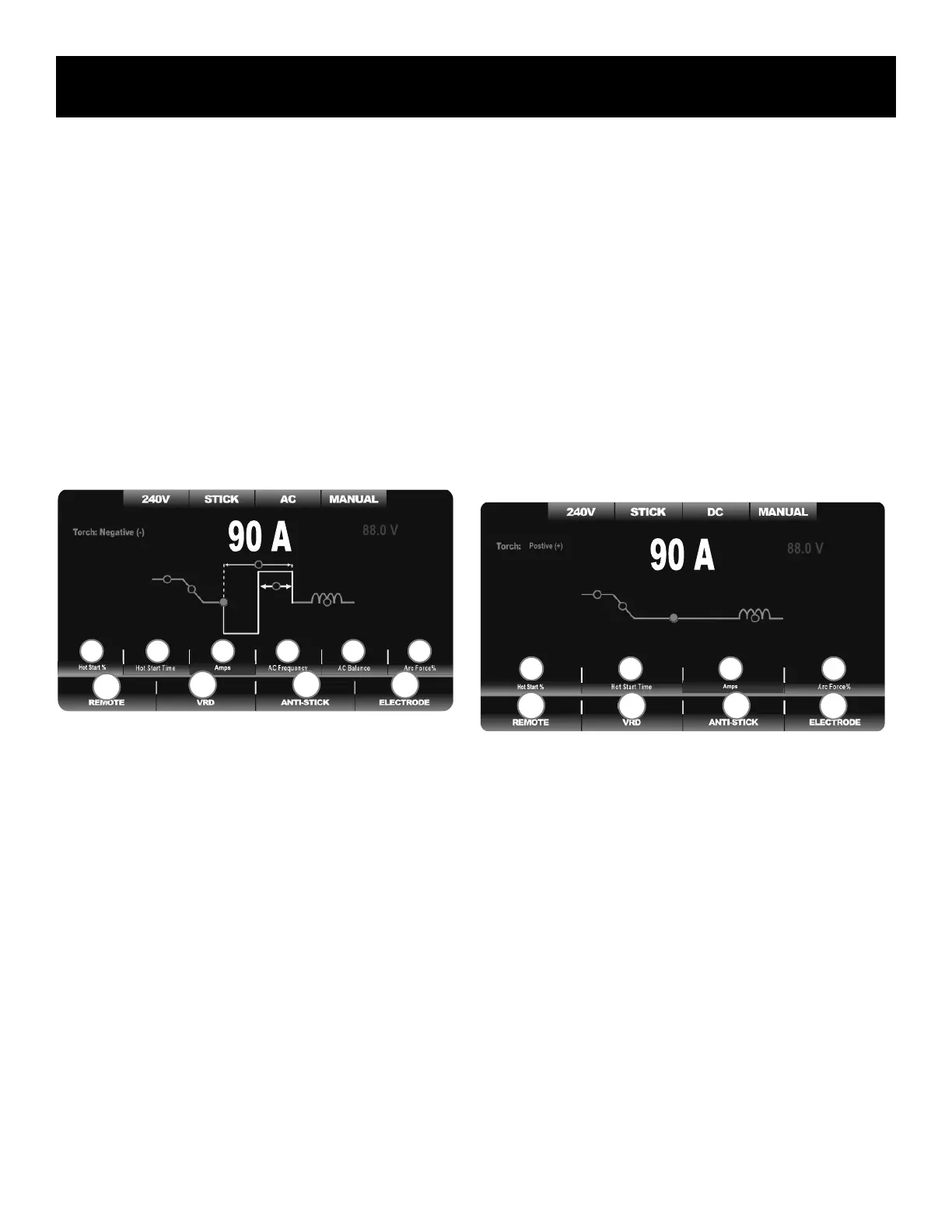
AC STICK MENU:
• USE ELECTRODE NEGATIVE
• SOME ELECTRODES MAY NOT BE ALLOWED
• ADJUSTABLE AC FREQUENCY
• ADJUSTABLE AC BALANCE
• USE WITH E6011, E6013 AND E7018
Parameters and functions are listed in order, from left to right.
AC Stick Parameters:
Hot Start Amperage Percent: 0-100% over set amperage. The Hot
Start increases amperage upon arc striking to eliminate electrode
sticking. This is also referred to as Hot Start Intensity.
Hot Start Time: 0-2.0 Seconds. The Hot Start Time controls the dura-
tion of the Hot Start Activity.
Amps: 10-275A. This is the main amperage adjustment. Output is
capped on 120V to 100A.
AC Frequency: 20-400Hz. Increase frequency for tighter arc perfor-
mance. Lower frequency for wetter AC puddle.
AC Balance: 5-70%.
Arc Force. 0-100% over set amperage. This helps to maintain con-
stant arc and provide a steady welding wattage as voltage drops due
to short arc length. This is also referred to as “dig” or “inductance.”
AC Stick Functions:
1. Remote: Off or ON. This unit can operate with a remote Amperage
control when the Remote is set to On. For normal welding keep set-
ting to “OFF.” The foot pedal can be used in Stick mode. But in the
future there may be more options for remote Amperage control. Con-
tact Everlast for more options.
2. Voltage Reduction Device (VRD): Less than 24V. This function reduc-
es the OCV to below 24V when required for safety. May make arc
starting more difcult.
3. Anti-Stick: Off or On. This function when turned on helps to ease rod
removal by reducing output when the rod sticks.
4. Electrode Selector. Select from rod choices: E6011, E6013 and
E7018. May need to use E7018 AC rods for best results with E7018.
DC STICK MENU:
• USE ELECTRODE POSITIVE
• USE WITH E6010, E6011, E6013 E7018, E308/309
Parameters and functions are listed in order, from left to right.
DC Stick Parameters:
Hot Start Amperage Percent: 0-100% over set amperage. The Hot
Start increases amperage upon arc striking to eliminate electrode
sticking. This is also referred to as “Hot Start Intensity.”
Hot Start Time: 0-2.0 Seconds. The Hot Start Time controls the dura-
tion of the Hot Start Activity.
Amps: 10-275A. This is the main amperage adjustment. Output is
capped on 120V to 100A.
Arc Force. 0-100% over set amperage. This helps to maintain con-
stant arc and provide a steady welding wattage as voltage drops due
to short arc length. This is also referred to as “dig” or “inductance.”
DC Stick Functions:
1. Remote: Off or ON. This unit can operate with a remote Amperage
control when the Remote is set to On. For normal welding keep set-
ting to “OFF.” The foot pedal can be used in Stick mode. But in the
future there may be more options for remote Amperage control. Con-
tact Everlast for more options.
Component Identification and Explanation
AC and DC Stick Screen Setup, Functions and Parameters
1 2 3 4
F2
F4
F1 F3
2 4 3
F2
F4
F3
F1
1 5 6


 To Next Page