44
Component Identification and Explanation
DC TIG Screen Setup, Functions and Parameters
For the following pages, keep in mind that while there is only one hidden
menu screen designed for adjusting functions that are not commonly
changed or used, the screen menu and graph line do alter the shape, size
and number of parameters and functions available for adjustment, based
off of the functions and process the user selects. Remember that the pa-
rameter values depicted on the sample screens do not indicate actual rec-
ommended settings or default values unless specically noted. The values
and settings are used as illustrative purposes only.
Detailed discussion of all the parameters and functions can be found in the
“Explanation of Functions, Parameters and Welding Terms“ in alphabeti-
cal order in the manual.
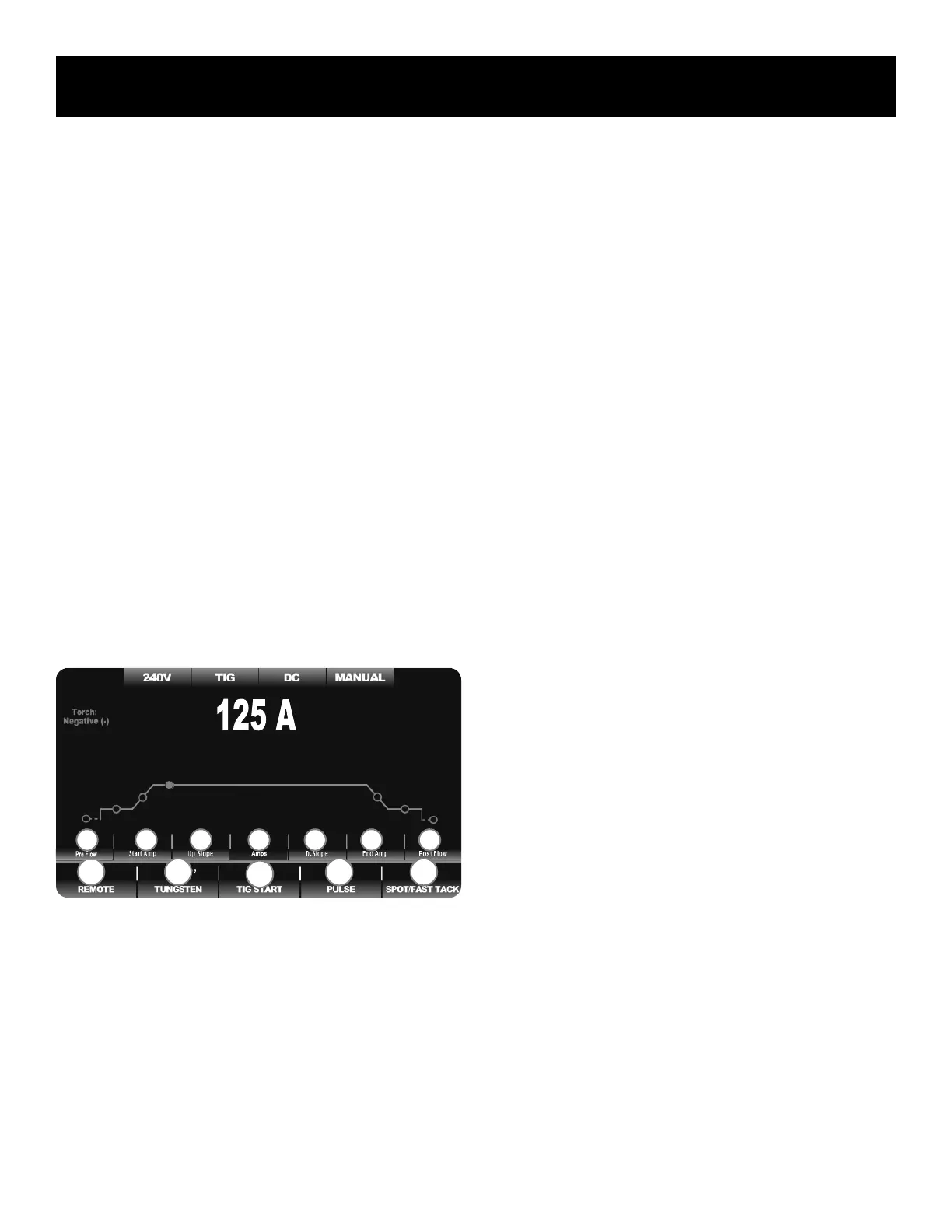
DC TIG BASIC MENU:
• WITHOUT PULSE
• NO SPOT/FAST-TACK
When the DC TIG process is selected, the menu screen closely resembles
the AC menu screen, except the AC functions are removed. The graph
and parameter lines and the appearance of the menu is contracted and
simplied. The graph line is all green. The options available for Pulse se-
lection are altered to allow the user to select different Pulse Wave form
shapes. Pulse Wave form shapes add nuanced levels of heat management
and arc performance. The Adv. AC pulse option is eliminated in lieu of
Pulse wave form shapes when operating in DC TIG mode.
Basic DC TIG Parameters:
In order of logical flow of the weld cycle from left to right.
1. Pre-Flow Time Setting: 0-30S. Available in all Remote Function Set-
tings. However, when TIG Start function is set to “Live Lift” it is not
available for adjustment.
2. Start Amps Value Setting: 2–330A. Available for adjustment in all
Remote Function settings. However when the Spot Function is select-
ed, it becomes unavailable for adjustment. Start Amps will be affected
by the selection of the Tungsten size. Select “Manual” setting of the
Tungsten function for lowest Amperage start capability.
3. Up-Slope Time Setting: 0-30S. Available in Remote Function Settings
except Foot Pedal Mode. When the Spot Function is selected, it be-
comes unavailable for adjustment.
4. Welding Amps Setting: 2-330A. This is the Amperage location for DC
TIG. It also serves as the Peak Current adjustment for Pulse.
5. Down Slope Timer Setting: 0-60S. Available for adjustment in all
Remote Function settings except Foot Pedal. Not available when Spot
Weld function is selected. Not available when Live Lift setting is se-
lected for the TIG Start Function.
6. End Amps Value Setting: 2-330A. Available in all Remote Function
settings except 4TS and Pedal. Not available when Spot Weld func-
tion is selected. Not available when the Live Lift setting is selected for
the TIG Start Function.
7. Post Flow Time Setting: 0-60S. Available in all Function Settings.
Basic DC TIG Functions:
In order of function numbers, from left to right.
1. Remote Operation Setting: Includes 2T, 4T, 2TS, 4TS, 2T plus Finger
(Special Torch Req.), 4T plus Finger (Special Torch Req.) and Pedal
modes. Remote selection becomes inactive when “Live Lift” is select-
ed. “Live Lift” creates a live tungsten and eliminates the need for
triggering to start and precludes the use of the foot pedal or remote
settings.
2. TIG Start Type: Includes HF Start, Lift Start with Remote Function, and
Live Lift. When the Spot Weld Function is selected, the TIG start
Type becomes unavailable for selection and HF is set as the default
due to the nature of Spot Welding.
3. Pulse Status Setting: Off, Adv. Square, Sine, Trapezoid, and Triangle.
The DC pulse uses selectable wave forms to affect the level of control
on the pulse Unavailable when the Spot Weld function is selected.
4. Spot/Fast-Tack Timer: Off, SPOT, Fast-Tack. When Spot or Fast-
Tack is selected, this function adds both Spot /Fast-Tack and Stitch
timer parameters to the graph line. The Remote Setting, Tig Start
Type and Pulse functions are not available for selection when it is set
to “On”. Use of this function overrides the remote and makes it una-
vailable for selection and will be grayed out. It will default to 2T oper-
ation. The foot pedal cannot be used.
DC TIG PULSE MENU:
• NO SPOT/FAST-TACK
• CHOOSE ADV. SQUARE, TRIANGULAR, TRAPEZOID, OR
SINE WAVE FORMS
When activated, the DC Pulse menu expands to include the Pulse related
parameters. There aren’t any changes in function that occur. However, the
“Spot/Fast-Tack” and “Pulse” functions are incompatible and they cannot
2 3 5 6
F1 F2
F4 F5
F3
7 1 4


 To Next Page