40
Component Identification and Explanation
AC TIG Screen Setup, Functions and Parameters
For the following pages, keep in mind that while there is only one hidden
menu screen designed for adjusting functions that are not commonly
changed or used, the screen menu and graph line do alter the shape, size
and number of parameters and functions available for adjustment, based
off of the functions and process the user selects. Remember that the pa-
rameter values depicted on the sample screens do not indicate actual rec-
ommended settings or default values unless specically noted. The values
and settings are used as illustrative purposes only.
Detailed discussion of all the parameters and functions can be found in the
“Explanation of Functions, Parameters and Welding Terms“ in alphabeti-
cal order in the manual.
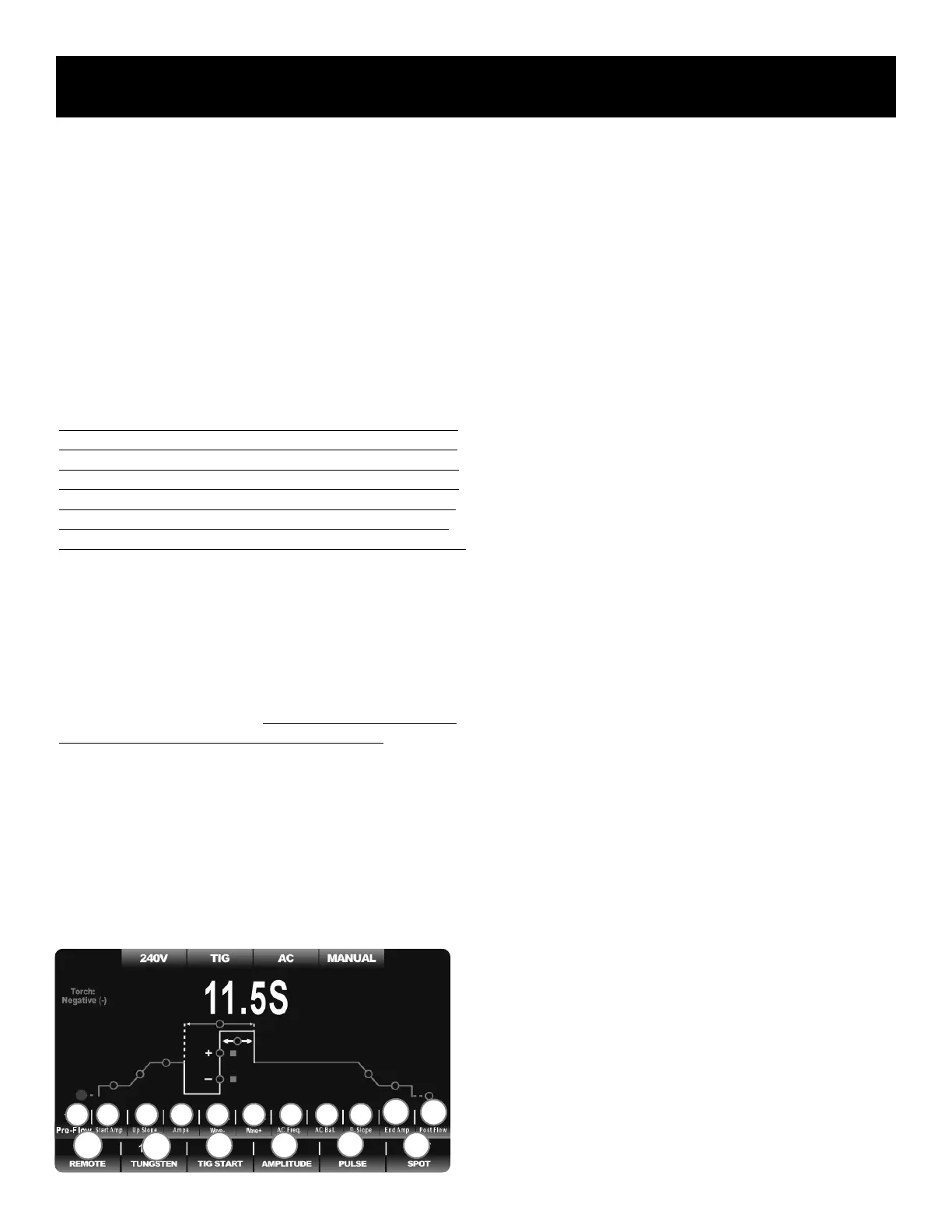
Notice in the example below that the Pre-Flow is selected for adjustment.
The font is slightly larger, the numeric value above “Pre-flow” is changed
to red, and the red colored circle on the graph line indicating Pre-Flow is
enlarged which indicates it is in the adjustment mode. As each parameter
is selected for adjustment the same thing will happen. Normally, the red
highlighted circle defaults to the relevant Amperage setting until adjust-
ments are made or after no adjustments or inputs are made for 5 seconds.
AC TIG BASIC MENU:
• NO INDEPENDENT AMPLITUDE
• NO PULSE
• NO SPOT
The AC TIG Screen menu depicted below represents the most basic AC
TIG menu available in Manual mode. It serves as the foundational screen
in AC TIG when functions are changed or turned on and off. As other func-
tions, such as Independent Amplitude or Spot Welder are selected, the
screen graphics will expand or contract as parameters are added or sub-
tracted, according to their relevance to the function selected. Turning on
the Spot Weld function will also remove or limit availability of other func-
tions and parameters due to the fact that these features are irrelevant to the
function of the Spot Weld function.
With the Pulse and Spot Weld functions set to “OFF” the following func-
tions and parameters will be available for selection and adjustment except
as noted.
Basic AC TIG Parameters:
(In order of logical flow of the weld cycle from left to right.)
1. Pre-Flow Time Setting: 0-30S. Available in all Remote Function Set-
tings. However, when TIG Start function is set to “Live Lift” it is not
available for adjustment.
2. Start Amps Value Setting: 3-330A. Available for adjustment in all
Remote Function settings. However when the Spot Function is select-
ed, it becomes unavailable for adjustment. The Start Amp minimum
will be affected by Tungsten size selection. For a lower Amperage
setting select the “Manual” status of the Tungsten Function.
3. Up-Slope Time Setting: 0-30S. Available in the Remote Function
Settings except Foot Pedal Mode. When the Spot Function is select-
ed, it becomes unavailable for adjustment.
4. Welding Amps Setting: 3-330A. Main default AC Amp setting for the
simple AC conguration. Also serves as Pulse Peak Amp Setting. See
section depicting AC with Amplitude turned on, and AC with Pulse
turned on for alternative function of the welding Amp setting.
5. Electrode Negative Wave Form Shape Setting. Select from Adv.
Square Wave, Soft Square Wave, Trapezoid Wave, Triangular Wave
and Sine Wave for the Electrode Negative (EN-) half of the AC cycle.
6. Split Electrode Positive Wave Form Shape Setting. Select from Adv.
Square Wave, Soft Square Wave, Trapezoid Wave, Triangular Wave
and Sine Wave for the Electrode Positive (EN+) half of the AC cycle.
7. AC Frequency (Hertz) Setting: 20-400Hz. Adjustable in all function
modes of AC TIG.
8. AC Balance Percent of Electrode Positive Setting: 5-70% of EP+.
Adjustable in all function modes of AC TIG.
9. Down Slope Timer Setting: 0-60S. Available for adjustment in all
Remote Function settings except Foot Pedal. Not available when Spot
Weld function is selected. Not available when Live Lift setting is se-
lected for the TIG Start Function.
10. End Amps Value Setting: 120V: 3-330A. Available in all Remote
Function settings except 4TS and Pedal. Not available when Spot
Weld function is selected. Not available when the Live Lift setting is
selected for the TIG Start Function.
11. Post Flow Time Setting: 0-60S. Available in all Function Settings.
Basic AC TIG Functions:
(In order of function numbers, from left to right.)
1. Remote Operation Setting: Includes 2T, 4T, 2TS, 4TS, 2T plus Finger
(Special Torch Req.), 4T plus Finger (Special Torch Req.) and Pedal
modes. Remote selection becomes inactive when “Live Lift” is select-
ed. “Live Lift” creates a live tungsten and eliminates the need for
triggering to start and precludes the use of the foot pedal or remote
11.5
1 2 3 4 5 6 7 8 9
10
11
F1
F2
F3 F4
F5
F6


 To Next Page