49
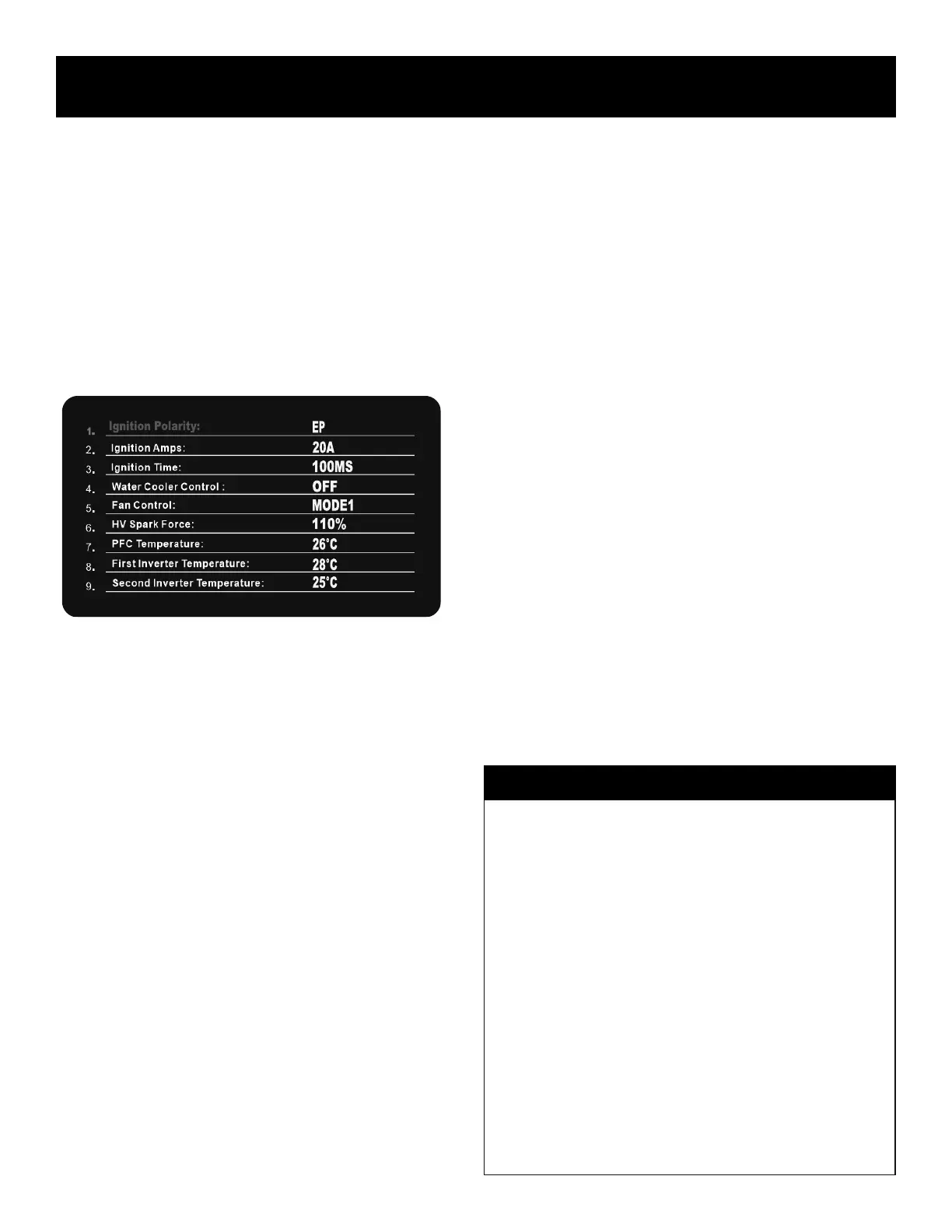
The unit features only one hidden background menu. It is used to access
secondary control functions and operating temperatures of the unit. See
the “Quick Setup Guide” in this manual to access the menu screen below.
BACKGROUND MENU:
• ACCESS ARC STARTING PARAMETERS
• ACCESS FAN CONTROL
• ACCESS COOLER CONTROL
• ACCESS AND MONITOR OPERATING TEMPERATURES
Menu Screen Settings and Parameters.
1. Ignition Polarity: Electrode Positive (EP) or Electrode Negative. Not
adjustable in DC. This does not indicate or suggest the torch polarity,
but rather which half of the AC cycle the arc is started on. No single
start polarity may t all situations.
• Electrode Positive starting can be of benet if you have dirty metal. It
works well with AC, helping to keep the Tungsten from free from
contamination during the start. However, Tungsten wear will be accel-
erated. It also may cause the Tungsten to ball on the start if other start
parameters are set aggressively. But it is the preferred start polarity
for AC, when adjusted properly.
• Electrode Negative starts can become contaminated. The Tungsten
will stay sharper longer, particularly when making multiple, rapid
restarts. But starts may not be as reliable on AC. This is the standard
Start for DC. Offers no cleaning on initial surge.
2. Ignition Amps: 5-50A. This is the micro-surge Amperage that is re-
quired for arc ignition. This is a brief surge that happens in all TIG
welders to help establish the arc cleanly. Increasing the Amps howev-
er will make arc starts aggressive and may increase burn through on
thin metals despite the Start Amp setting. Too low of amperage, and
arc starting/transfer may not be stable or consistent. With larger di-
ameter Tungsten, use higher Amp settings for reliable starting.
3. Ignition Time: 0-400ms. This is the amount of time the HF pulse
stays active trying to start the arc. If the Arc doesn’t initiate by the time
set, the arc start attempt will be aborted.
4. Water Cooler Control: ON/OFF. When set to “Off” the cooler runs full
time. When set to “On”, the cooler starts running as soon as the arc
is struck. It automatically turns off after a few seconds after the arc is
terminated to keep water circulating through the torch to cool it down.
The cooler itself has no control. This simply switches the power sup-
ply to the cooler on and off as needed to start and stop the cooler. If
using with Fan Control Mode 1, the cycling of the cooler and the
welder will not be synchronized. Set to Mode 2 to synchronize the
starts of both the cooler fan and the welder fan. NOTICE: The cooler
fan and pump always are on at the same time.
5. Fan Control: Off/Mode 1/Mode 2. When the Fan Control is set to
“Off” the fans will run full time. When set to Mode 1, the fan will run
when the inverter temperature reaches 140° F (60° C). When Mode
2 is selected, the fan will start upon arc strike (upon demand). Mode
2 is the safest method of fan control and provides the best compro-
mise between the fan running and duty cycle performance.
6. HV Spark Force: 50-110%. This is the strength of the Arc start.
Although it’s called HF for the sake of familiarity, the arc start is actu-
ally generated by a High Voltage solid state board that simulates the
HF start characteristics, without the aid of old style points. This helps
to ne-tune the force of the HV (HF) arc during starts.
7. PFC Temperature. Monitors the power factor correction control circuit
temperature.
8. First Inverter Temperature. Monitors the main inverter temperature.
9. Second Inverter Temperature. Monitors the AC inverter temperature.
Component Identification and Explanation
Background Menu Screen Setup and Parameters of Operation
How Does Knowing the Welder Temperature Help?
The inverter temperatures are monitored by sensors that are designed to
trigger the over temperature protection of the unit and provide a signal to
the fans to energize when the temperature exceeds 140°F (60°C), when
Mode 1. Any of the three main sensors exceeding this temperature
threshold will trigger fan operation automatically.
By periodically monitoring the temperatures:
1. It provides an indication of how well the unit is performing in work
conditions.
2. It can help determine if the heat sinks are getting dirty by an over all
increase in average temperature at idle.
3. It can also be used as a diagnostic to check for proper fan opera-
tion.
4. It is also good to check the temperature if you suspect a faulty tem-
perature sensor. Any sensor not giving a similar reading to the
others within a few degrees or customary reading based off of pre-
vious readings, or no reading will show up here.


 To Next Page