25
7.0 Operation
7.5 Precaution after use
Disconnectdevicefrompowersupplyorturnoentiresys-
tem control (⮑ separate manual).
7.6 How to stop device in
case of emergency
In hazardous situations, all movements of the device must
be stopped as quickly as possible and the power supply
mustbeturnedo.Thenalapplicationhastobecon-
structed in a way that in emergency situations (like blocking)
the patient can be set free by means of a appropriately solu-
tion or operation. Follow stopping procedures below.
7.6.1 Shut down the telescopic pillar
1. Immediatelyengageemergencyshut-o,ifpresent.
2. Pull the power line plug of the control unit out of the
power outlet
3. Pull the low-voltage plug (Jack plug or DIN-8 plug) of the
cable of the device out of the connecting socket of con-
trol unit (refer to chapter ⮑ 6.5.1 and 6.5.2).
4. Evacuatepeoplefromthehazardzone,initiaterstaid
measures.
5. Notifydoctorandredepartment,ifnecessary.
6. Notify responsible person on-site.
7. Keep access paths open for rescue vehicles.
8. Based on severity of emergency, notify the authorities if
necessary.
9. Orderspecializedstatorepairmalfunction.
10. Check the device and application that uses the device
prior to restarting the operation and ensure that all safety
equipment is installed and fully functional. and that there
are no persons in the hazard zone.
WARNING
Life-threatening situation due to premature restart!
A premature restart may present a life-threatening situation for
all persons in the hazard zone.
Therefore:
• Ensure prior to the restart that there are no persons in the hazard
zone.
7.6.2 Pull jack plug out of the KOM
control unit
Proceed as follows to pull jack plug out of the connection
outlet of the control unit:
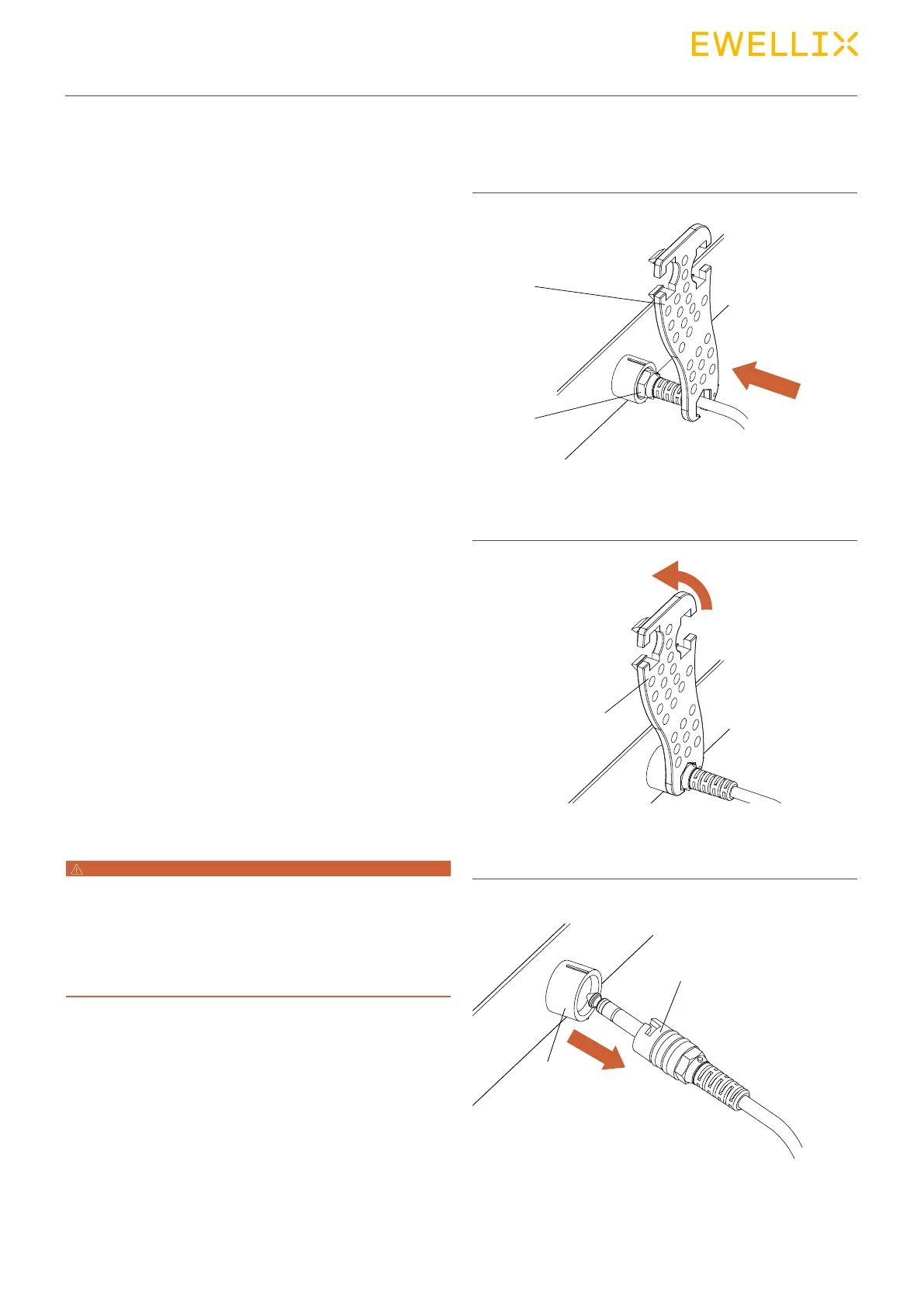
• Special tools required:
- Special tool from the manufacturer (part no. 0100609)
Connection, KOM control in this example
1. Insert special tool (1) in the groove (2) of the jack plug.
Fig. 24
2. Turn special key (1) counter-clockwise until the bayonet
joint of the jack plug is unlocked.
Fig. 25
3. Pull jack plug (1) out of the connection outlet (2) of the
control unit (arrow).
Fig. 26
1
1
1
2
2


 To Next Page