Operating Your Variable Attenuator
40 FVA-3100
Installing the EXFO Universal Interface (EUI)
Installing the EXFO Universal Interface (EUI)
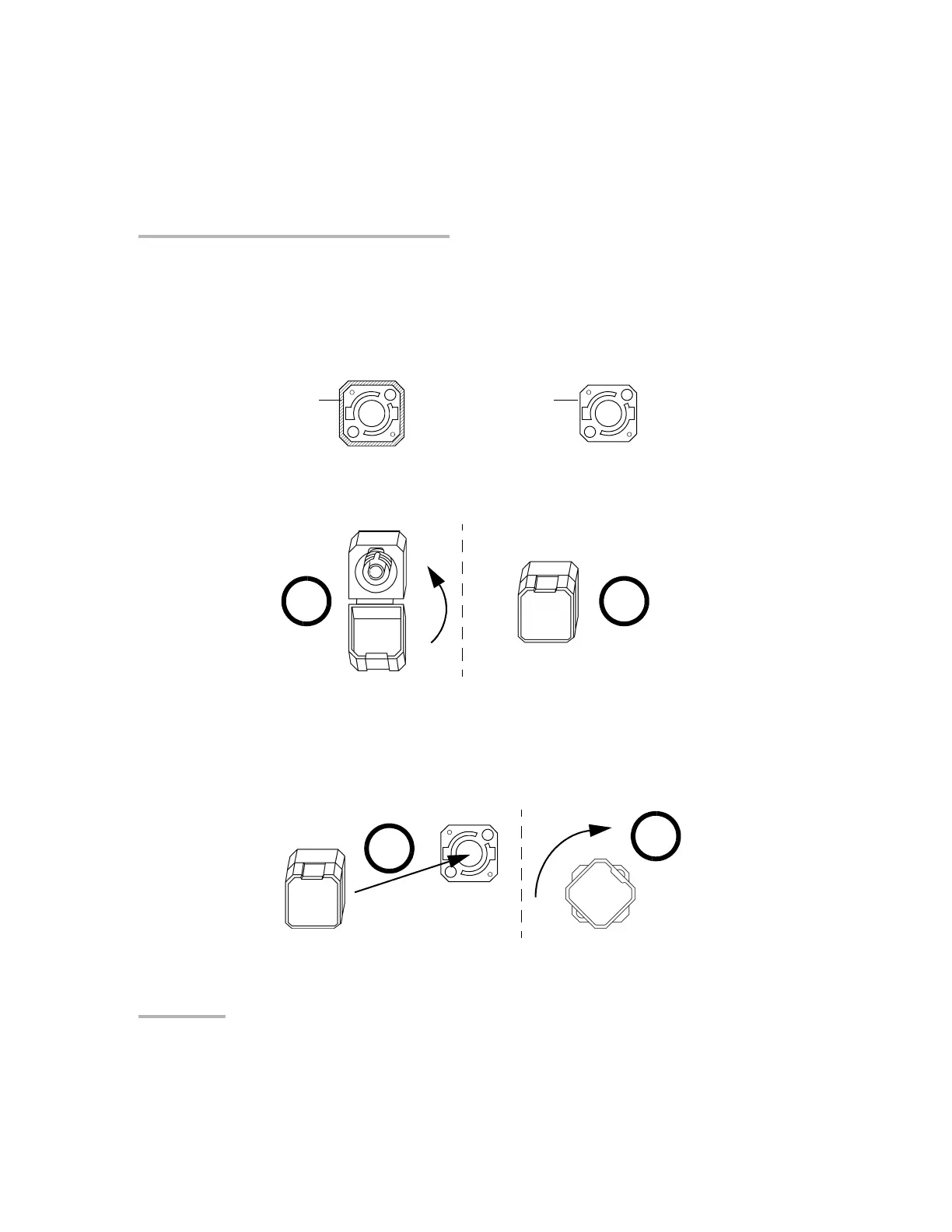
The EUI fixed baseplate is available for connectors with angled (APC) or
non-angled (UPC) polishing. A green border around the baseplate
indicates that it is for APC-type connectors, as shown below:
To install an EUI connector adapter onto the EUI baseplate:
1. Hold the EUI connector adapter so the dust cap opens downwards.
2. Close the dust cap in order to hold the connector adapter more firmly.
3. Insert the connector adapter into the baseplate.
4. Turn the connector adapter clockwise on the baseplate to lock it in
place.
Bare metal
(or blue border)
indicates UPC
option
Green border
indicates APC
option
1 2
4
3
Artisan Technology Group - Quality Instrumentation ... Guaranteed | (888) 88-SOURCE | www.artisantg.com













 To Next Page