© Boule Medical AB, March 2018. Article no. 1504496 Page 25
3. Operation (Sample Analysis)
Analyzing Sample (Open Tube)
3 The aspiration time is approximately 10 seconds. After ~ 10 seconds the analyzer will time out
due to no detection of blood, and continue its cycle.
4 The background count should not be higher than the values shown in gure 28:
Rerun sample if values are not acceptable.
Analyzing Sample (Open Tube)
The following steps will guide the operator through analyzing a blood sample using the “Open Tube”
mode, which aspirates the blood sample through the sample probe.
X Sample Analysis Flowchart
Go to Start Menu.
Choose Sample and
Prole Type.
Aspirate patient sample by
pressing Start Plate.
Analyzer performs sample
measurements and clean cycle.
− Results are displayed.
− Sample analysis complete.
Enter in Sample ID1, Sample
ID2, and/or Operator ID.
X Analyzing Sample (Open Tube)
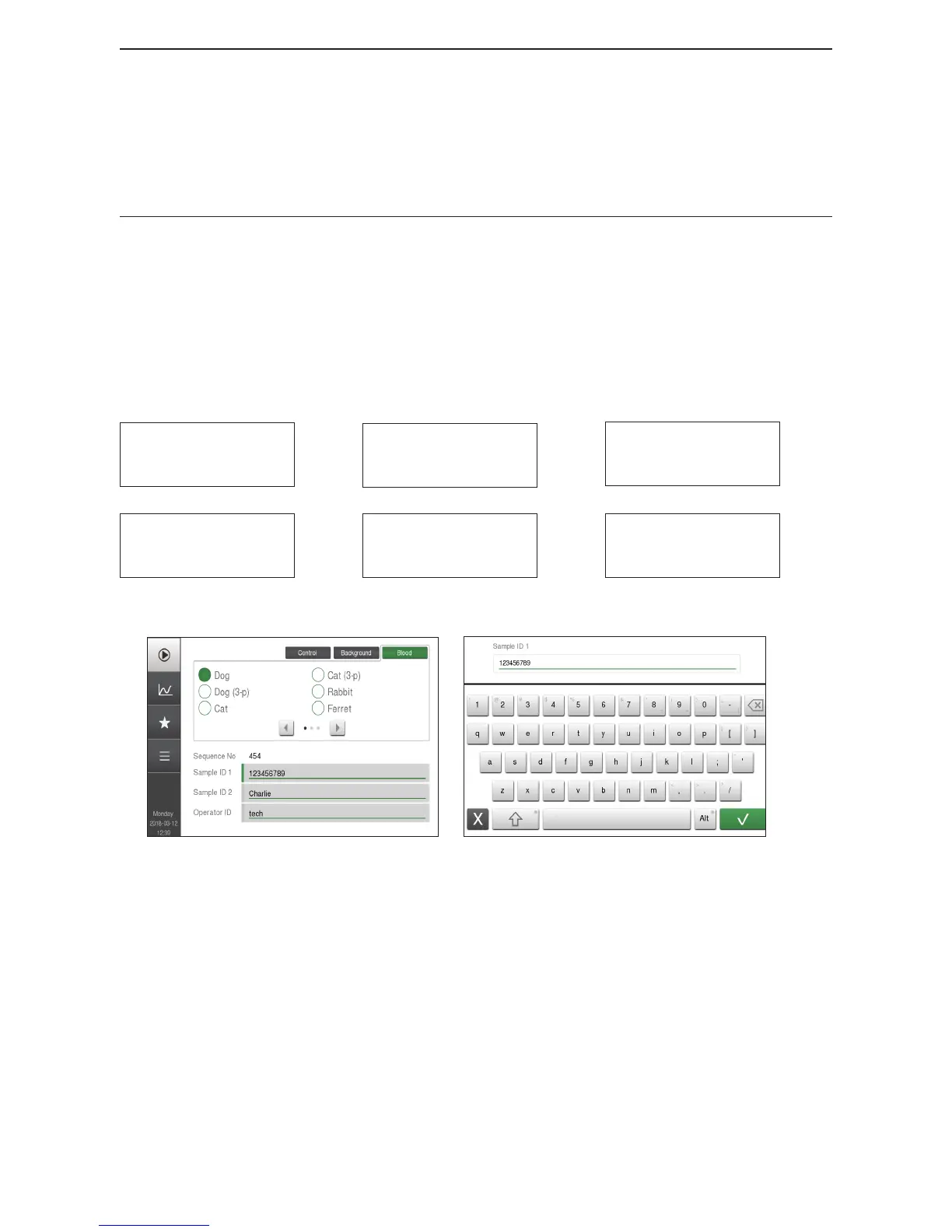
Figure 29: Start Menu
Figure 30: Sample Entry Keyboard
1 Enter Sample Analysis Mode Go to Start Menu.
2 Choose Sample type Choose Blood tab, in upper right-hand corner, for sample type.
3 Choose Prole type The analyzer can hold ≥ 20 dierent proles.
Choose prole by selecting the circle next to desired prole
type.
To see more proles use left and right arrows to scroll to
more prole types.



 To Next Page