Page 6 © Boule Medical AB, March 2018. Article no. 1504496
1. Introduction
Analyzer Overview
Analyzer Overview
3
2
1
7
6
4
5
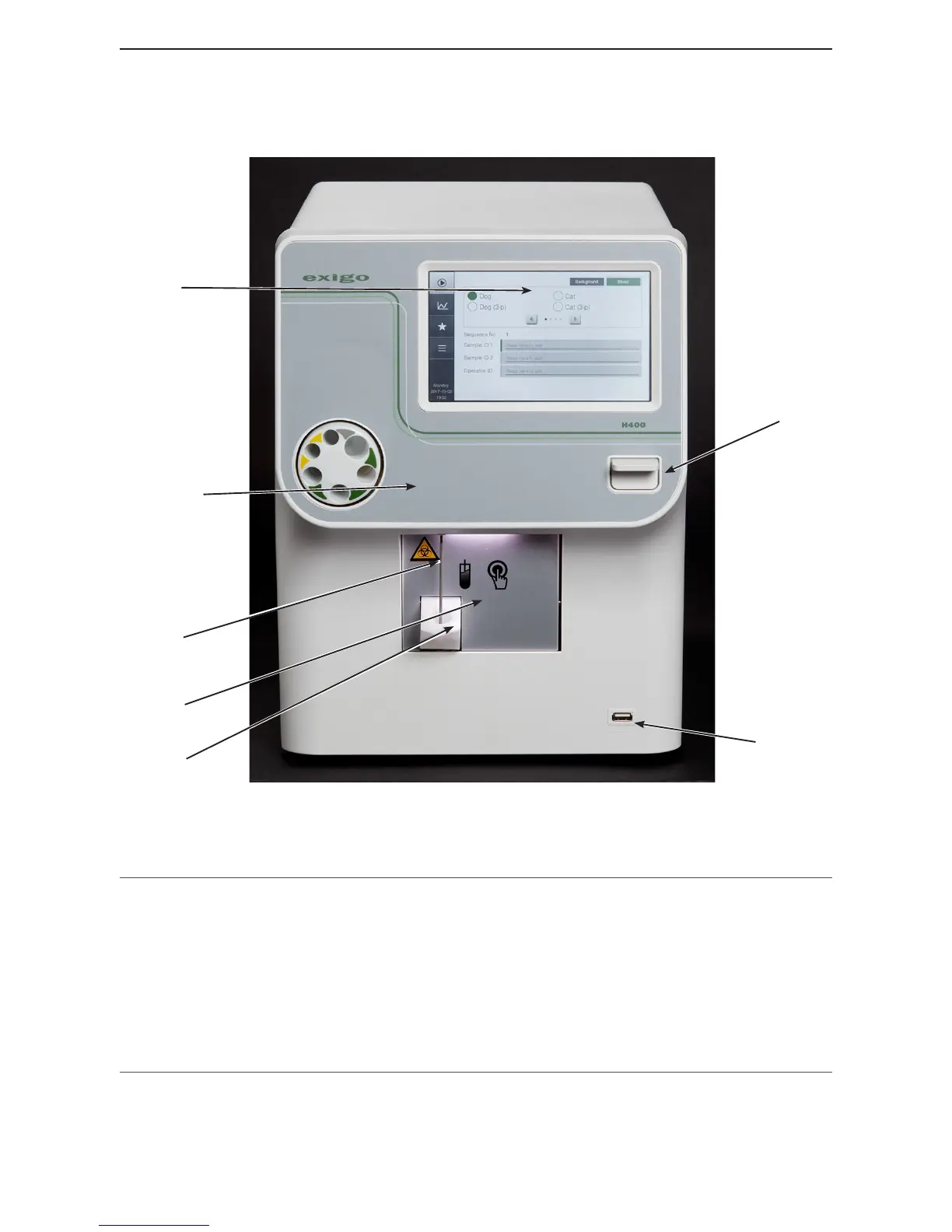
Figure 1: Analyzer front view
Part Description/Function
1 Display TFT-LCD Touch screen which displays patient and QC data, allows
operator to enter setup and testing instructions, and prompts operator on
next step. See section 7 for menu structure.
2 Blood tube mixer Uniformly mixes samples before analysis.
3 Whole blood sample probe Aspirates whole blood for analysis (Open Tube).
4 Start Plate, Open Tube Plate pressed to begin Open Tube aspiration.
5 Wash cup Reservoir where uid is removed after sample probe is washed.
6 MPA Micro Pipette Adapter enables analysis using 20 µL of blood.
7 USB port Connects analyzer to USB devices.



 To Next Page